Encryption and your users in Django
What your app sends through WordPlus Cloud is sealed on the way: the realtime servers carry it, and keep the history of a room, without being able to read or change it. You write no encryption code. Your server holds the keys and gives each user the ones they may have. The page opens everything before your listener sees it.
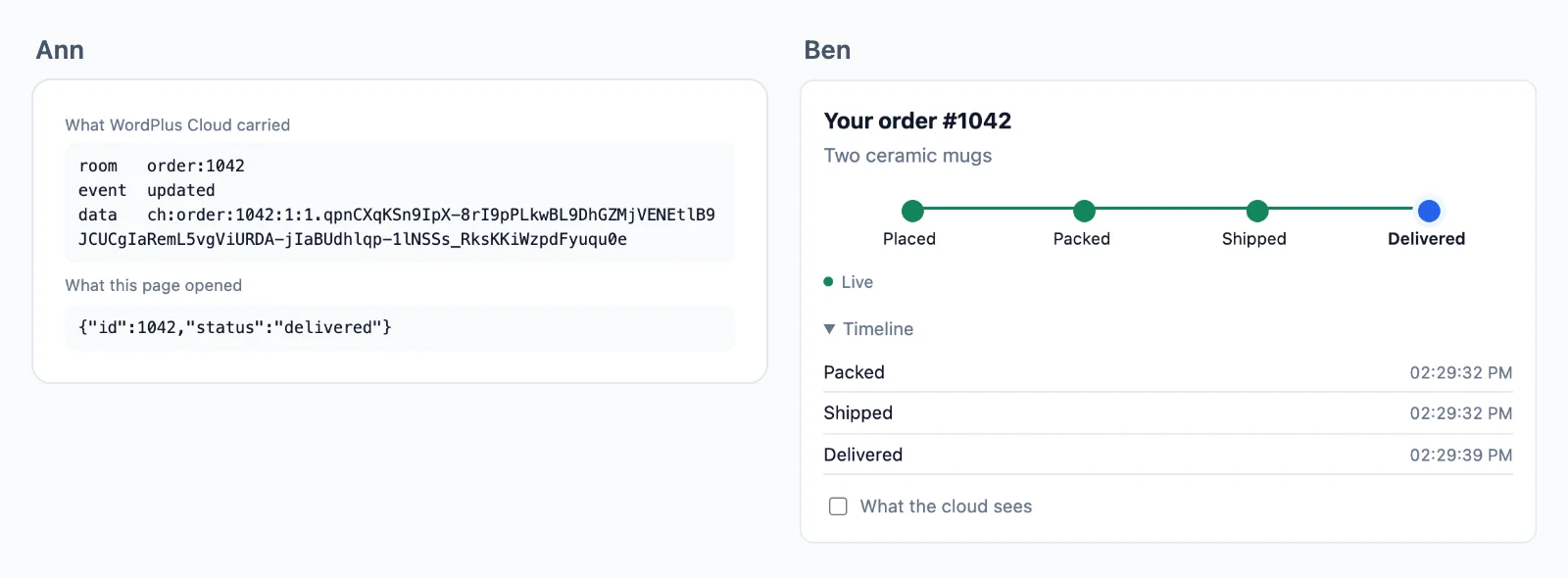
What is sealed
| What | Sealed with | Who can open it |
|---|---|---|
| Events to a room, from your server or a page, and its kept history | the room key | whoever the room rule lets in |
The info of a presence member | the room key | the same |
Events your server sends a user (to_user) | the key of the user | the pages of that user |
| What the people in a call see of each other | the day key | everyone your app knows |
| Your users in the directory | the day key | everyone your app knows |
| The media of a call | a key for that call | its people |
A room declared public=True is not sealed, and neither is one with seal=False. The realtime servers see room names, event names, user ids, which key a value needs, and sealed values. They never hold a key.
Your local key
WORDPLUS_LOCAL_KEY is the master every key is derived from. Keep it the same on every server of the app (Python, Node and PHP derive the same keys from it), as long as the app, and out of every page. Unlike SECRET_KEY, it is not for rotating: a new one means pages holding old keys cannot open what comes, until they reload, and the history kept before cannot be opened at all.
When someone loses access
Move a key on, and what comes next is sealed from them. The key generations live somewhere every server sees: a cache that does not evict, such as Redis or the database cache, but not the local memory one.
from django.core.cache import caches

class CacheGenerations:
    def get(self, name):
        return caches["default"].get("wordplus-realtime:" + name)

    def set(self, name, generation):
        caches["default"].set("wordplus-realtime:" + name, generation, timeout=None)

realtime = Realtime.from_environment(profile=wr.user_profile, generations=CacheGenerations())
realtime.in_room("chat:34:42").kick(43)   # out of the room now, and its key moves on
realtime.rotate_room("order:1042")        # the order moved to another customer
realtime.rotate_user(user.pk)             # their own key moves on
Those still let in get the new key from your server with the next event, and keep the old ones for the history before it.
Your users
A directory of your users, each profile sealed with the day key, that every page of your app reads. wr.user_profile shows the full name of a user, or their username. For more, such as an avatar, write your own:
def profile(user_id):
    user = User.objects.filter(pk=user_id).select_related("profile").first()
    return {"name": user.get_full_name(), "avatar": user.profile.avatar_url, "url": f"/people/{user.pk}/"} if user else None

realtime = Realtime.from_environment(profile=profile)
const users = await rt.users( [ 34, 42 ] ); // { 34: { user_id: 34, name: 'Ann', avatar: '…' }, 42: { … } }
- A user is in the directory once they have connected: a page sends its user identity, signed by your server with their profile, and may then read those of others. Ask again when someone comes online for a user not there yet.
- The same profile is what the ready-made parts and calls show of them, and the info of a presence member when the rule gives none.
Your own sealed values
realtime.kind("note", lambda rest, user, label: user is not None and Note.objects.filter(pk=rest, readers=user).exists())
sealed = realtime.keys.seal_json(note_data, f"note:{note.pk}")   # send it any way you like
import { keyring, labelOf } from '@wordplus/realtime';

await keyring().ensure( [ labelOf( sealed ) ] );   // asks your keys route for `note:…` if the page lacks it
const note = keyring().openJson( sealed );         // undefined when this user may not have it
The key derivation, and every label: encryption in depth.