Getting started with Next.js
Live updates, chat, who is online, calls and group calls in a Next.js app (App Router), through WordPlus Cloud. @wordplus/realtime is both halves:
- Your server (
@wordplus/realtime/server) declares your rooms once, says who may join them and call whom, and sends events to rooms and to users: from route handlers, server components and server actions. - The page (
@wordplus/realtime/react) connects to WordPlus Cloud through a provider, joins rooms with hooks, and sends and gets events:emit,emitWithAck,volatile.
What goes through WordPlus Cloud is sealed with keys only your server and the browsers of your users hold. Ready-made parts come with it, all optional: the Better Messages chat, its list of who is online and its call screen. The example app is a whole shop built this way.
A Next.js app cannot hold a websocket open on a serverless host. Why WordPlus Cloud says what the cloud runs for you, and what it adds.
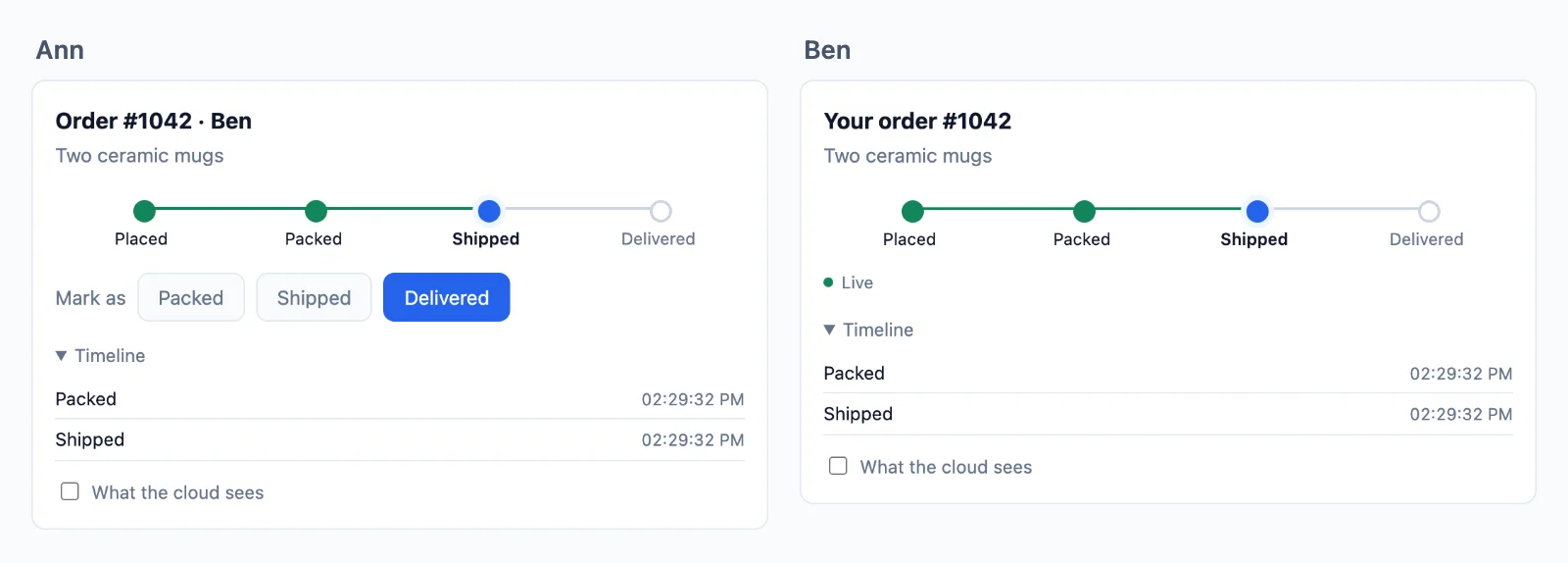
Try it live at nextjs.docs.wordplus.cloud: the example app of this guide as a demo, a shop of your own for a day, with Ben and Cara opening in windows of their own.
1. Your app in WordPlus Cloud
In your WordPlus Cloud account, go to Apps → Add app. Name it, and list the addresses its pages are served from: https://shop.example.com, and http://localhost:3000 while you develop. Only pages on those addresses may connect.
You get the app key, public because every page carries it, and its secret, for your server only. Make a local key of your own too: everything sealed is sealed with keys derived from it, and it never leaves your servers.
# .env.local
WORDPLUS_SITE=s1500000007
WORDPLUS_SECRET=…
WORDPLUS_LOCAL_KEY=…        # openssl rand -hex 32; the same on every server of the app, kept as long as the app
None of them takes NEXT_PUBLIC_: the secret and the local key never reach a page, and the key reaches it through config().
2. Install
npm install @wordplus/realtime
// package.json: the worker, the room client and the components' script into public/ after every install
"scripts": { "postinstall": "wordplus-realtime copy public" }
The worker lets the tabs of a user share one connection, the room client runs group calls, and realtime-ui.min.js is the ready-made parts.
3. Your server
// lib/realtime.ts
import { createRealtime } from '@wordplus/realtime/server';
import { currentUserId, profileOf } from '@/lib/auth';   // your sign-in: Auth.js, Clerk or your own sessions

export const realtime = createRealtime( {
    site: process.env.WORDPLUS_SITE!,
    secret: process.env.WORDPLUS_SECRET!,
    localKey: process.env.WORDPLUS_LOCAL_KEY!,
    worker: '/realtime-worker.js',
    rooms: '/realtime-rooms.min.js',
    // Who is asking: their id, or null for nobody.
    user: () => currentUserId(),
    // What others see of them: in presence, calls and the directory.
    profile: ( user ) => profileOf( user ),
} );

// The room of an order: its customer may join, and the last 20 updates are kept.
realtime.room( 'order:{id}', { history: 20 }, async ( user, { id } ) => user !== null && ( await ownerOf( id ) ) === user );
// app/api/realtime/[action]/route.ts: POST /api/realtime/auth, /calls, /keys and /webhook
import { realtime } from '@/lib/realtime';

export const POST = realtime.route;
- The user is whatever id your app knows them by, a number or a string (the ids of Clerk and Supabase work as they are), or
null.userruns inside the route handler, socookies()andauth()work there. It is also given theRequest. - The pattern of a room names its parts:
order:{id}matchesorder:1042, and the rule gets{ id: '1042' }. - The routes take JSON POSTs only. If your middleware guards
/api, let/api/realtime/*through with the session.
4. The page
Connect once, in the layout of your signed-in pages, with the user settings rendered in, so it connects with no request first:
// app/(app)/layout.tsx
import { CallScreen, RealtimeProvider } from '@wordplus/realtime/react';
import { currentUserId } from '@/lib/auth';
import { realtime } from '@/lib/realtime';

export default async function AppLayout( { children }: { children: React.ReactNode } ) {
    return (
        <RealtimeProvider options={ await realtime.config( await currentUserId() ) }>
            <CallScreen />
            { children }
        </RealtimeProvider>
    );
}
// app/(app)/orders/[id]/status.tsx
'use client';

import { useState } from 'react';
import { useRoom } from '@wordplus/realtime/react';

export function Status( { id, initial }: { id: string; initial: string } ) {
    const [ status, setStatus ] = useState( initial );
    const room = useRoom( `order:${ id }`, { updated: ( data: { status: string } ) => setStatus( data.status ) } );

    return <p>{ status } { room.state === 'failed' && room.error }</p>;
}
The React entry is a client module, so a server component can render the provider. Every page under the layout shares its connection, which stays up across client navigations.
5. Send
From a server action, a route handler, or anything else on the server, after the change is saved:
// app/(app)/orders/[id]/actions.ts
'use server';

import { realtime } from '@/lib/realtime';

export async function markShipped( id: string ) {
    await saveStatus( id, 'shipped' );
    await realtime.to( `order:${ id }` ).emit( 'updated', { status: 'shipped' } );
}
Everyone in the room gets { status }, sealed with the room key on the way, and a page that reconnects later gets it from the room history.
Next
- Rooms, presence and who is online, sending from your server and events from the page, with the ready-made chat
- Calls and group calls, with the call screen
- Encryption and your users
- Customizing the screens: their look, a piece of your own, or their whole code
- Deploying (Vercel, or any Node host), and the example app
- The React reference, the server reference, errors and limits