Events from the page, in Next.js
Pages send events to the rooms they are in, straight through WordPlus Cloud, with no request to your server: chat messages, typing, read ticks, a cursor. A room rule says which events its pages may send.
What a room allows
// lib/realtime.ts: the chat of Ann and Ben. They send messages, typing, reactions and read ticks. The messages and
// reactions reach this app by webhook, which keeps the conversation.
realtime.room( 'chat:{a}:{b}', { history: 50, emit: [ 'message', 'typing', 'reaction', 'read' ], webhook: [ 'message', 'reaction' ] },
    ( user, { a, b } ) => [ a, b ].includes( String( user ) ) );
emitlists the names, or'*'for any. None by default: a room your server alone sends to.webhooknames those your app gets too, to keep them (below).historykeeps the last events of the room for 30 minutes: what a page that reconnects missed comes again from it.- The answer for one user can narrow it:
{ emit: [ 'typing' ] }, or{ readOnly: true }. - Reserved:
joined,join,leave,countanderrorare the names kept for the room itself.
Sending
A page sends to a room it has joined, and hears what the others send:
'use client';

const chat = useRoom( 'chat:34:42', {
    message: ( data: { text: string }, meta ) => draw( data.text, meta.from ),   // meta: { from, id, at }
} );

chat.emit( 'message', { text: 'Hi' } );                                // sent, nothing waited for
const { id, at } = await chat.emitWithAck( 'message', { text: 'Hi' } ); // WordPlus Cloud took it: checked, kept, sent
chat.room?.volatile.emit( 'typing', { on: true } );                    // dropped rather than queued while off line, never kept
await chat.room?.timeout( 5000 ).emitWithAck( 'message', { text: 'Hi' } );   // an ack waited for 5 seconds at most
- Everyone in the room gets it, the other tabs and devices of the sender too. The tab that sent it does not, so it draws its own at once.
emitWithAckresolves with the kept event id and time, or rejects with a code:not_allowed(the rule does not list it),forbidden,rate_limited,too_large.meta.fromis the sender user id, as your server vouched for them: a page cannot send as someone else.- Binary: an
ArrayBuffer,Uint8ArrayorBlobmay be anywhere in the data. It is sealed as binary. - Limits: 1 MB an event, 50 a second a connection, in bursts of up to 100.
Typing, done the usual way
const sent = useRef( 0 );
const onChange = ( value: string ) => {
    setText( value );
    if ( Date.now() - sent.current < 2000 ) return;   // at most every 2 seconds
    sent.current = Date.now();
    chat.room?.volatile.emit( 'typing', { on: true } );
};
// and in the handlers: typing: ( data, meta ) => showTyping( meta.from, data.on ), hidden after 4 seconds of nothing
Keeping the conversation
The conversation is for your app to keep, in its own database, as Better Messages keeps its own in the WordPress database. A room keeps its events for 30 minutes, for pages that reconnect. Your app gets the events the rule names in webhook (webhooks) and saves them by event_id, the id the pages saw as meta.id. A route gives them back, a page at a time:
// lib/realtime.ts
realtime.on( 'message', ( { room, from, data, event_id, at } ) => db.messages.upsert( { id: event_id, room, from, text: data.text, at } ) );

// app/chat/[a]/[b]/messages/route.ts: the newest 50, or with ?before=<id> the 50 before that one, oldest first.
// Only its two people may read it.
export async function GET( request: Request, { params }: { params: Promise<{ a: string; b: string }> } ) {
    const { a, b } = await params;
    if ( ! [ a, b ].includes( String( await currentUserId() ) ) ) return new Response( null, { status: 403 } );
    const before = new URL( request.url ).searchParams.get( 'before' );
    return Response.json( await db.messages.page( `chat:${ a }:${ b }`, before, 50 ) );   // { messages: [ { id, from, text, at, reactions } ], more }
}
- Check there anything that matters: the events do not go through your app before they are sent on.
atis in milliseconds, andreactionsmaps each reaction to who chose it. A reaction comes as{ id, key }: the one reaction of the user to messageid, an emptykeytaking it back.
Ready-made: the chat
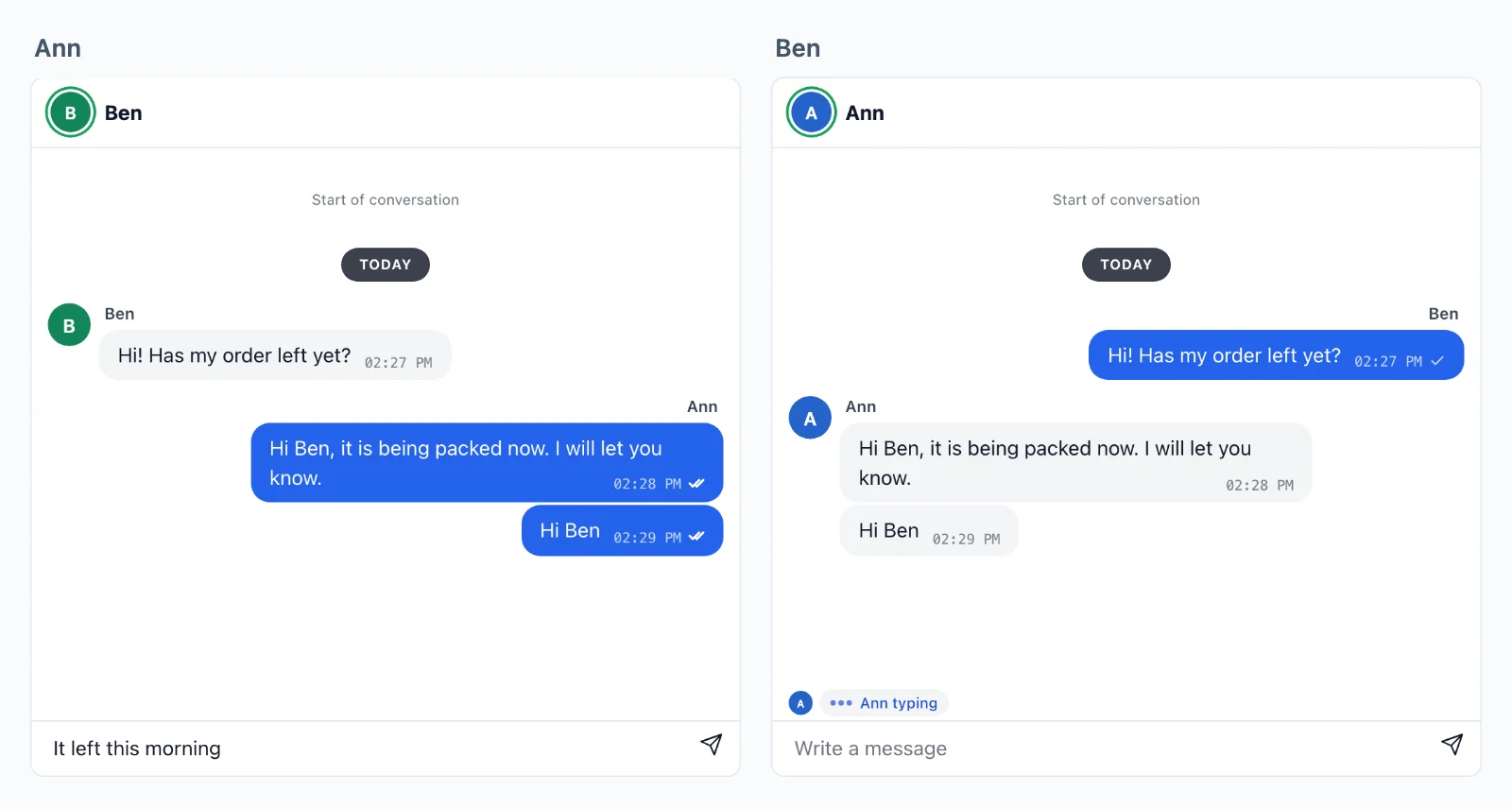
The Better Messages conversation, on any room: your app conversation paged back as the reader scrolls up, the room filling in what came since, the day separators, the messages of a sender stacked, typing, reactions, the read ticks and the composer:
import { Chat } from '@wordplus/realtime/react';

<div style={ { height: 520 } }>
    <Chat room="chat:34:42" messages="/chat/34/42/messages" placeholder="Write a message" />
</div>
- It loads with
<CallScreen />in your layout, or<RealtimeUi />on pages without calls. messagesis your route, asked with the page cookies.load={ async ( before ) => ( { messages, more } ) }replaces it, for a token or another shape:beforeisnullfor the newest page, or the oldest message shown ({ id, at }). With neither, it shows what the room still has.- Its room rule lets it send what it uses:
emit: [ 'message', 'typing', 'reaction', 'read' ], and namesmessageandreactioninwebhookfor your app to keep. - What it sends is what you would:
messageas{ text }with an ack,typingas{ on }andreadas{ id }, both volatile, andreactionas{ id, key }. Your own pages and apps on the same room read it. - Names and pictures come from your directory.
reactionssets the reactions offered (reactions={ [ '1f44d', '2764', '1f602' ] }), andmaxLengththe longest message.- It fills the height its place gives it. Its look is that of Better Messages, in a shadow root. Its colours are CSS custom properties your page sets.
<Typing room="…" /> is the typing line alone, for a page that draws its own messages.
More, with PHP and Python side by side: events in depth.