Live streams in Next.js
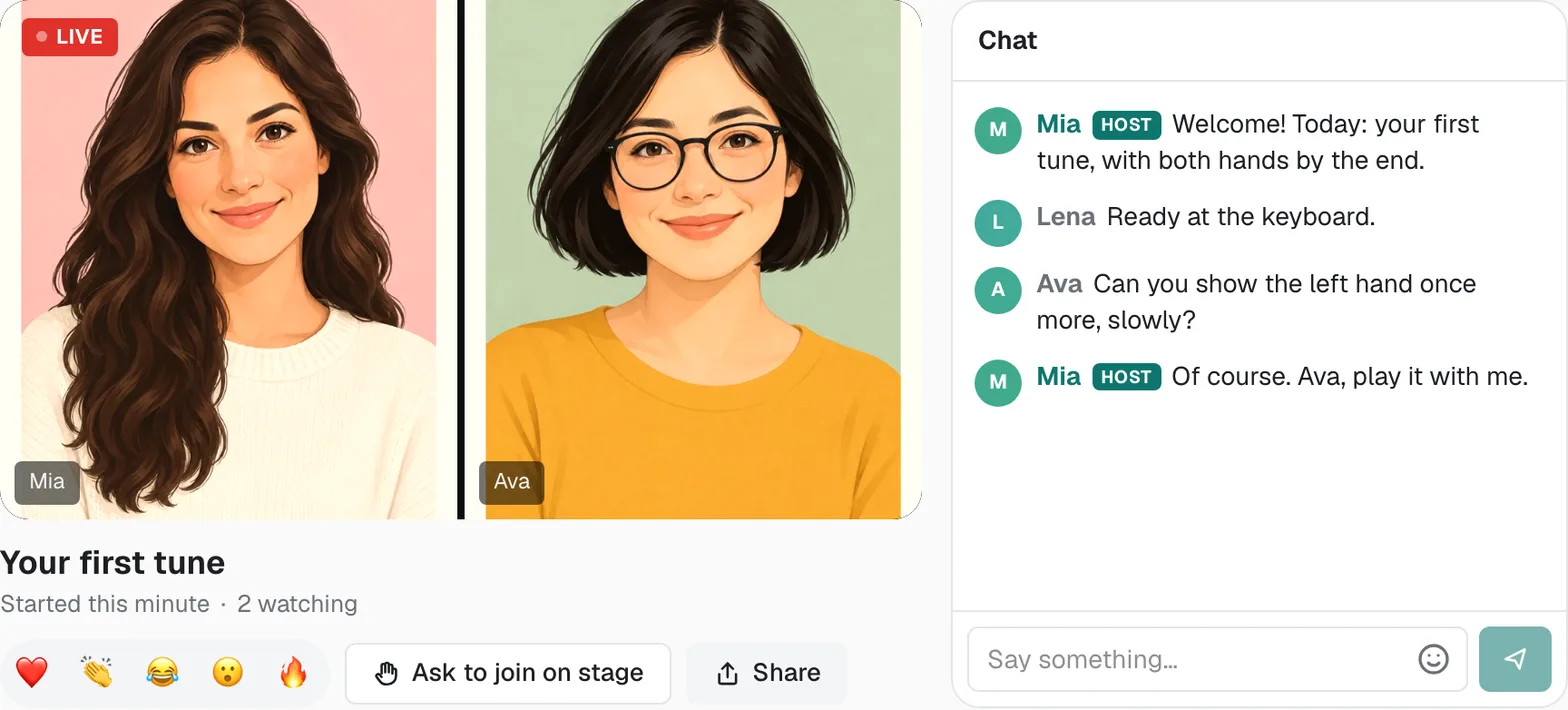
One person presents live to everyone watching: the picture, a chat beside it, reactions, and the count of who watches. The host goes live from the browser, a phone or OBS, and brings viewers on stage beside them. Viewers may be signed in or not.
How a stream starts, runs and ends is in how it works. Live streaming builds one from an empty folder, and Build a live lessons site builds a whole Next.js site on it, with teachers live in their lessons and students on stage.
Who is who
Each stream has a name, as a room has: show:mugs is the show of the mugs, one name for each show of your shop. A page that opens a stream asks your server first, through the realtime route, and a rule of yours answers who the user is in it. WordPlus Cloud then holds the page to the answer. The rule goes beside your rooms and calls, in lib/realtime.ts, and decides:
- A show of your shop opens: any other name is refused.
- A visitor who is not signed in watches and reads the chat, and signs in to write.
- The presenter of the show hosts: goes live, brings viewers on stage and keeps the chat.
- Your staff keep the chat beside the host.
- Everyone else watches, writes in the chat, and may raise a hand to come on stage.
Its settings take guests on stage and reactions, and links in the chat only from those who keep it.
// lib/realtime.ts: showOf() and isStaff() are yours, from your data.
realtime.streams('show:{slug}', async (user, { slug }) => {
    // 1. A show of your shop: any other name is refused.
    const show = await showOf(slug);
    if (!show) return false;

    // 2. A visitor watches and reads the chat, and signs in to write.
    if (user === null) return { role: 'viewer', chat: 'read' };

    // 3. Its presenter hosts: goes live, brings viewers on stage and keeps the chat.
    if (user === show.presenter) return 'host';

    // 4. Your staff keep the chat beside the host.
    if (await isStaff(user)) return { role: 'viewer', mod: true };

    // 5. Everyone else watches, writes, and may raise a hand to come on stage.
    return 'viewer';
}, {
    // Guests on stage, reactions, and links in the chat only from those who keep it.
    stage: true,
    reactions: true,
    chat: { links: false },
});
- The answer:
false,'host'or'viewer', or{ role, info, chat, mod, src, quality }for more: what others see of them (info, yourprofileby default), whether they write in the chat (writeorread), whether they keep it (mod), and what the host sends (src:camera,microphone,screen, andquality:720por1080p). - A visitor who is not signed in comes with
usernull, and may only be a viewer: a rule that gives them more is refused withno_user. Withchat: 'read', the player offers them Log in to chat, to the page itsloginUrlnames. - The settings of the stream, the third argument, are each a value or a function of the parts of its name:
stage(guests on stage, on unlessfalse),reactions,people(who sees who is watching:mods, the default, orall) andchat: { offline, links, fresh }: the chatopenorclosedwhile the stream is not live, links from everyone or only from those who keep the chat, and the chat emptied each time it goes live (live streams in depth).
The realtime route (app/api/realtime/[...path]/route.ts) answers streams too: nothing more to add.
Your server hears each stream go live and end by webhook: stream.live and stream.ended, with its name in stream, and started_at and ended_at in milliseconds.
The page
Optional, as every ready-made part: a screen of your own below draws the stream with no element.
The stream drawn ready: its player with the chat beside it, and the studio where the host goes live.
'use client';
import { LiveStream } from '@wordplus/realtime/react';

export function Show() {
    return <LiveStream name="show:mugs" title="The new mugs" loginUrl="/login?next=/shows/mugs" />;
}
- The host sees the studio in it: the camera and microphone, the picture before going live, a shared screen, OBS, the guests, Go live and End stream. Everyone else sees the player, how many watch, and the chat.
- Guests on stage: while live, a viewer who is signed in raises a hand from the player, and the host invites them from the studio to come on with their camera and microphone (guests on stage). Build a live lessons site does it.
- Its parts apart, each where the page wants it:
view="player",chat(withheight={ 480 }),detailsorstudio. The parts of one stream share one join, wherever they are. - A studio page of its own for the host:
view="studio-page"on a page of yours, in the height itsclassNamegives it, withurl(where viewers watch) andbackUrl, andstudioUrlon the page viewers watch, which then shows the host the way there in place of the studio (the studio as a page of its own). Build a live lessons site gives its teachers one. - Its props:
title,cover,url(the page to share),loginUrl(where a visitor signs in to chat),studioUrl,backUrl,chat={ false },sticky(the player kept at the top of a phone while live),classNameandstyle. - Its words follow the language of the page: English, German, Spanish, French, Italian, Dutch, Polish, Croatian and Hebrew.
- A refusal shows its words in place of the stream, such as no access (refusals).
- Its script, realtime-ui-streams.min.js, comes from the realtime route with the others, and loads with the first stream on a page.
Show in app/(shop)/shop.tsx of the API demo is this.
A screen of your own
useStream( name ) joins the stream while the component is on the page, and gives its state as it changes:
'use client';
import { useCallback } from 'react';
import { useStream } from '@wordplus/realtime/react';

export function Show() {
    const { stream, state, error } = useStream('show:mugs');
    const picture = useCallback((video: HTMLVideoElement | null) => (video && stream ? stream.watch(video) : undefined), [stream]);
    if (error) return <p>The show is not available here ({error}).</p>;

    const live = state?.stream?.state === 'live';
    return (
        <section>
            <video ref={picture} muted playsInline autoPlay />
            {stream?.role === 'host' && !live && <button onClick={() => stream.goLive()}>Go live</button>}
            {stream?.role === 'host' && live && <button onClick={() => stream.end()}>End stream</button>}
            {live && <p>{state.viewers} watching</p>}
            <ul>{state?.chat.map((m) => <li key={m.id}><strong>{m.from.name}</strong> {m.text}</li>)}</ul>
        </section>
    );
}
stateis everything the screen of the stream draws: its phase, the audience, the chat, the stage, the pictures and their layout (live streams in depth).streamdoes what the page does:chat.send( text ),react( '❤️' ),preview(),setCamera(),setMicrophone(),setScreenShare(),goLive(),end().- The picture follows the stream as it changes: a shared screen, the picture from OBS, else the camera of the host.
videostaysmuted, and the sound plays from the page. - One join for the page: each
useStream()joins on its own, so the parts below takestreamandstatefromShow.
With @wordplus/realtime-ui in your app, StreamView draws the same stream in your React tree (live streams in depth).
Guests on stage
A viewer raises a hand, the host invites them, and they come on stage beside the host with their camera and microphone, for everyone watching: a question from the audience, an interview, a panel. The host may invite anyone signed in who watches, hand raised or not.
'use client';
import type { Stream, StreamSnapshot } from '@wordplus/realtime';

// Under the player of Show: a viewer raises a hand and joins once invited, and the host invites from the hands raised.
export function Stage({ stream, state }: { stream: Stream; state: StreamSnapshot }) {
    if (state.stream?.state !== 'live') return null;

    if (stream.role === 'host') {
        return (
            <ul>
                {stream.hands.map((hand) => (
                    <li key={hand.user}>
                        {hand.name} <button onClick={() => stream.invite(hand.user)}>Invite</button>
                    </li>
                ))}
            </ul>
        );
    }

    if (state.onStage) return <button onClick={() => stream.leaveStage()}>Leave the stage</button>;
    if (state.invited) return <button onClick={() => stream.joinStage()}>Join on stage</button>;
    return <button onClick={() => stream.hand(!state.handRaised)}>{state.handRaised ? 'Lower your hand' : 'Raise your hand'}</button>;
}
- A guest is a viewer on stage: everyone watching sees them in the picture of the stream, by the layout the host chose, and
state.tileshas each of them withrole: 'guest'. - The host takes someone off stage with
stream.unstage( user ), back to watching, and lays the stage out withstream.layout( 'grid' ),'speaker'(the one speaking large), or'spotlight'with a user id. - A guest sends their camera and microphone, the picture up to 720p.
- A visitor who is not signed in watches, and does not come on stage.
- The stage is on unless the settings of the stream say
stage: false, as for a show where nobody but the host appears. - The ready-made player does all of it: Ask to join on stage for a viewer, the hands in the studio with Invite beside each, and the guests with a way to take them off (interviews and questions on stage).
Keeping the chat
The host, and anyone the rule made mod, keep the chat. In the ready-made player, each message has a menu for them: pin it over the chat, delete it, mute its writer for a minute, 10 minutes, an hour or a day, remove them from the stream, or ban them. The chat settings hold slow mode and Clear the chat, and Who is here lists the signed-in people watching, with the same menu, and those banned, with Let back.
On a screen of your own:
'use client';
import type { Stream, StreamSnapshot } from '@wordplus/realtime';

// The chat of Show, with Pin and Delete on each message for whoever keeps it, and slow mode.
export function Chat({ stream, state }: { stream: Stream; state: StreamSnapshot }) {
    const mod = state.you?.mod;
    return (
        <section>
            {mod && <button onClick={() => stream.chat.slow(state.slow ? 0 : 30)}>{state.slow ? 'Slow mode off' : 'Slow mode'}</button>}
            <ul>
                {state.chat.map((m) => (
                    <li key={m.id}>
                        <strong>{m.from.name}</strong> {m.text}
                        {mod && <button onClick={() => stream.chat.pin(m.id)}>Pin</button>}
                        {mod && <button onClick={() => stream.chat.delete(m.id)}>Delete</button>}
                    </li>
                ))}
            </ul>
        </section>
    );
}
await stream.chat.unpin();
await stream.chat.timeout(user, 600);   // no writing for 10 minutes, a minute to a day: they go on watching
await stream.chat.clear();              // every message, the pinned one too
await stream.kick(user);                // out now: they may come back
await stream.ban(user);                 // out, and kept out
useris the id your rule named them by.- A host is never put out, banned or timed out.
- Your server keeps the chat too, with no page open (from your server): a ban lifted, a timeout lifted, or the stream ended.
From OBS
A host may stream from OBS, or any encoder that sends over WHIP, in place of the camera: a studio camera, a mixed scene, a game. The studio of the ready-made player has it as Stream from OBS, with the settings that suit a stream, such as a keyframe every second. On a screen of your own:
const { url, key } = await stream.ingest(); // ingest( true ) makes a new key and cuts off the old one
- In OBS, Settings, Stream: Service WHIP, Server the
url, and Bearer Token thekey. - Start Streaming in OBS. Its picture shows in the studio, in place of the camera.
- Go live from the studio, or with
stream.goLive(). Everyone watching sees the picture from OBS.
Only the host gets the key. Keep it as a password: anyone with it streams to the show.
The sound
A browser plays sound only once the person has clicked or typed on the page, or on the page of your site they came from. A viewer who opens the stream from a link in a new tab sees the picture without its sound, and the ready-made player shows Turn sound on over it: the sound starts at that click.
On a screen of your own, state.audioBlocked says so, and startAudio() from a click turns it on:
{state.audioBlocked && <button onClick={() => stream.startAudio()}>Turn sound on</button>}
From your server
Your server reads a stream and keeps its chat as its moderators do, with no page open. Each change reaches everyone watching at once:
await realtime.listStreams();                    // [ { name, started_at, viewers } ], those live now
const show = realtime.stream('show:mugs');
await show.get();                                // { state, viewers, peak, slow, reactions, pinned }
await show.people();                             // { watching, people: [ { user, name, role, timeout_until? } ] }
await show.chat({ limit: 50 });                  // the last messages, oldest first, up to 200
await show.say('Free shipping until midnight', { name: 'Mug Shop', avatar: 'https://shop.example/logo.png' });
await show.deleteMessage(id);                    // clearChat() empties it
await show.pin(id);                              // null unpins
await show.slow(30);                             // one message per 30 seconds each, up to 300, 0 turns it off
await show.timeout(user, 600);                   // untimeout( user ) lifts it
await show.kick(user);                           // out now, they may come back
await show.ban(user);                            // unban( user ) lifts it, bans() lists them
await show.reactions(false);
await show.end();
A button of your staff page calls a route handler of yours, which checks who asks, then speaks in the chat and pins it:
// app/api/shows/[slug]/announce/route.ts
import { currentUserId } from '@/lib/auth';
import { realtime } from '@/lib/realtime';

export async function POST(request: Request, { params }: { params: Promise<{ slug: string }> }) {
    if (!(await isStaff(await currentUserId()))) return new Response(null, { status: 403 });

    const { slug } = await params;
    const { text } = await request.json();
    const show = realtime.stream(`show:${slug}`);
    const message = await show.say(text, { name: 'Mug Shop', avatar: 'https://shop.example/logo.png' });
    await show.pin(message.id);
    return Response.json({ ok: true });
}
- A message from your app shows as a host message, with the name and https picture you give it, up to 500 characters, and nobody may ban it.
useris the id your rule named them by. A host is never put out or timed out: that is refused withhost.- A timeout lasts from a minute to a day, and they go on watching.
people()lists the signed-in people watching or on stage, andwatchingcounts everyone, visitors included.- In a server component,
await realtime.listStreams()lists what is live as the page renders: callawait connection()first, so Next.js renders it for each request.
Charging for what was watched
An app that charges its users by the minute hears each signed-in person watching or presenting, at its webhook:
stream.joined, as they start watching while the stream is live: they opened it live, or it went live with them on it.stream.left, as that ends, withsecondsof live time: they left, or the stream ended.
// lib/realtime.ts: each viewer pays for the minutes watched live, the host nothing. charge() is yours, once for each id.
realtime.on('stream.left', async ({ id, user, role, seconds }) => {
    if (role === 'viewer' && seconds > 0) await charge(id, user, Math.ceil(seconds / 60));
});
- Only live time counts. A page open before the stream goes live counts from when it goes live. Going live again starts another pair, with the same
watch. - Visitors are not told: someone who did not sign in has nobody to charge.
- Each event has an
id: an event may come again, so charge once for each. roleis the one your rule gave them, so the host pays nothing here.
Your rule letting a viewer in only with a balance, and your server taking out whoever ran out while watching: charging for calls and streams.
Refusals
useStream() gives the code of a refusal in error, an action on the stream rejects with it, and the ready-made player shows its words in place of the stream:
| Code | |
|---|---|
forbidden | Your rule said no, or no pattern matches the name |
no_user | Your rule gave a visitor who is not signed in more than the place of a viewer |
not_included | The plan of your app does not include live streams |
banned | This user is banned from the stream, until unban() lets them back |
no_hours | A new viewer above what your plan includes, while your account has no credits left (below) |
not_host | An action of the host from someone who is not the host |
anonymous | A hand raised by a visitor who is not signed in |
no_stage | A hand or an invitation in a stream whose settings say stage: false |
not_invited | joinStage() with no invitation |
no_encoder | Going live from OBS before its picture came |
read_only, slow, timeout, too_long, links, not_live | A message refused: the chat is read-only for them, it came sooner than slow mode allows, they are timed out, it is over 500 characters, a link from someone who does not keep the chat, or the chat is closed while the stream is not live |
When the credits run out. Viewers above what your plan includes take credits from your account, a credit a minute each (limits). Once the credits of the month, those you bought and what the account may borrow are used, a new viewer above that number is not let in. Everyone watching goes on, the host and the guests come in, and someone signed in who was watching comes back after a reload. Buy credits in your WordPlus Cloud account, or the next month refills them, and new viewers come in again.
What WordPlus Cloud sees
A stream is for everyone watching it, so its picture and its chat are not encrypted end to end. They are encrypted on the way, and the media servers of WordPlus Cloud see them, as a stream needs.
More
- Every method, the snapshot and the events of a stream: live streams in depth and the React reference.
- How a stream starts, runs and ends: how it works.
- Use cases: live streaming, interviews and questions on stage, members-only streams and charging for calls and streams.
- A whole site: Build a live lessons site.