Getting started with mobile apps
Live updates, chat, who is online and calls in a mobile app built with web technology, through WordPlus Cloud, beside the guide for your server (Next.js, Laravel, Django, Express …): the server declares the rooms, says who may join and call, and sends, as it does for your web pages. Two kinds of app:
| React Native | Capacitor and Ionic | |
|---|---|---|
| What it is | native screens, your JavaScript | your web pages, in the platform web view |
| The package | @wordplus/realtime/native | @wordplus/realtime, as in a browser |
| Rooms, presence, events, who is online, the directory | yes | yes |
| The ready-made chat and list of who is online | not in native screens | yes, as in a browser |
| Calls, group calls and the call screen | not yet: they need a WebRTC module, in a later version | yes, as in a browser |
| Its address in WordPlus Cloud | none: it has none to list | capacitor://localhost (iOS), https://localhost (Android) |
An app written in Swift or Kotlin has guides of its own: iOS and Android.
All of them are in the same rooms as your web pages: a customer in the app and an agent in a browser see each other. The example apps are the shop on both, with the Express example as their server.
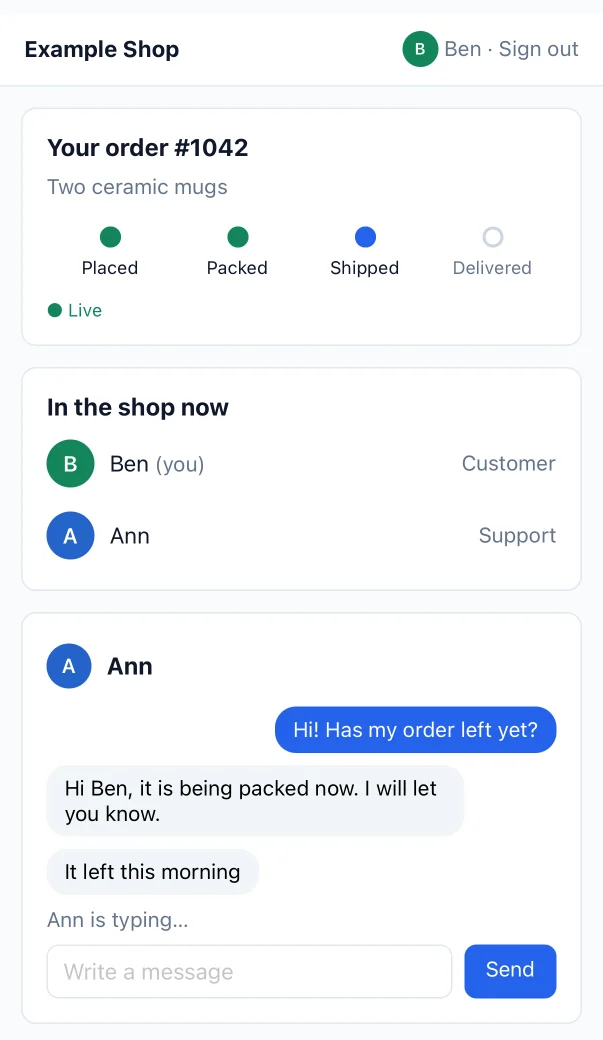
Try it live at mobile.docs.wordplus.cloud: the Capacitor app in a phone, signed in as Ben, beside the page of Ann, a shop of your own for a day.
1. Your app in WordPlus Cloud
Use the app you made for your website (Apps in your WordPlus Cloud account), so the app and the site share rooms and users. For Capacitor, add capacitor://localhost and https://localhost to its addresses. A React Native app needs none.
2. Your server knows the app user
An app has no cookie of your site, so it sends its own sign-in, such as a bearer token, with every request, and your server user reads it:
// Express: the user of the session in a browser, that of the token in an app.
app.use( '/api/realtime', realtime.node( ( req ) => req.session.userId ?? userFromToken( req.get( 'authorization' ) ) ) );
Send the app the user realtime settings when it signs in, so it connects with no request first:
app.post( '/api/token', async ( req, res ) => {
    const user = await checkSignIn( req.body );
    res.json( { token: tokenFor( user ), realtime: await realtime.config( user.id ) } );
} );
3. React Native
npx expo install react-native-get-random-values
npm install @wordplus/realtime
// index.ts: crypto.getRandomValues first, which sealing needs
import 'react-native-get-random-values';
import { connect } from '@wordplus/realtime/native';

const { token, realtime } = await fetch( 'https://shop.example.com/api/token', { method: 'POST', /* … */ } ).then( ( r ) => r.json() );

const rt = await connect( {
    app: realtime.site,
    endpoint: 'https://shop.example.com/api/realtime',     // in full: an app has no address of its own
    headers: { Authorization: `Bearer ${ token }` },      // how your server knows the user
    keys: realtime.keys,                                  // the keys and identity of the user: no request first
} );

rt.join( 'order:1042' ).on( 'updated', ( data ) => setStatus( data.status ) );
The app connects by itself, with no worker. Its WebSocket names the address of the realtime server itself as its Origin, which WordPlus Cloud takes as that of an app.
4. Capacitor and Ionic
The app is your page: use @wordplus/realtime as in a browser, with your server routes in full and the token, and serve the worker, the room client and the components from the files of the app (npx wordplus-realtime copy www/):
import { connect } from '@wordplus/realtime';

const auth = { Authorization: `Bearer ${ token }` };
const inFull = ( route ) => ( { ...route, endpoint: 'https://shop.example.com' + route.endpoint, headers: { ...route.headers, ...auth } } );

const rt = await connect( { ...realtime, auth: inFull( realtime.auth ), calls: inFull( realtime.calls ), keys: inFull( realtime.keys ) } );
await rt.callScreen();   // calls ring in the app, as in a browser, and the ready-made parts load
Your server answers the app address with CORS, for the routes and anything else the app asks it (deploying).
Next
- Rooms, presence and who is online, sending from your server and events from the app
- Calls, in Capacitor, and what React Native does meanwhile
- Encryption and your users
- Customizing the screens: their look, a piece of your own, or their whole code
- Deploying, and the example apps
- The React reference, the browser reference, errors and limits