Build a private consultations site
A consultations site on Next.js: clients book half an hour with an expert, a doctor, a lawyer, a tutor or a counsellor, or talk now to one who is free. At its time the client waits in the waiting room, and the expert lets them in. The visit is a video call of the two, encrypted end to end, with their messages and files beside it, and afterwards the expert writes notes for the client. Its accounts are Better Auth's and its data is in Postgres. Everything live is WordPlus Cloud: who is free, the waiting room, the visit and its call screen, the messages, and the notices.
The whole site is in the package, examples/consultations: sign-up, six experts and five clients to try it with, and on its demo, How this page works under each page, which shows the code that makes it, a step at a time, with the values of the page open. This page runs it, then goes through how it is built, a part at a time, with its code.
Try it live at consultations.docs.wordplus.cloud: be Ava, a client whose visit with Lena is open now, and press I'm ready. Then open the site in a private window as Lena, who sees Ava in the waiting room, and let Ava in: both come into the visit, on camera. The people there are yours alone for a day, and a visit ends by itself after 10 minutes.
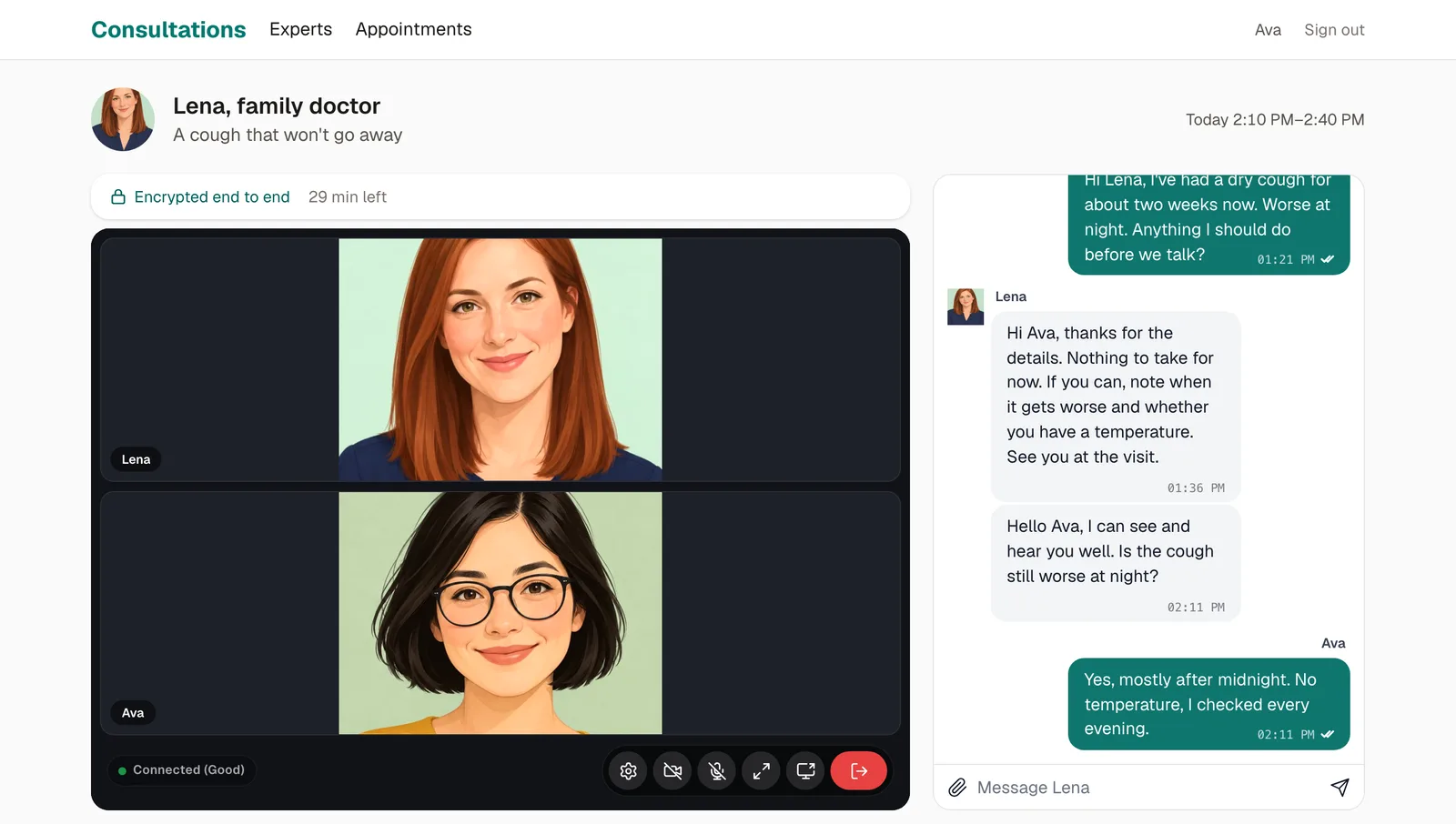
What it does
| On the site | What makes it |
|---|---|
| Who is free now, online and in no visit, on the page of the experts and on each expert's page | useOnline() for who is online, and realtime.listCalls() for the visits on now, with no table of yours (who is online) |
| Booking a half hour from the times still free, a time booked going from every page that shows it | your server keeps it, then says so in a room every page joins, experts (rooms) |
| A waiting room for each appointment, where the expert sees the client on any page | the presence room waiting:{id}, and usePresence() (a presence room) |
| The expert lets the client in, whose page comes into the visit by itself | the visit's rule, which says yes to the client from then on, and realtime.toUser( id ).emit() to the page of the client (to a user) |
| The visit, a video call of the two in the page, encrypted end to end, open from ten minutes before its time until its end | realtime.groupCalls( 'visit:{id}', rule, { encrypt: true } ), and <CallSpot> with join (the call in the page, encryption) |
| The visit ends for both at its time, or when the expert ends it | realtime.call( room ).end(), from a timer the group.joined webhook starts, or from End visit (from your server) |
| Messages and files about each appointment, before the visit, during it and after, for the two alone | <Chat> with upload on the room chat:{id}, the files kept by your server, which asks the room's rule with realtime.mayJoin() (the ready-made chat) |
| Talk now to an expert who is free: the request reaches them on whatever page they are, and taken, both go straight into a new visit | realtime.toUser( id ).emit() both ways, and useUserEvent() on the pages (to a user) |
| Notes after the visit, and a notice of each step on whatever page | the same, toUser and useUserEvent() |
Run it
You need:
- Node.js 22 or newer.
- Postgres 15 or newer, with a database of its own for the site.
- An app in WordPlus Cloud. Apps are in early access, so first ask for it. Then in your account, go to Apps, then Add app, and give it the address
http://localhost:3000. You get its key and its secret (getting started).
cd examples/consultations
cp .env.example .env.local    # the key and secret of your app, a local key, the database, and a secret for Better Auth
npm install
npm run db                    # the tables of Better Auth, then those of the site
npm run dev                   # http://localhost:3000
Then, in a second terminal, the ready-made people:
npm run seed # six experts and five clients with their photos, and their appointments
They sign up through the site itself, so it runs first. Open http://localhost:3000/signup and click Ava, a client whose visit with Lena is open now, then press I'm ready: Ava is in the waiting room. Open the site again in a private window and click Lena, a family doctor: the appointments show Ava waiting, and on the visit, Let Ava in brings the two of them into it, on camera, with their messages beside it. Ethan and Mia have a visit open now too. A client sees Talk now on each expert who is online and in no visit.
.env.local holds:
WORDPLUS_SITE, WORDPLUS_SECRET | the key and secret of your app |
WORDPLUS_LOCAL_KEY | a key of your own, which seals what goes through WordPlus Cloud and makes the keys the visits are encrypted with: openssl rand -hex 32, kept as long as the app |
DATABASE_URL | your Postgres database |
BETTER_AUTH_SECRET, BETTER_AUTH_URL | a long random string for Better Auth, and the address of the site |
CONSULT_DEMO | 1 for the demo: the ready-made experts and clients in one click on the sign-up and sign-in pages, and How this page works under each page |
A visit starting, with the timer that ends it at its time, and who is free keeping up as visits start and end, come by webhook, which needs the site at an address WordPlus Cloud reaches. On localhost none arrives, unless a tunnel gives your computer a public address (while you develop): who is in a visit shows on a reload, and a visit's call isn't ended for both at its time, so End visit ends it. Everything a page does tells the others at once, webhook or not: a time booked, I'm ready, letting someone in, ending a visit, the notes. The messages are kept either way: each page tells your server of the messages it sent.
How it is built
The site is a Next.js app as create-next-app makes it, App Router, TypeScript and Tailwind, with four packages added:
npm install @wordplus/realtime @wordplus/realtime-ui better-auth pg
@wordplus/realtimeconnects your server and your pages to WordPlus Cloud: the rooms, who is online, the calls.@wordplus/realtime-uiholds the screens of Better Messages, in your own tree: the call screen, the place of a call in the page, and the chat with its files.better-authsigns people up and in, its tables in your database.pgtalks to Postgres.
Sign-up and sign-in are ordinary Next.js and are left out here: they are app/account.ts, app/signin, app/signup and app/photos in the example, with proxy.ts, which sends a visitor who isn't signed in to sign in before the pages of the experts and the appointments render. What follows is the rest, a part at a time.
Who may use what
An appointment is a client's half hour with an expert, and two rules decide it all. Its messages and its waiting room are for its expert and its client, before the visit, during it and after. Its visit is open from ten minutes before its time until its end, or until its expert ends it: its expert may come in while it is open, and its client once the expert let them in. The database holds the people, each an expert or a client, the appointments, the requests to talk now, and the messages and files of each appointment:
-- The consultations part of the database. Better Auth makes its own tables first (npx auth migrate), as this one refers
-- to "user", whose ids are numbers (generateId: 'serial' in lib/auth.ts).

-- A person: an expert, who takes appointments, or a client, who books them.
create table if not exists profile (
    user_id    integer primary key references "user" (id) on delete cascade,
    role       text not null default 'client' check (role in ('expert', 'client')),
    -- An expert's: what they do, and the field the directory files them under.
    title      text not null default '',
    field      text not null default '',
    about      text not null default '',
    photo      bytea,
    created_at timestamptz not null default now()
);

-- An appointment: a client's half hour with an expert. Its visit is the group call visit:{id}, its messages the room
-- chat:{id}, and its waiting room the presence room waiting:{id}.
create table if not exists appointment (
    id          serial primary key,
    expert      integer not null references "user" (id) on delete cascade,
    client      integer not null references "user" (id) on delete cascade,
    starts_at   timestamptz not null,
    ends_at     timestamptz not null,
    topic       text not null default '',
    -- The expert let the client in: from then on the client may join the visit.
    admitted_at timestamptz,
    -- The visit itself: when the first one came in, and when it ended.
    started_at  timestamptz,
    ended_at    timestamptz,
    -- What the expert wrote down after it, for the client.
    notes       text,
    notes_at    timestamptz,
    created_at  timestamptz not null default now()
);
-- An expert has one appointment at a time.
create unique index if not exists appointment_slot on appointment (expert, starts_at);
create index if not exists appointment_client on appointment (client, starts_at);

-- A session asked for now ("Talk now"), until the expert takes it or says not now.
create table if not exists request (
    id          serial primary key,
    expert      integer not null references "user" (id) on delete cascade,
    client      integer not null references "user" (id) on delete cascade,
    topic       text not null default '',
    created_at  timestamptz not null default now(),
    -- 'accepted' with its appointment, or 'declined'.
    answer      text,
    appointment integer references appointment (id) on delete cascade
);

-- The messages about each appointment, by the id of the room event that brought them, with their files.
create table if not exists message (
    id             text primary key,
    appointment_id integer not null references appointment (id) on delete cascade,
    sender         integer not null references "user" (id) on delete cascade,
    text           text not null,
    files          jsonb not null default '[]',
    at             bigint not null,
    reactions      jsonb not null default '{}'
);
create index if not exists message_appointment on message (appointment_id, at);

-- A file sent in an appointment's messages: kept here, opened only by its expert and its client.
create table if not exists file (
    id             text primary key,
    appointment_id integer not null references appointment (id) on delete cascade,
    owner          integer not null references "user" (id) on delete cascade,
    name           text not null,
    type           text not null,
    size           integer not null,
    data           bytea not null,
    created_at     timestamptz not null default now()
);
The rules, and what they read. Appointment 7 is visited in the group call visit:7, written about in the room chat:7, and waited for in the presence room waiting:7:
export const SESSION_MINUTES = 30;
const MINUTE = 60_000;
/** A visit opens this long before it starts. */
export const OPENS_BEFORE = 10 * MINUTE;

/** Whether someone is the expert or the client of an appointment. A visitor who isn't signed in (null) never is. */
export function isParty(appointment: Appointment, user: string | number | null): boolean {
    return user !== null && [appointment.expert, appointment.client].includes(String(user));
}

/** Whether a visit is open: from ten minutes before it starts until it ends, or until its expert ended it. */
export function visitOpen(appointment: Appointment, now = Date.now()): boolean {
    return appointment.endedAt === null && now >= appointment.startsAt - OPENS_BEFORE && now < appointment.endsAt;
}

/**
 * Whether someone may write in an appointment's messages, and read them: its expert and its client, before the visit,
 * during it and after.
 */
export async function mayChat(user: string | number | null, id: string): Promise<boolean> {
    const appointment = await appointmentOf(id);
    return appointment !== null && isParty(appointment, user);
}

/** Whether someone may come into an appointment's visit now: its expert while it is open, its client once let in. */
export async function mayJoinVisit(user: string | number | null, id: string): Promise<boolean> {
    const appointment = await appointmentOf(id);
    if (!appointment || !isParty(appointment, user) || !visitOpen(appointment)) return false;
    return String(user) === appointment.expert || appointment.admittedAt !== null;
}

// Rooms and calls, by an appointment's number: appointment 7 is visited in visit:7, written about in chat:7, and
// waited for in waiting:7.

export const visitOf = (id: string) => `visit:${id}`;
export const chatOf = (id: string) => `chat:${id}`;
export const waitingOf = (id: string) => `waiting:${id}`;

/** The appointment of a room or call: 7 for visit:7 with 'visit', and none for any other name. */
export function appointmentIn(name: string, kind: 'visit' | 'chat' | 'waiting'): string | null {
    const id = name.startsWith(`${kind}:`) ? name.slice(kind.length + 1) : '';
    return isNumber(id) ? id : null;
}
Your server and WordPlus Cloud
The realtime side of your server is one file: who is asking and what people see of each other, then the three of each appointment. Its messages are a room, with the rule above. Its waiting room is a presence room, with the same rule. Its visit is a group call, with the rule of the visit. Then the room experts, through which every page keeps who is free current, and the webhooks. Those keep the messages with their files and tell the other one, start the timer that ends a visit at its time, and tell every page that someone came into a visit or left it.
encrypt: true encrypts the visit end to end. Each browser encrypts its camera and its microphone before they leave, with a key your server makes from its local key and gives, with the pass, only to the two the rule lets in. WordPlus Cloud's media servers forward what they cannot see or hear. The messages go from page to page sealed with the key of their room, which the realtime servers never hold (what is sealed).
import { createRealtime } from '@wordplus/realtime/server';
import { currentUserId } from './auth';
import {
    appointmentIn, appointmentOf, filesFor, isParty, keepMessage, markEnded, markStarted, mayChat, mayJoinVisit, nameOf, personOf, photoOf, react,
    visitOf, type Appointment, type Message,
} from './clinic';
import { DEMO_VISIT_MINUTES, WORLDS, webhooksInEveryWorld } from './worlds';

export const realtime = createRealtime({
    site: process.env.WORDPLUS_SITE!,
    secret: process.env.WORDPLUS_SECRET!,
    localKey: process.env.WORDPLUS_LOCAL_KEY!,
    // Who is asking: the signed-in user, or null.
    user: () => currentUserId(),
    // What people see of each other: in the messages, the waiting room and the visit.
    profile: async (user) => {
        const person = await personOf(String(user));
        return person ? { name: person.name, avatar: photoOf(person.id) } : null;
    },
});
// The public demo: the webhooks read and keep the appointments of every visitor's world (lib/worlds.ts).
if (WORLDS) webhooksInEveryWorld(realtime);

// An appointment's messages: chat:{id}, where {id} is the appointment's number. Its expert and its client write there
// before the visit, during it and after, with files. Messages, typing, reactions and read ticks go from page to page
// sealed, and the messages and reactions come here too (below), to be kept. A page asks to join at /api/realtime/auth.
realtime.room(
    'chat:{id}',
    {
        history: 50,
        emit: ['message', 'typing', 'reaction', 'read'],
        webhook: ['message', 'reaction'],
    },
    async (user, { id }) => mayChat(user, id),
);

// Its waiting room: waiting:{id}, a presence room. The client waits there once they are ready, and the expert's pages
// see them in it, as they come and go.
realtime.room('waiting:{id}', { presence: true }, async (user, { id }) => mayChat(user, id));

// Its visit: visit:{id}, a group call on WordPlus Cloud's media servers, encrypted end to end: each browser encrypts
// what it sends with a key this server makes, which only those the rule lets in get, so the media servers forward
// what they can't see or hear. Its expert comes in while it is open, from ten minutes before it starts, and its client
// once the expert let them in (lib/clinic.ts). A page asks to join at /api/realtime/calls.
realtime.groupCalls('visit:{id}', async (user, { id }) => mayJoinVisit(user, id), { encrypt: true });

// Who is free: every signed-in page joins it, and hears when a visit starts or ends, or a time is booked, to show the
// experts as they are now. Only the server says anything in it.
realtime.room('experts', async (user) => user !== null);

/** The experts in a visit now: WordPlus Cloud knows which visits are on, with no table here. */
export async function inVisitNow(): Promise<Set<string>> {
    const busy = new Set<string>();
    for (const call of await realtime.listCalls()) {
        const id = appointmentIn(call.name, 'visit');
        const appointment = id && call.people > 0 ? await appointmentOf(id) : null;
        if (appointment) busy.add(appointment.expert);
    }
    return busy;
}

/** Keeps a message, and the first time, tells the other one of the appointment, on whatever page they are. */
export async function keepAndTell(message: Message) {
    const appointment = await appointmentOf(message.appointment);
    if (!appointment || !isParty(appointment, message.from)) return;
    // Only the files kept for this appointment, as they were kept: anyone may write anything into a message of their own.
    const files = await filesFor(appointment.id, message.files);
    if (!message.text && !files.length) return;
    if (!(await keepMessage({ ...message, files }))) return; // kept before, so told before
    const other = message.from === appointment.expert ? appointment.client : appointment.expert;
    await realtime.toUser(other).emit('message', {
        appointment: appointment.id,
        name: await nameOf(message.from),
        text: message.text ? message.text.slice(0, 140) : files.length === 1 ? `sent ${files[0].name}` : `sent ${files.length} files`,
    });
}

// The webhooks of the messages: each message and reaction, as the cloud took it.
realtime.on('message', async ({ room, from, data, event_id, at }) => {
    const id = appointmentIn(room, 'chat');
    if (!from || !id) return;
    await keepAndTell({ id: event_id, appointment: id, from: String(from), text: String(data.text ?? ''), files: data.files as unknown[], at });
});
realtime.on('reaction', async ({ from, data }) => {
    if (from) await react(String(data.id), String(from), String(data.key ?? ''));
});

// The webhooks of the visits: someone came in, or left. The first one in starts it, and it ends at its time. Every page
// shows who is free.
realtime.on('group.joined', async ({ call }) => {
    const id = appointmentIn(call, 'visit');
    if (!id) return;
    await markStarted(id);
    await realtime.to('experts').emit('changed');
    const appointment = await appointmentOf(id);
    if (appointment) endAtItsTime(appointment);
});
realtime.on('group.left', async ({ call }) => {
    if (appointmentIn(call, 'visit')) await realtime.to('experts').emit('changed');
});

/** Ends a visit for both: its call, and the tokens they had, so nobody comes back into it. */
export async function endVisit(appointment: Appointment) {
    await realtime.call(visitOf(appointment.id)).end().catch(() => {}); // not on, if nobody came in
    await markEnded(appointment.id);
    await realtime.toUser([appointment.expert, appointment.client]).emit('ended', { appointment: appointment.id });
    await realtime.to('experts').emit('changed');
}

const ending = new Set<string>();

/**
 * A visit ends at the end of its half hour, unless its expert ended it before. A timer of this server's, set as the
 * visit starts: a site of your own may run a job for it instead. The public demo ends a visit after a few minutes.
 */
function endAtItsTime(appointment: Appointment) {
    if (ending.has(appointment.id)) return;
    ending.add(appointment.id);
    const end = WORLDS ? Math.min(appointment.endsAt, Date.now() + DEMO_VISIT_MINUTES * 60_000) : appointment.endsAt;
    setTimeout(async () => {
        ending.delete(appointment.id);
        const now = await appointmentOf(appointment.id).catch(() => null);
        if (now && now.endedAt === null) await endVisit(now).catch(() => {});
    }, Math.max(0, end - Date.now())).unref();
}
The rules run on your server, in two routes of your own, each time a page asks: to join an appointment's messages or its waiting room, or to come into its visit. The page gets a pass signed with the app's secret, or why not. The pass of a visit carries the key its media is encrypted with.
// POST /api/realtime/auth: a page asks to join rooms, as { rooms: ['chat:7', 'waiting:7'] }. This server runs each
// room's rule (realtime.room in lib/realtime.ts) for the person signed in, and answers a pass for the rooms allowed,
// signed with the app's secret, with why each other was refused. The page shows the pass to WordPlus Cloud, which lets
// it in.
import { currentUserId } from '@/lib/auth';
import { realtime } from '@/lib/realtime';

export async function POST(request: Request) {
    // JSON only, which a page of another site can't send here.
    if (!request.headers.get('content-type')?.includes('application/json')) {
        return new Response(null, { status: 415 });
    }
    const { rooms } = await request.json();
    const user = await currentUserId();
    const pass = await realtime.authorize(rooms, user);
    return Response.json(pass);
}
// POST /api/realtime/calls: a page asks to come into an appointment's visit, as { room: 'visit:7', type: 'video' }. This
// server runs the visit's rule (realtime.groupCalls in lib/realtime.ts) for the person signed in, and answers a pass for
// it, signed with the app's secret, with the key its media is encrypted with, or why not. With the pass, WordPlus Cloud
// lets them in.
import { currentUserId } from '@/lib/auth';
import { realtime } from '@/lib/realtime';

export async function POST(request: Request) {
    // JSON only, which a page of another site can't send here.
    if (!request.headers.get('content-type')?.includes('application/json')) {
        return new Response(null, { status: 415 });
    }
    const ask = await request.json();
    const user = await currentUserId();
    const pass = await realtime.authorizeCall(ask, user);
    return Response.json(pass);
}
The SDK's other routes, the webhooks among them, and the browser files:
// WordPlus Cloud's other routes: the keys of sealed rooms (POST /api/realtime/keys), the webhooks the cloud sends
// (POST /api/realtime/webhook), and the browser's files (GET). Joining rooms and calling are the site's own routes,
// auth/route.ts and calls/route.ts beside this one.
import { realtime } from '@/lib/realtime';

export const GET = realtime.route;
export const POST = realtime.route;
Every page connected
Every page of someone signed in connects through the layout of their pages: one connection for all of them, kept as they move between pages. The call screen is in it, so a visit goes on in a window in the corner on any other page of the site, and comes back to its place when the page of the appointment opens again. So are who is free kept current (ExpertsLive), the notices, and on the pages of an expert, the requests to talk now:
import Link from 'next/link';
import { Suspense } from 'react';
import { redirect } from 'next/navigation';
import { connection } from 'next/server';
import { RealtimeProvider } from '@wordplus/realtime/react';
import { currentUserId } from '@/lib/auth';
import { personOf } from '@/lib/clinic';
import { realtime } from '@/lib/realtime';
import { signOut } from '../account';
import { ExpertsLive, Notices, Requests } from './live';
import { Screens } from './screens';

// Every page of someone signed in. One connection to WordPlus Cloud for all of them, kept as they move between pages,
// and the call screen, which shows a visit in its page, or in the corner on any other.
export default function AppLayout({ children }: { children: React.ReactNode }) {
    return (
        <Suspense fallback={<p className="p-6 text-stone-500">Loading…</p>}>
            <Connected>{children}</Connected>
        </Suspense>
    );
}

async function Connected({ children }: { children: React.ReactNode }) {
    await connection(); // made for each request: the settings are signed for this person, now
    const me = await currentUserId();
    if (!me) redirect('/signin');
    const person = await personOf(me);
    return (
        <RealtimeProvider options={await realtime.config(me)}>
            <Screens />
            <ExpertsLive />
            <header className="sticky top-0 z-10 border-b border-stone-200 bg-white/90 backdrop-blur">
                <nav className="mx-auto flex max-w-6xl flex-wrap items-center gap-x-5 gap-y-1 px-4 py-3">
                    <Link href={person?.role === 'expert' ? '/appointments' : '/experts'} className="text-xl font-bold text-teal-700">Consultations</Link>
                    <Link href="/experts" className="hover:text-teal-700">Experts</Link>
                    <Link href="/appointments" className="hover:text-teal-700">Appointments</Link>
                    <span className="ml-auto text-sm text-stone-600">{person?.name}{person?.role === 'expert' ? ` · ${person.title}` : ''}</span>
                    <form action={signOut}>
                        <button className="text-sm text-stone-500 hover:text-stone-900">Sign out</button>
                    </form>
                </nav>
            </header>
            <Notices />
            {person?.role === 'expert' && <Requests />}
            <main className="mx-auto w-full max-w-6xl flex-1 px-4 py-6">
                {children}
            </main>
        </RealtimeProvider>
    );
}
The call screen, with the look of the chat and the calls:
'use client';

// The look of the ready-made chat and call screens, and the call screen itself: it takes no place on the page, shows the
// ring over it, and a call in a window in the corner wherever the page has no place of its own for it.
import '@wordplus/realtime-ui/calls.css';
import '@wordplus/realtime-ui/chat.css';
import { useRealtime } from '@wordplus/realtime/react';
import { CallScreen } from '@wordplus/realtime-ui/react';

export function Screens() {
    return <CallScreen rt={useRealtime()} />;
}
Who is free
An expert is free when they are online and in no visit. Who is online, WordPlus Cloud tells the page as people come and go, with useOnline(), and no request to your server. Which visits are on, it tells your server, with no table of yours: inVisitNow asks for the group calls on now and keeps the experts of the visits with someone in them (lib/realtime.ts above). The page of the experts asks your server for the second, and puts the two together:
import { Suspense } from 'react';
import { currentUserId } from '@/lib/auth';
import { experts, personOf, photoOf } from '@/lib/clinic';
import { inVisitNow } from '@/lib/realtime';
import { Directory } from './directory';

export default function ExpertsPage() {
    return (
        <Suspense fallback={<p className="text-stone-500">Loading…</p>}>
            <Experts />
        </Suspense>
    );
}

// Every expert, with who is free now: online (the page sees it from WordPlus Cloud) and in no visit (the server asks
// WordPlus Cloud which visits are on).
async function Experts() {
    const me = (await currentUserId())!;
    const [all, busy, person] = await Promise.all([experts(), inVisitNow(), personOf(me)]);
    return (
        <Directory
            experts={all.map((expert) => ({ id: expert.id, name: expert.name, title: expert.title, field: expert.field, about: expert.about, photo: photoOf(expert.id), inVisit: busy.has(expert.id) }))}
            client={person?.role === 'client'}
            me={me}
        />
    );
}
'use client';

import Link from 'next/link';
import { useState } from 'react';
import { useOnline } from '@wordplus/realtime/react';
import { Availability } from '../live';
import { TalkNow } from './talk-now';

type Expert = { id: string; name: string; title: string; field: string; about: string; photo: string; inVisit: boolean };

/**
 * Every expert, those free now first, kept live: who is online WordPlus Cloud tells the page as they come and go, and who
 * is in a visit the server's next render says, as every page asks for one when a visit starts or ends.
 */
export function Directory({ experts, client, me }: { experts: Expert[]; client: boolean; me: string }) {
    const { online } = useOnline(experts.map((expert) => expert.id));
    const fields = [...new Set(experts.map((expert) => expert.field))].sort();
    const [field, setField] = useState<string | null>(null);
    const free = (expert: Expert) => online[expert.id] && !expert.inVisit;
    const shown = experts.filter((expert) => !field || expert.field === field);
    const sorted = [...shown.filter(free), ...shown.filter((expert) => !free(expert))];

    return (
        <section className="flex flex-col gap-5">
            <div className="flex flex-wrap items-end justify-between gap-3">
                <div>
                    <h1 className="text-2xl font-semibold">Experts</h1>
                    <p className="text-stone-600">Book a half hour, or talk now to one who is free.</p>
                </div>
                <p className="text-sm text-stone-500">{experts.filter(free).length} free now</p>
            </div>
            <div className="flex flex-wrap gap-2" role="tablist">
                {[null, ...fields].map((one) => (
                    <button key={one ?? 'all'} role="tab" aria-selected={field === one} onClick={() => setField(one)}
                            className={`rounded-full px-4 py-1.5 text-sm ${field === one ? 'bg-stone-900 text-white' : 'border border-stone-300 bg-white hover:bg-stone-50'}`}>
                        {one ?? 'All'}
                    </button>
                ))}
            </div>
            <ul className="grid gap-4 sm:grid-cols-2 lg:grid-cols-3" id="experts">
                {sorted.map((expert) => (
                    <li key={expert.id} data-id={expert.id} data-free={free(expert) ? '' : undefined} className="flex flex-col gap-3 rounded-2xl bg-white p-4 shadow-sm">
                        <Link href={`/experts/${expert.id}`} className="flex items-center gap-3">
                            <span className="relative shrink-0">
                                {/* eslint-disable-next-line @next/next/no-img-element */}
                                <img src={expert.photo} alt="" className="size-16 rounded-full object-cover" />
                                {online[expert.id] && <span className={`absolute -right-0.5 -bottom-0.5 size-4 rounded-full border-2 border-white ${expert.inVisit ? 'bg-amber-500' : 'bg-emerald-500'}`} />}
                            </span>
                            <span className="min-w-0">
                                <span className="block text-lg font-medium">{expert.name}</span>
                                <span className="block truncate text-sm text-stone-600">{expert.title}</span>
                                <Availability id={expert.id} inVisit={expert.inVisit} />
                            </span>
                        </Link>
                        <p className="line-clamp-2 text-sm text-stone-600">{expert.about}</p>
                        <div className="mt-auto flex flex-wrap gap-2">
                            <Link href={`/experts/${expert.id}`} className="rounded-full border border-stone-300 px-4 py-2 text-sm hover:bg-stone-50">
                                {client ? 'Book a time' : 'Profile'}
                            </Link>
                            {client && expert.id !== me && <TalkNow expert={expert.id} name={expert.name} free={free(expert)} />}
                        </div>
                    </li>
                ))}
            </ul>
        </section>
    );
}
Each page keeps itself current. Every page joins the room experts, and when a visit starts or ends, or a time is booked, your server says so there, with realtime.to( 'experts' ).emit( 'changed' ). ExpertsLive in the layout asks the server for the page again, with no reload, and Availability says of one expert whether they are free, in a visit, or away:
/** Who is free, as every page shows it: the page asks the server again when a visit starts or ends, or a time is booked. */
export function ExpertsLive() {
    const router = useRouter();
    // What the server sends every page (realtime.to( 'experts' ).emit( 'changed' ) in lib/realtime.ts).
    useRoom('experts', { changed: () => router.refresh() });
    return null;
}

/** Whether an expert is free now: online and in no visit, in a visit, or away. */
export function Availability({ id, inVisit }: { id: string; inVisit: boolean }) {
    const { online, lastSeen } = useOnline([id]);
    const [, tick] = useState(0);
    useEffect(() => {
        const timer = setInterval(() => tick((n) => n + 1), 60_000);
        return () => clearInterval(timer);
    }, []);
    if (inVisit) return <span className="inline-flex items-center gap-1.5 text-sm text-amber-700"><span className="size-2 rounded-full bg-amber-500" />In a visit</span>;
    if (online[id]) return <span className="inline-flex items-center gap-1.5 text-sm text-emerald-700"><span className="size-2 rounded-full bg-emerald-500" />Free now</span>;
    return <span className="text-sm text-stone-500">{lastSeen[id] ? `Away, seen ${ago(lastSeen[id])}` : 'Away'}</span>;
}

function ago(at: number): string {
    const minutes = Math.round((Date.now() - at) / 60000);
    if (minutes < 1) return 'just now';
    if (minutes < 60) return `${minutes} min ago`;
    const hours = Math.round(minutes / 60);
    return hours < 24 ? `${hours} h ago` : `${Math.round(hours / 24)} d ago`;
}
Booking a time
The page of an expert shows their half hours of the next three days, from 9:00 to 17:00 by the visitor's own clock, with those taken and those gone by left out. Your server gives the times taken (takenBetween in lib/clinic.ts), and the page draws the rest, as only the browser knows the visitor's time zone. A time booked by anyone goes from every page showing it, as each of those pages asks for itself again when the room experts says so:
import Link from 'next/link';
import { Suspense } from 'react';
import { notFound } from 'next/navigation';
import { currentUserId } from '@/lib/auth';
import { personOf, photoOf, takenBetween } from '@/lib/clinic';
import { inVisitNow } from '@/lib/realtime';
import { Availability } from '../../live';
import { TalkNowIfFree } from '../talk-now';
import { Booking } from './booking';

export default function ExpertPage(props: PageProps<'/experts/[id]'>) {
    return (
        <Suspense fallback={<p className="text-stone-500">Loading…</p>}>
            <Expert {...props} />
        </Suspense>
    );
}

const DAY = 24 * 3600 * 1000;

// An expert: who they are, whether they are free now, and their half hours of the next three days, those taken left
// out. A time booked by anyone takes it out of every page showing it, as it asks for itself again.
async function Expert({ params }: PageProps<'/experts/[id]'>) {
    const { id } = await params;
    const me = (await currentUserId())!;
    const [expert, viewer] = await Promise.all([personOf(id), personOf(me)]);
    if (!expert || expert.role !== 'expert') notFound();
    const now = Date.now();
    const [taken, busy] = await Promise.all([takenBetween(id, now, now + 3 * DAY), inVisitNow()]);
    const client = viewer?.role === 'client';

    return (
        <section className="mx-auto flex max-w-3xl flex-col gap-6">
            <div className="flex items-center gap-5">
                {/* eslint-disable-next-line @next/next/no-img-element */}
                <img src={photoOf(id)} alt="" className="size-24 rounded-full object-cover" />
                <div className="flex-1">
                    <p className="text-sm font-medium text-teal-700">{expert.field}</p>
                    <h1 className="text-2xl font-semibold">{expert.name}</h1>
                    <p className="text-stone-600">{expert.title}</p>
                    <Availability id={id} inVisit={busy.has(id)} />
                </div>
                {client && <TalkNowIfFree expert={id} name={expert.name} inVisit={busy.has(id)} />}
            </div>
            <p className="text-lg">{expert.about}</p>
            {client ? (
                <Booking expert={id} name={expert.name} taken={taken} />
            ) : (
                <p className="rounded-2xl bg-white p-5 text-stone-600 shadow-sm">Clients book {expert.name} from this page: a half hour, from the times still free.</p>
            )}
            <Link href="/experts" className="text-sm text-stone-500">Back to experts</Link>
        </section>
    );
}
The times of a day, and Book, which asks your server:
/**
 * The expert's half hours of the next three days, from 9:00 to 17:00 by the visitor's clock, those taken and those gone
 * by left out, a day at a time, and the booking of one: what about, then Book. The server checks the time again, as it
 * may have just gone to someone else.
 */
export function Booking({ expert, name, taken }: { expert: string; name: string; taken: number[] }) {
    const now = useNow(60_000);
    const [day, setDay] = useState(0);
    const [picked, setPicked] = useState<number | null>(null);
    const [topic, setTopic] = useState('');
    const [error, setError] = useState('');
    const [pending, start] = useTransition();
    if (now === null) return <div className="h-72 rounded-2xl bg-white shadow-sm" />;

    const days = [0, 1, 2].map((offset) => {
        const date = new Date(now);
        date.setDate(date.getDate() + offset);
        date.setHours(9, 0, 0, 0);
        const slots = Array.from({ length: 16 }, (_, i) => date.getTime() + i * HALF_HOUR).filter((at) => at > now && !taken.includes(at));
        return { label: dayOf(date.getTime(), now), slots };
    });
    // Taken by someone else since it was picked: picked no more.
    const still = picked !== null && days.some((one) => one.slots.includes(picked)) ? picked : null;

    const book = () => {
        if (still === null) return;
        setError('');
        start(async () => {
            const refused = await bookVisit(expert, still, topic);
            if (refused) setError(refused.error);
        });
    };
    // … the three days, the times of the day picked, what about, and Book
}
Your server checks the time again, as it may have just gone to someone else, and keeps the appointment. The database holds to one appointment per expert and start too (appointment_slot above):
/**
 * Books a half hour with an expert, for a client: on the half hour, from the next one to a week ahead, and free. The
 * appointment, or why not.
 */
export async function book(client: string, expert: string, startsAt: number, topic: string): Promise<Appointment | string> {
    const [who, withWhom] = await Promise.all([personOf(client), personOf(expert)]);
    if (!who || who.role !== 'client') return 'Only a client books a visit.';
    if (!withWhom || withWhom.role !== 'expert') return 'That is no expert of this site.';
    const now = Date.now();
    if (!Number.isInteger(startsAt) || startsAt % (SESSION_MINUTES * MINUTE) !== 0) return 'A visit starts on the half hour.';
    if (startsAt <= now || startsAt > now + 7 * 24 * 60 * MINUTE) return 'Pick a time in the coming week.';
    const endsAt = startsAt + SESSION_MINUTES * MINUTE;
    if (await busy(expert, startsAt, endsAt)) return 'That time was just taken. Pick another.';
    const { rows } = await db.query(
        `insert into appointment (expert, client, starts_at, ends_at, topic) values ($1, $2, $3, $4, $5)
         on conflict do nothing returning id::text as id`,
        [expert, client, new Date(startsAt), new Date(endsAt), topic.trim().slice(0, 140)],
    );
    if (!rows[0]) return 'That time was just taken. Pick another.';
    return (await appointmentOf(rows[0].id))!;
}
Then it tells the expert, on whatever page they are, with realtime.toUser(), and every page following who is free, which takes the time away, and the client goes to the appointment:
'use server';

import { redirect } from 'next/navigation';
import { currentUserId } from '@/lib/auth';
import { admit, answerRequest, appointmentOf, askNow, book, nameOf, REQUEST_WAITS, saveNotes, visitOpen, withdraw } from '@/lib/clinic';
import { endVisit, realtime } from '@/lib/realtime';

// What the pages do, each for the person signed in: the server keeps it, then tells the other one through WordPlus
// Cloud, on whatever page they are (realtime.toUser), and every page following who is free (realtime.to('experts')).

/** A client books a half hour with an expert, then goes to it. Why not, when it can't be booked. */
export async function bookVisit(expert: string, startsAt: number, topic: string): Promise<{ error: string }> {
    const me = await currentUserId();
    if (!me) return { error: 'Sign in first.' };
    const booked = await book(me, expert, startsAt, topic);
    if (typeof booked === 'string') return { error: booked };
    await realtime.toUser(expert).emit('booked', { appointment: booked.id, name: booked.clientName, startsAt: booked.startsAt });
    // Every page showing this expert's times takes this one away.
    await realtime.to('experts').emit('changed');
    redirect(`/appointments/${booked.id}`);
}
The expert sees it as a notice, which opens the appointment (notes, and the notices).
The visit
The visit is the group call visit:{id}, shown in the page of the appointment by <CallSpot>: both cameras, and the call's controls. Inside the spot is what shows while the person is not in the call: the lobby of the client or of the expert (the waiting room). join comes into the call, with the camera and the microphone on (joinWith="microphone camera"), once a click says so, on this page or on the one before it: Join the visit, I'm ready once the client is let in, or a session taken now, which opens the page with ?join=1. Your rule decides each time, as for any other way in (straight into a meeting).
The page tells apart three times. Before the visit opens, it says when it does, and the messages are already beside it. While it is open, the visit. After its end, or once its expert ended it, it says the visit ended, and the notes follow.
'use client';

import { usePathname, useRouter, useSearchParams } from 'next/navigation';
import { useEffect, useRef, useState } from 'react';
import { useOnline, usePresence, useRealtime, useRoom, useUserEvent } from '@wordplus/realtime/react';
import { CallSpot } from '@wordplus/realtime-ui/react';
import { endNow, imHere, letIn } from '../../actions';
import { relative, timeOf, useNow } from '../../when';

type Person = { id: string; name: string; photo: string };
type Props = {
    id: string;
    /** Whether the page's user is the expert of the appointment, rather than its client. */
    expert: boolean;
    startsAt: number;
    endsAt: number;
    ended: boolean;
    admitted: boolean;
    other: Person;
};

const OPENS_BEFORE = 10 * 60 * 1000;

/**
 * The visit: a group call of two, visit:{id}, shown here in the page while it is on. It opens ten minutes before its
 * time. The client says they are ready and waits in the waiting room, a presence room the expert's pages see them in,
 * and the expert lets them in: from then on the visit's rule lets the client come in, and their page comes in by
 * itself. Opened from a session taken now (?join=1), both come straight in.
 */
export function Visit({ id, expert, startsAt, endsAt, ended: endedBefore, admitted: admittedBefore, other }: Props) {
    const rt = useRealtime();
    const router = useRouter();
    const path = usePathname();
    const params = useSearchParams();
    const now = useNow(5_000);
    const [admitted, setAdmitted] = useState(admittedBefore);
    const [ended, setEnded] = useState(endedBefore);
    const [ready, setReady] = useState(false);
    const readyNow = useRef(ready);
    readyNow.current = ready;
    // Into the visit, with the camera and the microphone on: set by a click on this page, or the one that led here.
    const [join, setJoin] = useState<'video' | undefined>(() => (params.get('join') === '1' ? 'video' : undefined));
    useEffect(() => {
        if (params.get('join')) window.history.replaceState(null, '', path); // a reload doesn't come in again
    }, [params, path]);

    // What the server tells this page (realtime.toUser( … ).emit( … ) in app/(app)/actions.ts and lib/realtime.ts).
    useUserEvent('admitted', (data: { appointment: string }) => {
        if (data.appointment !== id) return;
        setAdmitted(true);
        if (readyNow.current) setJoin('video');
    });
    useUserEvent('ended', (data: { appointment: string }) => {
        if (data.appointment !== id) return;
        setEnded(true);
        router.refresh();
    });

    if (now === null) return <div className="h-[34rem] rounded-2xl bg-stone-900" />;

    if (ended || now >= endsAt) {
        return (
            <div className="flex h-56 flex-col items-center justify-center gap-2 rounded-2xl bg-stone-100 p-6 text-center" id="visit" data-state="ended">
                <p className="text-lg font-medium">This visit has ended</p>
                <p className="text-sm text-stone-600">{expert ? `Write your notes for ${other.name} below.` : `Notes from ${other.name} show below once they are written.`}</p>
            </div>
        );
    }

    if (now < startsAt - OPENS_BEFORE) {
        return (
            <div className="flex h-56 flex-col items-center justify-center gap-2 rounded-2xl bg-stone-100 p-6 text-center" id="visit" data-state="later">
                <p className="text-lg font-medium">The visit opens at {timeOf(startsAt - OPENS_BEFORE)}, {relative(startsAt - OPENS_BEFORE, now)}</p>
                <p className="max-w-md text-sm text-stone-600">Ten minutes before it starts. Meanwhile, write to {other.name} beside it, and send what they should see.</p>
            </div>
        );
    }

    const left = Math.max(1, Math.ceil((endsAt - now) / 60_000));
    return (
        <div className="flex flex-col gap-2" id="visit" data-state="open">
            <div className="flex flex-wrap items-center gap-x-4 gap-y-2 rounded-2xl bg-white px-4 py-2.5 text-sm shadow-sm">
                <Encrypted />
                <span className="text-stone-500 tabular-nums">{now < startsAt ? `Starts at ${timeOf(startsAt)}` : `${left} min left`}</span>
                {expert && <ExpertControls id={id} client={other} admitted={admitted} onLetIn={() => { setAdmitted(true); setJoin('video'); }} />}
            </div>
            {/* Its group call, in the page while it is on: everyone's camera, and the call's controls. */}
            <CallSpot rt={rt} call={`visit:${id}`} join={join} joinWith="microphone camera" className="h-[32rem] overflow-hidden rounded-2xl bg-stone-900 text-white">
                {expert ? (
                    <ExpertLobby id={id} client={other} admitted={admitted} onJoin={() => setJoin('video')} />
                ) : (
                    <ClientLobby id={id} expert={other} admitted={admitted} ready={ready}
                                 onReady={() => { setReady(true); void imHere(id); }} onJoin={() => setJoin('video')} />
                )}
            </CallSpot>
        </div>
    );
}

/** What the visit is, said where it is: encrypted end to end, so the media servers forward what they can't see or hear. */
function Encrypted() {
    return (
        <span className="inline-flex items-center gap-1.5 text-teal-800" title="Your camera and microphone are encrypted in your browser, with a key only the two of you get. WordPlus Cloud's media servers forward them without being able to see or hear them.">
            <svg viewBox="0 0 24 24" className="size-4" fill="none" stroke="currentColor" strokeWidth="2" aria-hidden="true"><rect x="4" y="10" width="16" height="11" rx="2" /><path d="M8 10V7a4 4 0 0 1 8 0v3" /></svg>
            Encrypted end to end
        </span>
    );
}
The visit ends at its time, or when its expert presses End visit. Your server ends the call for both, realtime.call( room ).end(), which refuses the passes they had, and keeps that it ended, so the rule refuses them from then on. Then it tells both pages, which show that it ended, and every page following who is free (endVisit in lib/realtime.ts above). The timer that ends it at its time starts as the first one comes in, with the group.joined webhook. End visit is the expert's alone:
/** The expert ends the visit for both. */
export async function endNow(id: string) {
    const me = await currentUserId();
    const appointment = await appointmentOf(id);
    if (!me || !appointment || appointment.expert !== me || appointment.endedAt !== null) return;
    await endVisit(appointment);
}
- Encrypted end to end is said above the call, where the two see it: each browser encrypts what it sends before it leaves, with a key only the two of them get (encryption).
- Sound plays once the person has clicked on the page, or on the page they came from: I'm ready, Join the visit, Take it, or the click that asked to talk now each count (camera, microphone and sound).
- On another page of the site the visit goes on in the window in the corner, and comes back here when the page of the appointment opens again. Nothing starts over: the camera, the microphone, the time.
- A reload doesn't come in again by itself: the page takes
?join=1out of its address as it opens.
The waiting room
Each appointment has a waiting room, the presence room waiting:{id}. Once the client says they are ready, their page joins it, and the pages of the expert see them in it, as they come and go, with usePresence(). Nothing on your server keeps who waits: closing the page leaves the room. Its rule is that of the messages, the expert and the client (lib/realtime.ts above).
The client says they are ready from the lobby of the visit, and waits there until let in:
/** The client before the visit: ready, then waiting until the expert lets them in, then in. */
function ClientLobby({ id, expert, admitted, ready, onReady, onJoin }: { id: string; expert: Person; admitted: boolean; ready: boolean; onReady: () => void; onJoin: () => void }) {
const { online } = useOnline([expert.id]);
return (
<Lobby photo={expert.photo}>
{admitted ? (
<>
<p className="text-lg font-medium">{expert.name} is ready for you</p>
<button onClick={onJoin} className="rounded-full bg-teal-500 px-6 py-3 font-medium text-white hover:bg-teal-400">Join the visit</button>
</>
) : ready ? (
<>
<InWaitingRoom room={`waiting:${id}`} />
<p className="text-lg font-medium" data-waiting="">You are in the waiting room</p>
<p className="max-w-sm text-stone-300">
{online[expert.id] ? `${expert.name} knows you're here and will let you in shortly.` : `${expert.name} isn't online yet. You'll be let in as soon as ${expert.name} arrives.`}
</p>
</>
) : (
<>
<p className="text-lg font-medium">Your visit with {expert.name} is open</p>
<p className="max-w-sm text-stone-300">Say you are ready, and {expert.name} lets you in from the waiting room. You come in with your camera and microphone on.</p>
<button onClick={onReady} className="rounded-full bg-teal-500 px-6 py-3 font-medium text-white hover:bg-teal-400">I'm ready</button>
</>
)}
</Lobby>
);
}
/** In the waiting room while on the page: a member of its presence room, which the expert's pages see. */
function InWaitingRoom({ room }: { room: string }) {
useRoom(room, {});
return null;
}
I'm ready also tells the expert, on whatever page they are, with a notice that opens the appointment:
/** The client is in the waiting room: the expert hears it, on whatever page they are. */
export async function imHere(id: string) {
    const me = await currentUserId();
    const appointment = await appointmentOf(id);
    if (!me || !appointment || appointment.client !== me || !visitOpen(appointment)) return;
    await realtime.toUser(appointment.expert).emit('waiting', { appointment: id, name: appointment.clientName });
}
The expert sees the client in the waiting room in the lobby of the visit, and on the list of appointments, beside each one open now:
/** The expert before the visit: whether the client waits, and the button that lets them in and comes in too. */
function ExpertLobby({ id, client, admitted, onJoin }: { id: string; client: Person; admitted: boolean; onJoin: () => void }) {
    const here = useWaiting(id, client.id);
    return (
        <Lobby photo={client.photo}>
            {admitted ? (
                <>
                    <p className="text-lg font-medium">{client.name} may come in</p>
                    <button onClick={onJoin} className="rounded-full bg-teal-500 px-6 py-3 font-medium text-white hover:bg-teal-400">Join the visit</button>
                </>
            ) : (
                <p className="text-lg font-medium" data-waiting={here ? '' : undefined}>
                    {here ? `${client.name} is in the waiting room` : `${client.name} isn't in the waiting room yet`}
                </p>
            )}
            {!admitted && <p className="max-w-sm text-stone-300">Let {client.name} in when you are ready: you come in together, with your camera and microphone on.</p>}
        </Lobby>
    );
}

/** Whether the client is in the waiting room now, as WordPlus Cloud tells the page. */
function useWaiting(id: string, client: string): boolean {
    return usePresence(`waiting:${id}`).some((member) => String(member.id) === client);
}

function Lobby({ photo, children }: { photo: string; children: React.ReactNode }) {
    return (
        <div className="flex h-full flex-col items-center justify-center gap-4 p-6 text-center" id="lobby">
            {/* eslint-disable-next-line @next/next/no-img-element */}
            <img src={photo} alt="" className="size-20 rounded-full border-2 border-stone-700 object-cover" />
            {children}
        </div>
    );
}
/** Whether the client is in the waiting room now: the room's members, kept current by WordPlus Cloud. */
function Waiting({ room, client, name }: { room: string; client: string; name: string }) {
    const members = usePresence(room);
    const here = members.some((member) => String(member.id) === client);
    return here
        ? <span className="flex items-center justify-end gap-1.5 text-xs font-medium text-amber-700" data-waiting=""><span className="size-2 animate-pulse rounded-full bg-amber-500" />{name} is waiting</span>
        : <span className="block text-xs font-medium text-teal-700">Open now</span>;
}
Letting the client in
The expert lets the client in from the page of the appointment, before the time of the visit or during it. Your server keeps when (admitted_at), so the rule of the visit says yes to the client from then on, and tells the page of the client. That page comes into the visit by itself if the client said they are ready, as their click on I'm ready lets its sound play, or else shows Join the visit (the admitted event in Visit above). The page of the expert comes in at the same time.
/** The expert's buttons above the visit: let the client in, from before the visit or during it, and end it for both. */
function ExpertControls({ id, client, admitted, onLetIn }: { id: string; client: Person; admitted: boolean; onLetIn: () => void }) {
    const here = useWaiting(id, client.id);
    const [busy, setBusy] = useState(false);
    const letThemIn = async () => {
        setBusy(true);
        if (await letIn(id)) onLetIn();
        setBusy(false);
    };
    return (
        <span className="ml-auto flex items-center gap-2">
            {!admitted && (
                <button onClick={letThemIn} disabled={busy} className={`rounded-full px-4 py-1.5 font-medium text-white disabled:opacity-60 ${here ? 'bg-amber-600 hover:bg-amber-700' : 'bg-teal-700 hover:bg-teal-800'}`}>
                    Let {client.name} in
                </button>
            )}
            <button onClick={() => void endNow(id)} className="rounded-full border border-stone-300 px-4 py-1.5 hover:bg-stone-50">End visit</button>
        </span>
    );
}
/** The expert lets the client in: from now on the visit's rule lets the client come in, and the client hears so. */
export async function letIn(id: string): Promise<boolean> {
    const me = await currentUserId();
    const appointment = me ? await admit(id, me) : null;
    if (!appointment) return false;
    await realtime.toUser(appointment.client).emit('admitted', { appointment: id, name: appointment.expertName });
    return true;
}
Only the expert of the appointment lets someone in, and only while its visit is open:
/** The expert lets the client in: the client may come into the visit from now on. */
export async function admit(id: string, expert: string): Promise<Appointment | null> {
    const appointment = await appointmentOf(id);
    if (!appointment || appointment.expert !== expert || !visitOpen(appointment)) return null;
    await db.query(`update appointment set admitted_at = coalesce(admitted_at, now()) where id = $1`, [id]);
    return appointmentOf(id);
}
Messages and files
Each appointment has its messages, before the visit, during it and after, with files: a scan, a contract, a picture. <Chat> is the conversation of Better Messages on the room chat:{id}: your server's messages paged back as the reader scrolls up, typing, reactions, read ticks and the composer. The messages go through WordPlus Cloud sealed, and your server keeps them. The files never go through WordPlus Cloud. With upload, the composer gets its paperclip, and takes files pasted or dropped on the chat too: each goes to a route of yours as it is picked, your server keeps it, and the message carries only where it opens (files). The page gives the chat the names and photos of the two, people.
'use client';

import { useRealtime } from '@wordplus/realtime/react';
import { Chat } from '@wordplus/realtime-ui/react';

type Props = { room: string; other: string; people: Record<string, { name: string; avatar: string }> };

/**
 * The appointment's messages, kept by this app's server, with typing, reactions and read ticks, and files: a picture,
 * a scan, a contract, each taken up to this server (/api/files) as it is picked, and opened only by the two of them.
 * Before the visit, during it and after. On localhost, where no webhook reaches this server, onSent tells it of each
 * message.
 */
export function Messages({ room, other, people }: Props) {
    return (
        <Chat
            rt={useRealtime()}
            room={room}
            people={people}
            placeholder={`Message ${other}`}
            messages={`/api/messages?room=${room}`}
            upload="/api/files"
            accept="image/*,.pdf,.doc,.docx,.txt"
            maxFileSize={10 * 1024 * 1024}
            onSent={(message) => {
                fetch('/api/chat/sent', {
                    method: 'POST',
                    headers: { 'Content-Type': 'application/json' },
                    body: JSON.stringify(message),
                });
            }}
        />
    );
}
The route for files asks the room's own rule whether this person may be in the conversation, realtime.mayJoin( room, user ), so the files follow the rule of the messages, with nothing to write twice. Then it keeps the file, pictures, PDFs, documents and text up to 10 MB, and answers what the message will carry:
// POST /api/files: a file for an appointment's messages, from the chat's `upload` (app/(app)/appointments/[id]/
// messages.tsx), as a form of the `file` and the chat's `room`. Kept here, for its expert and its client alone, and
// answered as the chat's message will carry it: where it opens, its name, type and size. WordPlus Cloud never sees it.
import { currentUserId } from '@/lib/auth';
import { appointmentIn, keepFile } from '@/lib/clinic';
import { realtime } from '@/lib/realtime';

/** The largest file this site keeps, as the chat says too (maxFileSize). */
const LARGEST = 10 * 1024 * 1024;
/** Pictures, PDFs, documents and text: what a visit needs, and nothing a browser would run. */
const KINDS = /^(image\/(jpeg|png|gif|webp|heic)|application\/pdf|application\/msword|application\/vnd\.openxmlformats-officedocument\.wordprocessingml\.document|text\/plain)$/;

export async function POST(request: Request) {
    const me = await currentUserId();
    const form = await request.formData().catch(() => null);
    const room = String(form?.get('room') ?? '');
    const appointment = appointmentIn(room, 'chat');
    const file = form?.get('file');
    // The room's own rule (realtime.room('chat:{id}') in lib/realtime.ts): whoever may be in the conversation may send
    // it a file.
    if (!me || !appointment || !(file instanceof File) || !(await realtime.mayJoin(room, me))) {
        return Response.json({ error: 'This file is not for this conversation.' }, { status: 403 });
    }
    if (file.size > LARGEST) return Response.json({ error: 'Larger than 10 MB.' }, { status: 413 });
    if (!KINDS.test(file.type)) return Response.json({ error: 'Pictures, PDFs, documents and text only.' }, { status: 415 });
    const kept = await keepFile(appointment, me, { name: file.name.slice(0, 200), type: file.type, data: Buffer.from(await file.arrayBuffer()) });
    return Response.json(kept, { status: 201 });
}
A file opens only for the expert and the client of its appointment: anyone else, or someone not signed in, gets nothing, whatever address they have. It answers as what it is, never what the browser would guess, so no file runs as a page of the site:
// A file sent in an appointment's messages, for its expert and its client alone: anyone else, or someone not signed in,
// gets nothing, whatever address they have.
import { currentUserId } from '@/lib/auth';
import { fileOf, mayChat } from '@/lib/clinic';

export async function GET(_request: Request, { params }: { params: Promise<{ id: string }> }) {
    const { id } = await params;
    const [me, file] = await Promise.all([currentUserId(), fileOf(id)]);
    if (!file || !(await mayChat(me, file.appointment))) return new Response(null, { status: 404 });
    // A picture shows in the page, and anything else downloads, by its own name.
    const inline = file.type.startsWith('image/');
    return new Response(new Uint8Array(file.data), {
        headers: {
            'Content-Type': file.type,
            'Content-Disposition': `${inline ? 'inline' : 'attachment'}; filename*=UTF-8''${encodeURIComponent(file.name)}`,
            'Cache-Control': 'private, max-age=3600',
            // What it is, never what a browser guesses: no file runs as a page of this site.
            'X-Content-Type-Options': 'nosniff',
            'Content-Security-Policy': "default-src 'none'; img-src 'self'; style-src 'unsafe-inline'; sandbox",
        },
    });
}
Each message is kept with the files kept for its appointment alone, as they were kept, since anyone may write anything into a message of their own (keepAndTell in lib/realtime.ts above):
/** The files a message may carry: those kept for its appointment, as kept, whatever the message said of them. */
export async function filesFor(appointment: string, given: unknown): Promise<KeptFile[]> {
    if (!Array.isArray(given)) return [];
    const ids = given.map((file) => (file as { id?: unknown })?.id).filter((id): id is string => typeof id === 'string').slice(0, 10);
    if (!ids.length) return [];
    const { rows } = await db.query(`select id, name, type, size from file where appointment_id = $1 and id = any($2)`, [appointment, ids]);
    return rows.map((row) => ({ id: row.id, url: fileUrl(row.id), name: row.name, type: row.type, size: row.size }));
}
The messages come from your server, and only for the two of the appointment:
// A page of an appointment's messages: GET /api/messages?room=chat:7, with &before=<id> for older ones. Only its expert
// and its client may read it.
import { currentUserId } from '@/lib/auth';
import { appointmentIn, mayChat, messagesPage } from '@/lib/clinic';

export async function GET(request: Request) {
    const url = new URL(request.url);
    const appointment = appointmentIn(url.searchParams.get('room') ?? '', 'chat');
    const before = url.searchParams.get('before');
    const me = await currentUserId();
    if (!appointment || !(await mayChat(me, appointment))) {
        return new Response(null, { status: 403 });
    }
    return Response.json(await messagesPage(appointment, before));
}
Your server keeps each message as the message webhook brings it, once, by the id of its event. On localhost no webhook arrives, so each page also tells your server of the messages it sent, with onSent:
import { currentUserId } from '@/lib/auth';
import { appointmentIn } from '@/lib/clinic';
import { keepAndTell } from '@/lib/realtime';

// A message this page's user sent, from the chat's onSent: keep it, and tell the other one. The webhook does the same on
// a server the cloud reaches, and the message is kept once, by its id. On localhost no webhook arrives, so this is what
// keeps the messages while you develop.
export async function POST(request: Request) {
    const me = await currentUserId();
    const sent = await request.json().catch(() => null);
    const appointment = typeof sent?.room === 'string' ? appointmentIn(sent.room, 'chat') : null;
    const whole = typeof sent?.id === 'string' && typeof sent.text === 'string' && typeof sent.at === 'number';
    if (!me || !appointment || !whole) return new Response(null, { status: 400 });
    // keepAndTell keeps it only from the expert or the client, with only the files kept for this appointment.
    await keepAndTell({ id: sent.id, appointment, from: me, text: sent.text, files: sent.files ?? [], at: sent.at });
    return new Response(null, { status: 204 });
}
- The room's rule lets the chat send what it uses,
message,typing,reactionandread, and namesmessageandreactioninwebhookfor your server to keep (the ready-made chat). - A message to the other one while they aren't on the page of the appointment reaches them as a notice, on whatever page they are (
keepAndTell, and the notices). - Pictures show in a grid that opens them large, and any other file as a row with its download.
Talking now
A client asks an expert who is free for a session now. The request goes to the expert alone, on whatever page they are, and waits a minute for an answer. Taken, your server makes an appointment from this minute, its client let in already, and both pages go straight to it, into the visit. Talk now shows only while the expert is free, as the page of the experts says it (free in Directory above).
/** A client asks a free expert for a session now: the expert hears it, and has a minute to take it. */
export async function talkNow(expert: string, topic: string): Promise<{ request: string } | { error: string }> {
    const me = await currentUserId();
    if (!me) return { error: 'Sign in first.' };
    const request = await askNow(me, expert, topic);
    if (typeof request !== 'string') return request;
    await realtime.toUser(expert).emit('request', { request, name: await nameOf(me), topic: topic.trim().slice(0, 140), waits: REQUEST_WAITS });
    return { request };
}

/** The client stops waiting for an answer: the expert's page drops the request. */
export async function stopAsking(request: string, expert: string) {
    const me = await currentUserId();
    if (!me) return;
    await withdraw(request, me);
    await realtime.toUser(expert).emit('withdrawn', { request });
}

/** The expert's answer to a session asked for now. Taken, its appointment, which both go to. */
export async function answer(request: string, accept: boolean): Promise<{ appointment: string } | null> {
    const me = await currentUserId();
    const answered = me ? await answerRequest(request, me, accept) : null;
    if (!answered) return null;
    await realtime.toUser(answered.client).emit('answer', { request, accepted: accept, appointment: answered.appointment, name: await nameOf(me!) });
    if (!answered.appointment) return null;
    await realtime.to('experts').emit('changed');
    return { appointment: answered.appointment };
}
The pages of an expert show each request, with Take it and Not now, until the expert answers, the client stops asking, or a minute goes by. Taken, the expert goes to the new appointment, into its visit:
/**
 * An expert's: a client asking to talk now, with Take it and Not now, until the expert answers, the client stops
 * asking, or a minute goes by. Taken, both go to their new appointment and into its visit.
 */
export function Requests() {
    const [requests, setRequests] = useState<Request[]>([]);
    const router = useRouter();
    const drop = (request: string) => setRequests((list) => list.filter((one) => one.request !== request));

    useUserEvent('request', (data: Request) => {
        setRequests((list) => [...list, data]);
        setTimeout(() => drop(data.request), data.waits);
    });
    useUserEvent('withdrawn', (data: { request: string }) => drop(data.request));

    const reply = async (request: string, accept: boolean) => {
        drop(request);
        const taken = await answer(request, accept);
        if (taken) router.push(`/appointments/${taken.appointment}?join=1`);
    };

    if (!requests.length) return null;
    return (
        <div className="fixed top-20 right-4 z-30 flex w-[min(92vw,22rem)] flex-col gap-3" id="requests">
            {requests.map((one) => (
                <div key={one.request} className="rounded-2xl border border-teal-200 bg-white p-4 shadow-lg" role="alertdialog" aria-label={`${one.name} asks to talk now`}>
                    <p className="font-medium">{one.name} would like to talk now</p>
                    {one.topic && <p className="mt-1 text-sm text-stone-600">“{one.topic}”</p>}
                    <div className="mt-3 flex gap-2">
                        <button onClick={() => reply(one.request, true)} className="rounded-full bg-teal-700 px-4 py-2 text-sm font-medium text-white hover:bg-teal-800">Take it</button>
                        <button onClick={() => reply(one.request, false)} className="rounded-full border border-stone-300 px-4 py-2 text-sm hover:bg-stone-50">Not now</button>
                    </div>
                </div>
            ))}
        </div>
    );
}
The page of the client asks, waits for the answer, and taken, goes to the new appointment, into its visit. A minute with no answer, or Stop asking, takes the request back:
export function TalkNow({ expert, name, free }: { expert: string; name: string; free: boolean }) {
    const router = useRouter();
    const [state, setState] = useState<State>('idle');
    const [topic, setTopic] = useState('');
    const [error, setError] = useState('');
    const request = useRef<string | null>(null);

    // The expert's answer (realtime.toUser( client ).emit( 'answer', … ) in app/(app)/actions.ts).
    useUserEvent('answer', (data: { request: string; accepted: boolean; appointment: string | null }) => {
        if (data.request !== request.current) return;
        request.current = null;
        if (data.accepted && data.appointment) router.push(`/appointments/${data.appointment}?join=1`);
        else setState('declined');
    });

    // A minute without an answer: the request goes.
    useEffect(() => {
        if (state !== 'asking') return;
        const timer = setTimeout(() => {
            if (request.current) void stopAsking(request.current, expert);
            request.current = null;
            setState('unanswered');
        }, 60_000);
        return () => clearTimeout(timer);
    }, [state, expert]);

    const ask = async () => {
        setState('asking');
        const asked = await talkNow(expert, topic);
        if ('error' in asked) {
            setError(asked.error);
            setState('error');
            return;
        }
        request.current = asked.request;
    };
    const cancel = () => {
        if (request.current) void stopAsking(request.current, expert);
        request.current = null;
        setState('idle');
    };
    // … Talk now while the expert is free, then what about, Asking, and the answer
}
A request is answered once. Your server refuses an answer after its minute, a second answer, and one from another expert, and checks the time is still free before it makes the appointment, its client let in already (admitted_at):
/**
 * The expert's answer to a session asked for now, once: taken, it is an appointment from this minute, its client let
 * in already. The request as answered, or null when it was answered before, timed out, or is someone else's.
 */
export async function answerRequest(id: string, expert: string, accept: boolean): Promise<Request | null> {
    const request = await requestOf(id);
    if (!request || request.expert !== expert || request.answer !== null || Date.now() - request.createdAt > REQUEST_WAITS) return null;
    if (!accept) {
        await db.query(`update request set answer = 'declined' where id = $1 and answer is null`, [id]);
        return { ...request, answer: 'declined' };
    }
    const startsAt = Math.floor(Date.now() / MINUTE) * MINUTE;
    if (await busy(expert, startsAt, startsAt + SESSION_MINUTES * MINUTE)) return null;
    const { rows } = await db.query(
        `insert into appointment (expert, client, starts_at, ends_at, topic, admitted_at) values ($1, $2, $3, $4, $5, now())
         on conflict do nothing returning id::text as id`,
        [expert, request.client, new Date(startsAt), new Date(startsAt + SESSION_MINUTES * MINUTE), request.topic || 'A session now'],
    );
    if (!rows[0]) return null;
    await db.query(`update request set answer = 'accepted', appointment = $2 where id = $1`, [id, rows[0].id]);
    return { ...request, answer: 'accepted', appointment: rows[0].id };
}
Both pages open the appointment with ?join=1, so the visit's join comes in as the page opens, the click that asked, or Take it, letting its sound play there.
Notes, and the notices
After the visit, the expert writes notes for the client, and Share keeps them and tells the page of the client, which shows them at once:
/** The expert's notes after the visit: kept, and the client hears they are there. */
export async function writeNotes(id: string, notes: string): Promise<boolean> {
    const me = await currentUserId();
    const appointment = me ? await saveNotes(id, me, notes) : null;
    if (!appointment) return false;
    await realtime.toUser(appointment.client).emit('notes', { appointment: id, name: appointment.expertName });
    return true;
}
Every step tells the other one, on whatever page they are: your server sends it with realtime.toUser(), and Notices in the layout shows a notice that opens the appointment, unless its page is open already. A time booked and someone waiting also ask the server for the page again, so the list of appointments shows them, and notes on the open page of the appointment show there at once:
'use client';

import Link from 'next/link';
import { usePathname, useRouter } from 'next/navigation';
import { useEffect, useState } from 'react';
import { useOnline, useRoom, useUserEvent } from '@wordplus/realtime/react';
import { answer } from './actions';
import { When } from './when';

type Notice = { key: number; text: React.ReactNode; href: string };
type Request = { request: string; name: string; topic: string; waits: number };

/**
 * What the server tells this person, on whatever page they are: a message about an appointment, unless its page is
 * open, a client in the waiting room, a time booked, the expert letting the client in, and notes after a visit.
 */
export function Notices() {
    const [notices, setNotices] = useState<Notice[]>([]);
    const path = usePathname();
    const router = useRouter();

    const drop = (key: number) => setNotices((list) => list.filter((notice) => notice.key !== key));
    const show = (text: React.ReactNode, href: string) => {
        const key = Date.now() + Math.random(); // its own, to drop it by
        setNotices((list) => [...list, { key, text, href }]);
        setTimeout(() => drop(key), 8000);
    };
    const elsewhere = (appointment: string) => path !== `/appointments/${appointment}`;

    // What the server sends this person (realtime.toUser( id ).emit( … ) in lib/realtime.ts and app/(app)/actions.ts).
    useUserEvent('message', (data: { appointment: string; name: string; text: string }) => {
        if (elsewhere(data.appointment)) show(`${data.name}: ${data.text}`, `/appointments/${data.appointment}`);
    });
    useUserEvent('waiting', (data: { appointment: string; name: string }) => {
        if (elsewhere(data.appointment)) show(`${data.name} is in the waiting room`, `/appointments/${data.appointment}`);
        router.refresh(); // the appointments say who waits
    });
    useUserEvent('booked', (data: { appointment: string; name: string; startsAt: number }) => {
        show(<>{data.name} booked a visit, <When at={data.startsAt} /></>, `/appointments/${data.appointment}`);
        router.refresh();
    });
    useUserEvent('admitted', (data: { appointment: string; name: string }) => {
        if (elsewhere(data.appointment)) show(`${data.name} is ready for you`, `/appointments/${data.appointment}`);
    });
    useUserEvent('notes', (data: { appointment: string; name: string }) => {
        if (elsewhere(data.appointment)) show(`${data.name} wrote notes from your visit`, `/appointments/${data.appointment}`);
        else router.refresh();
    });

    return (
        <div className="fixed bottom-4 left-1/2 z-20 flex w-[min(92vw,24rem)] -translate-x-1/2 flex-col gap-2">
            {notices.map((notice) => (
                <Link key={notice.key} href={notice.href} className="rounded-2xl bg-stone-900 px-4 py-3 text-sm text-white shadow-lg">{notice.text}</Link>
            ))}
        </div>
    );
}
A user with no page open gets nothing: send an email for what must reach them, such as a booking (to a user).
Make it yours
- Who may use what is
mayChatandmayJoinVisitinlib/clinic.ts, which the rules oflib/realtime.ts, the routes and the pages ask. - When a visit opens is
OPENS_BEFORE, and how long it lastsSESSION_MINUTES, inlib/clinic.ts. The page of the visit and the list of appointments say when it opens with their ownOPENS_BEFORE. - No waiting room: book each appointment with its client let in already,
admitted_atset asanswerRequestsets it for a session taken now. The client then finds Join the visit as the visit opens. - The expert as host: the visit's rule answering
{ admin: true }for the expert gives them mute and remove on the tile of the client (permissions). - Files are
KINDSandLARGESTinapp/api/files/route.ts, withacceptandmaxFileSizeon the chat to match. Where they are kept iskeepFileandfileOfinlib/clinic.ts: storage of your own works the same, as long asapp/files/[id]/route.tsasksmayChatbefore it answers. - Ending on time is a timer of your server, set by the
group.joinedwebhook. With several servers, or one that restarts, run it as a job of yours (ending it on time). - Your own sign-in:
currentUserId()inlib/auth.tsis all the realtime side asks of it. - Its look is Tailwind's in your pages, and in the call screen and the chat their CSS custom properties, and their classes for more (customizing).
- Take out the demo:
CONSULT_DEMOoff, thendb/people.json,db/seed.mjs,public/portraits,app/demo-people.tsx,how-it-works.md,app/how-it-works.tsx,app/how-it-works-cards.tsx,app/api/how-it-works,scripts/how-it-works.mjs, thepredevandprebuildscripts that run it, the.how-it-works-codestyles inapp/globals.css,lib/worlds.tsanddb/worlds.sql(the public demo's own), and their lines in the layout, the home page,lib/db.ts,lib/realtime.ts,proxy.ts,app/account.ts,app/account-form.tsx, and the sign-up and sign-in pages.
Put it online
- A host that runs Next.js, Vercel or your own: nothing realtime is kept on your servers (deploying). The visits end at their time from a timer of your server, so on a host whose functions don't stay up, end them from a job (ending it on time).
- A Postgres database your host gives you, its address in
DATABASE_URL, thennpm run dbonce against it. - Its settings as in
.env.local, withBETTER_AUTH_URLyour address andCONSULT_DEMOleft out.WORDPLUS_LOCAL_KEYstays the same on every server and for as long as the app: the keys of the visits come from it (your local key). - Its address among those of your app in WordPlus Cloud, such as
https://your-site.example. A page anywhere else is refused. - The webhook address on the app page,
https://your-site.example/api/realtime/webhook, so the messages are kept, a visit ends at its time, and who is free keeps up on every page.