Build a dating site
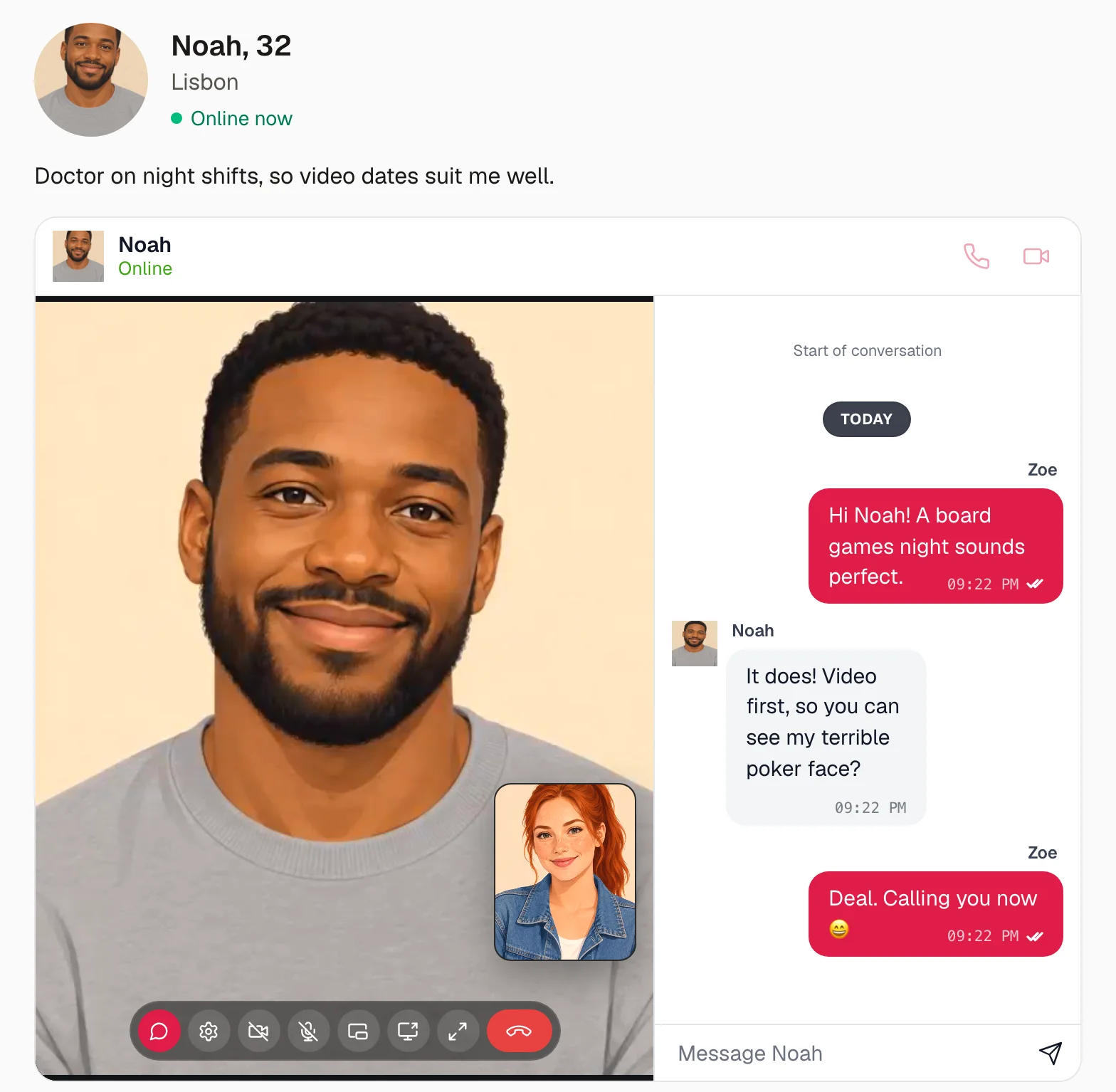
A dating site on Next.js where members find the people they are looking for, see who is online, chat, and go on a video date in their chat. Its accounts are Better Auth's and its data is in Postgres. Everything live is WordPlus Cloud: who is online, the chat between two pages, the calls and their screens.
The whole site is in the package, examples/dating: sign-up, profiles with a photo, eleven ready-made people to try it with, and on its demo, How this page works under each page, which shows the code that makes it, a step at a time, with the values of the page open. This page runs it, then goes through how it is built, a part at a time, with every file of its realtime side in full.
Try it live at dating.docs.wordplus.cloud: pick someone to be, then open it in a private window and pick another to meet them. The people there are yours alone for a day.
What it does
| On the site | What makes it |
|---|---|
| People: everyone the member may meet, those online first, live | useOnline on their ids: WordPlus Cloud tells the page as people come and go (who is online). A member who chose to hide is never shown online (hidden) |
| A chat with each of them, with typing, read ticks and reactions | <Chat> on the room of their chat, chat:{id}, which your rule opens to its members while they may meet (events from the page) |
| Video dates and voice calls in the chat, beside the messages | <Chat to name avatar call>, and a calls rule of the same name (the call in its chat) |
| Video on a card opens the chat and calls | startCall, from the address the card links to |
| A call goes on while they move between pages, at the top of each | <CallSpot> in the layout (the call in the page) |
| A notice of each new message, on whatever page they are | your server keeps each message from the webhook and tells the other person with realtime.toUser( id ).emit() (to a user) |
| Messages: the conversations, the latest first | your database, from the webhook (keeping the conversation) |
| Block or report: the chat closes at once on both screens | realtime.in( room ).kick(), and your rule from then on (taking access away) |
Run it
You need:
- Node.js 22 or newer.
- Postgres 15 or newer, with a database of its own for the site.
- An app in WordPlus Cloud. Apps are in early access, so first ask for it. Then in your account, go to Apps, then Add app, and give it the address
http://localhost:3000. You get its key and its secret (getting started).
cd examples/dating
cp .env.example .env.local    # the key and secret of your app, a local key, the database, and a secret for Better Auth
npm install
npm run db                    # the tables of Better Auth, then those of the site
npm run dev                   # http://localhost:3000
Then, in a second terminal, the ready-made people:
npm run seed # Mia, Leo and nine others, with their photos
They sign up through the site itself, so it runs first. Open http://localhost:3000/signup and click Mia, then open it again in a private window and click Leo. Mia sees the men, Leo first, as he is online. Press Video on his card: their chat opens and calls him, and when he answers, they are on video beside their messages.
.env.local holds:
WORDPLUS_SITE, WORDPLUS_SECRET | the key and secret of your app |
WORDPLUS_LOCAL_KEY | a key of your own, which seals what goes through WordPlus Cloud: openssl rand -hex 32, kept as long as the app |
DATABASE_URL | your Postgres database |
BETTER_AUTH_SECRET, BETTER_AUTH_URL | a long random string for Better Auth, and the address of the site |
SPARK_DEMO | 1 for the demo: the ready-made people in one click on the sign-up and sign-in pages, and How this page works under each page |
How it is built
The site is a Next.js app as create-next-app makes it, App Router, TypeScript and Tailwind, with four packages added:
npm install @wordplus/realtime @wordplus/realtime-ui better-auth pg
@wordplus/realtimeconnects your server and your pages to WordPlus Cloud.@wordplus/realtime-uidraws the chat and the call screen, those of Better Messages.better-authsigns people up and in, its tables in your database.pgtalks to Postgres.
Sign-up, sign-in and the profile with its photo are ordinary Next.js and are left out here: they are app/account.ts, app/signin, app/signup, app/(app)/profile and app/photos in the example. What follows is the rest, a part at a time.
Who may meet whom
One rule decides everything a member may do with another: see them, chat with them and call them. Two people may meet when each is among those the other is looking for, and neither has blocked the other. The database holds the profiles, the blocks, the chats with their members, and the messages:
-- The dating part of the database. Better Auth makes its own tables first (npx auth migrate), as this one refers to "user",
-- whose ids are numbers (generateId: 'serial' in lib/auth.ts).

-- A profile: what others see, beside the name the person signed up with.
create table if not exists profile (
    user_id     integer primary key references "user" (id) on delete cascade,
    birthday    date not null,
    gender      text not null check (gender in ('woman', 'man', 'nonbinary')),
    seeking     text not null check (seeking in ('women', 'men', 'everyone')),
    city        text not null default '',
    about       text not null default '',
    photo       bytea,
    hide_online boolean not null default false,
    created_at  timestamptz not null default now()
);

-- Someone blocked, with the reason when it was a report. Neither sees the other again.
create table if not exists block (
    who    integer not null references "user" (id) on delete cascade,
    whom   integer not null references "user" (id) on delete cascade,
    reason text,
    at     timestamptz not null default now(),
    primary key (who, whom)
);

-- A chat: two people, or a group. Its messages and calls are in the room chat:{id}.
create table if not exists chat (
    id         serial primary key,
    -- A chat of two people is known by their ids, the smaller first ('1:10'), so either of them finds the same one. A
    -- group has none.
    pair       text unique,
    created_at timestamptz not null default now()
);

-- Who is in each chat.
create table if not exists chat_member (
    chat_id integer not null references chat (id) on delete cascade,
    user_id integer not null references "user" (id) on delete cascade,
    primary key (chat_id, user_id)
);

-- The messages of every chat, by the id of the room event that brought them.
create table if not exists message (
    id        text primary key,
    chat_id   integer not null references chat (id) on delete cascade,
    sender    integer not null references "user" (id) on delete cascade,
    text      text not null,
    at        bigint not null,
    reactions jsonb not null default '{}'
);
create index if not exists message_chat on message (chat_id, at);
npm run db makes them, after Better Auth has made its own (npx auth migrate). The rule is canMeet( a, b ), which the member pages ask, and the rules of the chat and the calls below through mayChat:
WANTSsays whom each answer to "Looking for" takes in. Mia, a woman looking for men, wants Leo, a man, and Leo, looking for women, wants Mia.hasBlockedsays whether one has blocked the other, or reported them.membersForasks the same ascanMeetof everyone at once, in one query, for the catalog.
/** Whom each answer to "Looking for" takes in. */
export const WANTS: Record<Seeking, Gender[]> = {
    women: ['woman'],
    men: ['man'],
    everyone: ['woman', 'man', 'nonbinary'],
};

/** Whether someone has blocked another, or reported them. */
export async function hasBlocked(who: string, whom: string): Promise<boolean> {
    const { rows } = await db.query(`select 1 from block where who = $1 and whom = $2`, [who, whom]);
    return rows.length === 1;
}

/**
 * Whether two people may meet: see each other, chat and call. Each is among those the other looks for, and neither
 * has blocked the other. The rules of their chat and their calls ask it (lib/realtime.ts), and so does the page of a
 * member.
 */
export async function canMeet(a: string, b: string): Promise<boolean> {
    const personA = await profileOf(a);
    const personB = await profileOf(b);
    if (!personA || !personB || a === b) return false;

    const aWantsB = WANTS[personA.seeking].includes(personB.gender);
    const bWantsA = WANTS[personB.seeking].includes(personA.gender);
    const blocked = (await hasBlocked(a, b)) || (await hasBlocked(b, a));

    return aWantsB && bWantsA && !blocked;
}

/** The members someone sees in the catalog: those they may meet, the newest first. */
export async function membersFor(me: string): Promise<Profile[]> {
    const mine = await profileOf(me);
    if (!mine) return [];
    // canMeet with everyone at once: the genders I look for, among those who look for mine, with no block between us.
    // For Mia, a woman looking for men: the men looking for women or everyone.
    const genders = WANTS[mine.seeking];
    const answers = Object.keys(WANTS) as Seeking[];
    const seeking = answers.filter((answer) => WANTS[answer].includes(mine.gender));
    const { rows } = await db.query(
        `select ${columns('p')} from profile p join "user" u on u.id = p.user_id
         where p.user_id <> $1 and p.gender = any($2) and p.seeking = any($3)
           and not exists (select 1 from block k where (k.who = $1 and k.whom = p.user_id) or (k.who = p.user_id and k.whom = $1))
         order by p.created_at desc`,
        [me, genders, seeking],
    );
    return rows;
}
Chats
Each chat has a number and its members: two people here, and as many as a group has on a site that has groups. Its messages and calls are in the room chat:{id}: Mia and Leo's chat 7 is the room chat:7.
chatBetweenfinds the chat of two people, or makes it the first time either opens the other's page. A chat of two is known by their pair of ids, the smaller first, so both find the same one.membersOflists a chat's members.mayChatsays whether someone may use a chat: write and read in it, and call in it. They are one of its members, and may still meet each of the others.
/** The room of a chat, for its messages and its calls: chat 7 talks in the room chat:7. */
export function roomOf(chat: string): string {
    return `chat:${chat}`;
}

/** The chat of a room: chat 7 for the room chat:7, and none for any other room. */
export function chatIn(room: string): string | null {
    const id = room.startsWith('chat:') ? room.slice('chat:'.length) : '';
    return isNumber(id) ? id : null;
}

/** Whether an id is a number, as the ids of chats and members are: '7', never 'x' or ''. */
const isNumber = (id: string) => /^[0-9]+$/.test(id);

/** The chat of two people: theirs, or a new one the first time either of them opens the other's page. */
export async function chatBetween(me: string, them: string): Promise<string> {
    // Known by their pair of ids, the smaller first, so both find the same one.
    const smaller = Math.min(Number(me), Number(them));
    const larger = Math.max(Number(me), Number(them));
    const pair = `${smaller}:${larger}`;

    // Made the first time, found after.
    await db.query(
        `insert into chat (pair) values ($1) on conflict do nothing`,
        [pair],
    );
    const { rows } = await db.query(
        `select id::text as id from chat where pair = $1`,
        [pair],
    );
    const chat = rows[0].id;

    await db.query(
        `insert into chat_member (chat_id, user_id) values ($1, $2), ($1, $3)
         on conflict do nothing`,
        [chat, me, them],
    );
    return chat;
}

/** The members of a chat: its two people, or everyone in a group. */
export async function membersOf(chat: string): Promise<string[]> {
    if (!isNumber(chat)) return [];
    const { rows } = await db.query(`select user_id::text as id from chat_member where chat_id = $1`, [chat]);
    return rows.map((row) => row.id);
}

/**
 * Whether someone may use a chat: write in it, read it and call in it. They are one of its members, and may still
 * meet each of the others (canMeet). A visitor who isn't signed in (null) never may.
 */
export async function mayChat(user: string | number | null, chat: string) {
    if (user === null) return false;
    const me = String(user);
    const members = await membersOf(chat);
    if (!members.includes(me)) return false;
    for (const other of members) {
        if (other !== me && !(await canMeet(me, other))) return false;
    }
    return true;
}
Your server and WordPlus Cloud
Your server tells WordPlus Cloud three things: who is asking, what others see of them, and who may use which room and call. All of it is in one file:
import { createRealtime } from '@wordplus/realtime/server';
import { currentUserId } from './auth';
import { chatIn, keepMessage, mayChat, membersOf, nameOf, photoOf, profileOf, react, type Message } from './dating';

export const realtime = createRealtime({
    site: process.env.WORDPLUS_SITE!,
    secret: process.env.WORDPLUS_SECRET!,
    localKey: process.env.WORDPLUS_LOCAL_KEY!,
    // Who is asking: the signed-in user, or null.
    user: () => currentUserId(),
    // What the other person sees in the chat and the call: the name and photo.
    profile: async (user) => {
        const name = await nameOf(String(user));
        return name ? { name, avatar: photoOf(String(user)) } : null;
    },
    // Someone who chose to hide when they are online is never shown online.
    hidden: async (user) => {
        const profile = await profileOf(String(user));
        return profile?.hideOnline === true;
    },
});

// The room of each chat: chat:{id}, where {id} is the chat's number (chatBetween in lib/dating.ts). Its members get
// in, while they may still meet the others in it (mayChat). Messages, typing, reactions and read ticks go from page to
// page through WordPlus Cloud, and the messages and reactions come here too (below), to be kept. A page asks to join
// at /api/realtime/auth.
realtime.room(
    'chat:{id}',
    {
        history: 50,
        emit: ['message', 'typing', 'reaction', 'read'],
        webhook: ['message', 'reaction'],
    },
    async (user, { id }) => mayChat(user, id),
);

// Video and voice calls in a chat, by the name of its room: the one asking and the other one may both use the chat. A
// page asks to call, or to answer, at /api/realtime/calls.
realtime.calls('chat:{id}', async (user, other, { id }) => {
    // The one asking: who calls, as they call, or who is called, as they answer.
    const userMayChat = await mayChat(user, id);
    // The other one of the call.
    const otherMayChat = await mayChat(other, id);
    return userMayChat && otherMayChat;
});

/** Keeps a message, and the first time, tells the others in its chat, on whatever page they are. */
export async function keepAndTell(message: Message) {
    if (!(await mayChat(message.from, message.chat))) return;
    if (!(await keepMessage(message))) return; // kept before, so told before
    // Everyone else in the chat: the other one of two.
    const members = await membersOf(message.chat);
    const others = members.filter((member) => member !== message.from);
    await realtime.toUser(others).emit('message', {
        chat: message.chat,
        from: message.from,
        name: await nameOf(message.from),
        text: message.text.slice(0, 140), // enough for a notice
    });
}

// The webhooks of the chat rooms: each message and reaction, as the cloud took it.
realtime.on('message', async ({ room, from, data, event_id, at }) => {
    const chat = chatIn(room);
    if (!from || !chat) return;
    const text = String(data.text ?? '');
    await keepAndTell({ id: event_id, chat, from: String(from), text, at });
});
realtime.on('reaction', async ({ from, data }) => {
    if (from) await react(String(data.id), String(from), String(data.key ?? ''));
});
useris the signed-in member, from Better Auth's session.profileis what the other person sees of them in the chat and on the call screen: their name and photo.hidden: a member who chose to hide is never shown online, to anyone.- The room
chat:{id}is one rule for every chat.{id}stands for the chat's number in a room's name: forchat:7,idis7. It lets in whoevermayChatallows. Its pages send each other messages, typing, reactions and read ticks through WordPlus Cloud, with no request to your server, and the messages and reactions also come to your server as webhooks, to be kept. - The calls of the same name ring only within the chat: the one asking (
user) and the other one (other) may both use it. The caller's page asks as it calls, and the other's as it answers. A call your rule refuses never rings. keepAndTellkeeps a message once, by its id, and tells the others in the chat, wherever they are on the site.
A page asks your server before it joins a room or calls, and your server runs the rule. These routes are your own, so you see where it happens. A page asks to join at /api/realtime/auth:
// POST /api/realtime/auth: a page asks to join rooms, as { rooms: ['chat:7'] }. This server runs each room's rule
// (realtime.room in lib/realtime.ts) for the member signed in, and answers a pass for the rooms allowed, signed with
// the app's secret, with why each other was refused. The page shows the pass to WordPlus Cloud, which lets it in.
import { currentUserId } from '@/lib/auth';
import { realtime } from '@/lib/realtime';

export async function POST(request: Request) {
    // JSON only, which a page of another site can't send here.
    if (!request.headers.get('content-type')?.includes('application/json')) {
        return new Response(null, { status: 415 });
    }
    const { rooms } = await request.json();
    const user = await currentUserId();
    const pass = await realtime.authorize(rooms, user);
    return Response.json(pass);
}
realtime.authorize( rooms, user )runs the rule of each room for the member signed in. It answers a pass for the rooms allowed, signed with your app's secret, for 6 hours, with why each other was refused.- The page shows the pass to WordPlus Cloud, which checks the signature and lets it in. The page asks again before the pass runs out, so a block takes effect at once: the next answer is no.
A page asks to call, or to answer a call, at /api/realtime/calls:
// POST /api/realtime/calls: a page asks to call someone, as { call: 'chat:7', to: '10', role: 'caller', … }, or to
// answer a call, or whom it may call. This server runs the call's rule (realtime.calls in lib/realtime.ts) for the
// member signed in, and answers a pass for the call, signed with the app's secret, or why not. With the pass, WordPlus
// Cloud rings the other one.
import { currentUserId } from '@/lib/auth';
import { realtime } from '@/lib/realtime';

export async function POST(request: Request) {
    // JSON only, which a page of another site can't send here.
    if (!request.headers.get('content-type')?.includes('application/json')) {
        return new Response(null, { status: 415 });
    }
    const ask = await request.json();
    const user = await currentUserId();
    const pass = await realtime.authorizeCall(ask, user);
    return Response.json(pass);
}
The SDK answers its other routes by itself: the keys of sealed rooms, the webhooks, and its files for the browser.
// WordPlus Cloud's other routes: the keys of sealed rooms (POST /api/realtime/keys), the webhooks the cloud sends
// (POST /api/realtime/webhook), and the browser's files (GET). Joining rooms and calling are the site's own routes,
// auth/route.ts and calls/route.ts beside this one.
import { realtime } from '@/lib/realtime';

export const GET = realtime.route;
export const POST = realtime.route;
Every page connected
The layout of the pages of a signed-in member connects once for all of them, with settings your server signs for this member, and keeps the connection as they move between pages:
import Link from 'next/link';
import { Suspense } from 'react';
import { redirect } from 'next/navigation';
import { connection } from 'next/server';
import { RealtimeProvider } from '@wordplus/realtime/react';
import { currentUserId } from '@/lib/auth';
import { realtime } from '@/lib/realtime';
import { signOut } from '../account';
import { Notices, OnlineNow } from './live';
import { CallOnEveryPage, Screens } from './screens';

// Every page of a signed-in member. One connection to WordPlus Cloud for all of them, kept as they move between pages,
// and the call screen, which rings on any of them.
export default function AppLayout({ children }: { children: React.ReactNode }) {
    return (
        <Suspense fallback={<p className="p-6 text-stone-500">Loading…</p>}>
            <Connected>{children}</Connected>
        </Suspense>
    );
}

async function Connected({ children }: { children: React.ReactNode }) {
    await connection(); // made for each request: the settings are signed for this member, now
    const me = await currentUserId();
    if (!me) redirect('/signin');
    return (
        <RealtimeProvider options={await realtime.config(me)}>
            <Screens />
            <header className="sticky top-0 z-10 border-b border-stone-200 bg-white/90 backdrop-blur">
                <nav className="mx-auto flex max-w-3xl flex-wrap items-center gap-x-5 gap-y-1 px-4 py-3">
                    <Link href="/members" className="text-xl font-bold text-rose-600">Spark</Link>
                    <Link href="/members" className="hover:text-rose-600">People</Link>
                    <Link href="/messages" className="hover:text-rose-600">Messages</Link>
                    <Link href="/profile" className="hover:text-rose-600">Profile</Link>
                    <OnlineNow />
                    <form action={signOut}>
                        <button className="text-sm text-stone-500 hover:text-stone-900">Sign out</button>
                    </form>
                </nav>
            </header>
            <Notices />
            <main className="mx-auto w-full max-w-3xl flex-1 px-4 py-6">
                <CallOnEveryPage />
                {children}
            </main>
        </RealtimeProvider>
    );
}
realtime.config( me )is made for each request: it signs this member into the settings.connection()keeps it out of any page cached for everyone.- The call screen takes no place in the page. It rings on any of them.
<CallOnEveryPage />is where a call shows while the member moves around: at the top of the page, never over it. On the page of the person they talk with, the call moves into their chat.
'use client';

// The look of the ready-made chat and call screens, and the call screen itself: it takes no place on the page, and
// shows the ring over it.
import '@wordplus/realtime-ui/calls.css';
import '@wordplus/realtime-ui/chat.css';
import { useRealtime } from '@wordplus/realtime/react';
import { CallScreen, CallSpot } from '@wordplus/realtime-ui/react';

export function Screens() {
    return <CallScreen rt={useRealtime()} />;
}

/**
 * Any call, at the top of every page, so a call never covers what the member browses. A member's page shows its own
 * call in the chat instead (MemberChat), as a chat naming its call wins over this spot for every call.
 */
export function CallOnEveryPage() {
    return <CallSpot rt={useRealtime()} className="mb-6 h-[24rem] overflow-hidden rounded-2xl" />;
}
Who is online
The catalog asks WordPlus Cloud which of the people it shows are online, and keeps the answer live as they come and go:
import { Suspense } from 'react';
import { currentUserId } from '@/lib/auth';
import { ageOf, membersFor, photoOf, profileOf } from '@/lib/dating';
import { MakeProfile } from '../live';
import { Catalog } from './catalog';

export default function Members() {
    return (
        <Suspense fallback={<p className="text-stone-500">Loading…</p>}>
            <People />
        </Suspense>
    );
}

// Everyone this member may meet: each is among those the other is looking for, with no block between them.
async function People() {
    const me = (await currentUserId())!;
    if (!(await profileOf(me))) return <MakeProfile />;
    const members = await membersFor(me);
    const cards = members.map((member) => ({
        id: member.id,
        name: member.name,
        age: ageOf(member.birthday),
        city: member.city,
        photo: photoOf(member.id),
    }));
    return <Catalog members={cards} />;
}
'use client';

import Link from 'next/link';
import { useState } from 'react';
import { useOnline } from '@wordplus/realtime/react';

type Member = { id: string; name: string; age: number; city: string; photo: string };

/** The people for this member, those online first, kept live as people come and go. */
export function Catalog({ members }: { members: Member[] }) {
    // Which of them are online now: WordPlus Cloud tells the page as they come and go, with no request to this server.
    const { online } = useOnline(members.map((member) => member.id));
    const [onlineOnly, setOnlineOnly] = useState(false);
    const here = members.filter((member) => online[member.id]);
    const away = members.filter((member) => !online[member.id]);
    // Those online first, or only them while "Online now" is ticked.
    const shown = onlineOnly ? here : [...here, ...away];

    return (
        <section className="flex flex-col gap-4">
            <div className="flex flex-wrap items-center justify-between gap-3">
                <h1 className="text-2xl font-semibold">People for you</h1>
                <label className="flex items-center gap-2 text-sm">
                    <input type="checkbox" checked={onlineOnly} onChange={(event) => setOnlineOnly(event.target.checked)} />
                    Online now ({here.length})
                </label>
            </div>
            {shown.length === 0 && <p className="text-stone-600">{onlineOnly ? 'Nobody is online right now.' : 'Nobody here yet. New people join every day.'}</p>}
            <ul className="grid grid-cols-2 gap-4 sm:grid-cols-3" id="members">
                {shown.map((member) => (
                    <li key={member.id} data-id={member.id} data-online={online[member.id] ? '' : undefined} className="overflow-hidden rounded-2xl bg-white shadow-sm">
                        <Link href={`/members/${member.id}`} className="block">
                            <div className="relative">
                                {/* eslint-disable-next-line @next/next/no-img-element */}
                                <img src={member.photo} alt="" className="aspect-[4/5] w-full object-cover" />
                                {online[member.id] && (
                                    <span className="absolute left-3 top-3 flex items-center gap-1.5 rounded-full bg-white/90 px-2.5 py-1 text-xs font-medium text-emerald-700">
                                        <span className="size-2 rounded-full bg-emerald-500" />Online
                                    </span>
                                )}
                            </div>
                            <p className="px-3 pt-3 font-medium">{member.name}, {member.age}</p>
                            <p className="px-3 text-sm text-stone-500">{member.city || ' '}</p>
                        </Link>
                        <div className="flex gap-2 p-3">
                            <Link href={`/members/${member.id}`} className="flex-1 rounded-full border border-stone-300 py-1.5 text-center text-sm hover:bg-stone-50">Chat</Link>
                            {/* Their chat, which calls them as it opens: the video date is there, beside the messages. */}
                            <Link href={`/members/${member.id}?call=video`} className="flex-1 rounded-full bg-rose-600 py-1.5 text-center text-sm text-white hover:bg-rose-700">Video</Link>
                        </div>
                    </li>
                ))}
            </ul>
        </section>
    );
}
useOnline( ids )is WordPlus Cloud's answer, kept live. No page asks your server, however many are open.- Video links to the chat with
?call=video, which calls as it opens. The call starts there, beside the messages, not in the catalog.
The bar of every page counts who is online across the site, and the page of a member says when they were last seen. Both come from the same hook, in app/(app)/live.tsx, with the notices below:
'use client';

import Link from 'next/link';
import { usePathname, useRouter } from 'next/navigation';
import { useState } from 'react';
import { useOnline, useUserEvent } from '@wordplus/realtime/react';

type Notice = { key: number; text: string; href: string };
type NewMessage = { from: string; name: string; text: string };

/** What the server tells this member, on whatever page they are: a new message, unless its chat is open. */
export function Notices() {
    const [notices, setNotices] = useState<Notice[]>([]);
    const path = usePathname();
    const router = useRouter();

    const drop = (key: number) =>
        setNotices((list) => list.filter((notice) => notice.key !== key));
    const show = (text: string, href: string) => {
        const key = Date.now() + Math.random(); // its own, to drop it by
        setNotices((list) => [...list, { key, text, href }]);
        setTimeout(() => drop(key), 6000);
        router.refresh(); // the lists on the page show it too
    };

    // What the server sends this member (realtime.toUser( id ).emit( 'message', … )), on whatever page they are.
    useUserEvent('message', (data: NewMessage) => {
        if (path === `/members/${data.from}`) return; // the chat shows it already
        show(`${data.name}: ${data.text}`, `/members/${data.from}`);
    });
    useUserEvent('closed', () => router.refresh());

    return (
        <div className="fixed bottom-4 left-1/2 z-20 flex w-[min(92vw,24rem)] -translate-x-1/2 flex-col gap-2">
            {notices.map((notice) => (
                <Link key={notice.key} href={notice.href} className="rounded-2xl bg-stone-900 px-4 py-3 text-sm text-white shadow-lg">{notice.text}</Link>
            ))}
        </div>
    );
}

/** For someone who signed up but has no profile yet: others see nobody without one. */
export function MakeProfile() {
    return (
        <div className="rounded-3xl bg-white p-10 text-center shadow-sm">
            <p className="text-lg font-medium">Make your profile first.</p>
            <p className="mt-2 text-stone-600">People see you once you have one. <Link href="/profile" className="text-rose-600">Make it now</Link>.</p>
        </div>
    );
}

/** How many members are online now, across the site. */
export function OnlineNow() {
    const { count } = useOnline([], { count: true });
    return <span className="ml-auto text-sm text-stone-500">{count === null ? '' : `${count} online now`}</span>;
}

/** A green dot while someone is online, else when they were last seen. */
export function OnlineStatus({ id }: { id: string }) {
    const { online, lastSeen } = useOnline([id]);
    if (online[id]) return <span className="inline-flex items-center gap-1.5 text-sm text-emerald-700"><span className="size-2 rounded-full bg-emerald-500" />Online now</span>;
    return lastSeen[id] ? <span className="text-sm text-stone-500">Active {ago(lastSeen[id])}</span> : null;
}

function ago(at: number): string {
    const minutes = Math.round((Date.now() - at) / 60000);
    if (minutes < 1) return 'just now';
    if (minutes < 60) return `${minutes} min ago`;
    const hours = Math.round(minutes / 60);
    return hours < 24 ? `${hours} h ago` : `${Math.round(hours / 24)} d ago`;
}
The chat and its video date
The page of a member is their profile and your conversation, which holds your calls:
import Link from 'next/link';
import { Suspense } from 'react';
import { notFound } from 'next/navigation';
import { currentUserId } from '@/lib/auth';
import { ageOf, canMeet, chatBetween, photoOf, profileOf, roomOf } from '@/lib/dating';
import { blockMember } from '../../actions';
import { OnlineStatus } from '../../live';
import { MemberChat } from './chat';

type Props = { params: Promise<{ id: string }> };

export default function MemberPage(props: Props) {
    return (
        <Suspense fallback={<p className="text-stone-500">Loading…</p>}>
            <Member {...props} />
        </Suspense>
    );
}

async function Member({ params }: Props) {
    const { id } = await params;
    const me = await currentUserId();
    const them = await profileOf(id);
    if (!me || !them || !(await canMeet(me, id))) notFound();
    const chat = await chatBetween(me, id);
    const room = roomOf(chat);

    return (
        <section className="flex flex-col gap-4">
            <div className="flex items-center gap-4">
                {/* eslint-disable-next-line @next/next/no-img-element */}
                <img src={photoOf(id)} alt="" className="size-20 rounded-full object-cover" />
                <div className="flex-1">
                    <h1 className="text-xl font-semibold">{them.name}, {ageOf(them.birthday)}</h1>
                    {them.city && <p className="text-stone-600">{them.city}</p>}
                    <OnlineStatus id={id} />
                </div>
            </div>
            {them.about && <p className="whitespace-pre-line">{them.about}</p>}

            {/* Taller while a call is in it, the messages in a column beside the call. */}
            <div id="chat" className="h-[30rem] overflow-hidden rounded-2xl border border-stone-200 bg-white transition-[height] has-[[data-call]]:h-[38rem] [--realtime-chat-beside-call:300px]">
                <MemberChat
                    room={room}
                    to={id}
                    name={them.name}
                    avatar={photoOf(id)}
                    placeholder={`Message ${them.name}`}
                />
            </div>

            <details className="text-sm text-stone-600">
                <summary className="cursor-pointer">Block or report {them.name}</summary>
                <div className="mt-3 flex flex-wrap items-end gap-3">
                    <form action={blockMember.bind(null, id, 'block')}>
                        <button className="rounded-full border border-stone-300 px-4 py-2 hover:bg-white">Block</button>
                    </form>
                    <form action={blockMember.bind(null, id, 'report')} className="flex gap-2">
                        <select name="reason" className="rounded-full border border-stone-300 bg-white px-3 py-2">
                            <option value="fake">Fake profile</option>
                            <option value="rude">Rude or abusive</option>
                            <option value="spam">Spam or scam</option>
                            <option value="other">Something else</option>
                        </select>
                        <button className="rounded-full border border-red-300 px-4 py-2 text-red-700 hover:bg-red-50">Report</button>
                    </form>
                </div>
                <p className="mt-2">Either one ends your conversation at once, and you will not see each other again.</p>
            </details>
            <Link href="/members" className="text-sm text-stone-500">Back to people</Link>
        </section>
    );
}
notFound()unless the two may meet: a blocked member, or someone not looking for you, has no page.- The box of the chat grows while a call is in it:
has-[[data-call]]sees the call there.--realtime-chat-beside-callmakes the messages beside the call 300px wide.
The chat itself, from @wordplus/realtime-ui:
'use client';

import { usePathname, useRouter, useSearchParams } from 'next/navigation';
import { useEffect, useState } from 'react';
import { useRealtime, useRoom, useUserEvent } from '@wordplus/realtime/react';
import { Chat } from '@wordplus/realtime-ui/react';

type Props = { room: string; to: string; name: string; avatar: string; placeholder: string };

/**
 * The conversation with a member, kept by this app's server, with typing, reactions and read ticks. Their name and
 * calls are on its top bar, and a video date or a call shows in the chat itself, beside the messages. On any other
 * page the call goes on at the top, and comes back here when this page opens again. Opened from Video in the catalog
 * (`?call=video`), it calls them as it opens.
 */
export function MemberChat({ room, to, name, avatar, placeholder }: Props) {
    const router = useRouter();
    const path = usePathname();
    const params = useSearchParams();
    // Opened from Video in the catalog: kept for this visit, and out of the address at once, so a reload or Back does
    // not call again.
    const [start] = useState(() => (params.get('call') === 'video' ? ('video' as const) : undefined));
    useEffect(() => {
        if (start) window.history.replaceState(null, '', path);
    }, [start, path]);

    // One of the two blocked the other: this conversation is over. The server says so, and takes this page out of the
    // room (kicked), or the rule turns it away when it joins after (forbidden).
    useUserEvent('closed', (data: { room: string }) => {
        if (data.room === room) router.replace('/members');
    });
    const { error } = useRoom(room);
    useEffect(() => {
        if (error === 'kicked' || error === 'forbidden') router.replace('/members');
    }, [error, router]);

    // The conversation, kept by this server (messages), their name and photo on top from this page, and their calls in
    // it (call), started by itself when the catalog's Video opened it (startCall). On localhost, where no webhook
    // reaches this server, onSent tells it of each message.
    return (
        <Chat
            rt={useRealtime()}
            room={room}
            to={to}
            name={name}
            avatar={avatar}
            call
            startCall={start}
            placeholder={placeholder}
            messages={`/api/messages?room=${room}`}
            onSent={(message) => {
                fetch('/api/chat/sent', {
                    method: 'POST',
                    headers: { 'Content-Type': 'application/json' },
                    body: JSON.stringify(message),
                });
            }}
        />
    );
}
to,nameandavatarare the other person, on the bar of the chat with a video and an audio call button. Give their name and photo from your page: WordPlus Cloud keeps a person in its directory only for a day after they were last online, and someone away longer would show with neither.callshows their call in the chat while it is on: beside the messages where the chat is wide, over them where it is narrow, with Show Chat and Hide Chat in its controls.truenames it as the room,chat:{id}, which the calls rule above decides.startCallcalls them once as the chat opens, when the catalog's Video opened it. The page takes?call=videoout of the address at once, so a reload calls nobody.- A call goes on when either of them leaves the page: at the top of whatever page they open, and back into the chat when they come back.
Keeping the conversation
WordPlus Cloud carries the messages from one page to the other at once, and keeps the latest of a room for a few minutes. The conversation itself is yours, in your database:
- The webhook brings each message and reaction to your server, where
keepAndTellkeeps it, then tells the others in the chat. Set its address on your app page in your WordPlus Cloud account:https://your-site.example/api/realtime/webhook. - On localhost no webhook reaches your server, as a webhook needs an address on the internet. While you build there, the chat tells your server of each message it sent (
onSent), and the server keeps it the same way, once by its id:
import { currentUserId } from '@/lib/auth';
import { chatIn } from '@/lib/dating';
import { keepAndTell } from '@/lib/realtime';

// A message this page's user sent, from the chat's onSent: keep it, and tell the others in the chat. The webhook does
// the same on a server the cloud reaches, and the message is kept once, by its id. On localhost no webhook arrives, so
// this is what keeps the conversation while you develop.
export async function POST(request: Request) {
    const me = await currentUserId();
    const sent = await request.json().catch(() => null);
    const chat = typeof sent?.room === 'string' ? chatIn(sent.room) : null;
    const whole = typeof sent?.id === 'string' && typeof sent.text === 'string' && typeof sent.at === 'number';
    if (!me || !chat || !whole) return new Response(null, { status: 400 });
    // keepAndTell keeps it only from someone who may write in the chat.
    await keepAndTell({ id: sent.id, chat, from: me, text: sent.text, at: sent.at });
    return new Response(null, { status: 204 });
}
The chat asks for the conversation as it opens, and for older messages as the reader scrolls up:
// A page of a chat's messages: GET /api/messages?room=chat:7, with &before=<id> for older ones. Only those who may use
// the chat may read it.
import { currentUserId } from '@/lib/auth';
import { chatIn, mayChat, messagesPage } from '@/lib/dating';

export async function GET(request: Request) {
    const url = new URL(request.url);
    const chat = chatIn(url.searchParams.get('room') ?? '');
    const before = url.searchParams.get('before');
    const me = await currentUserId();
    if (!chat || !(await mayChat(me, chat))) {
        return new Response(null, { status: 403 });
    }
    return Response.json(await messagesPage(chat, before));
}
/** Keeps a message once, by its event id. True when it is new, so the others are told only once. */
export async function keepMessage(message: Message): Promise<boolean> {
    const { rowCount } = await db.query(
        `insert into message (id, chat_id, sender, text, at) values ($1, $2, $3, $4, $5) on conflict (id) do nothing`,
        [message.id, message.chat, message.from, message.text, message.at],
    );
    return rowCount === 1;
}

/** One reaction per person and message: `key` replaces theirs, an empty one takes it back. */
export async function react(id: string, user: string, key: string) {
    const { rows } = await db.query(`select reactions from message where id = $1`, [id]);
    if (!rows[0]) return;
    const reactions: Record<string, string[]> = {};
    for (const [reaction, users] of Object.entries(rows[0].reactions as Record<string, string[]>)) {
        const others = users.filter((someone) => someone !== user);
        if (others.length) reactions[reaction] = others;
    }
    if (key) reactions[key] = [...(reactions[key] ?? []), user];
    await db.query(`update message set reactions = $2 where id = $1`, [id, reactions]);
}

/** A page of a chat, oldest first: the newest 50, or the 50 before a message. */
export async function messagesPage(chat: string, before: string | null) {
    const { rows } = await db.query(
        `select id, sender::text as "from", text, at, reactions from message
         where chat_id = $1 and ($2::text is null or at < (select at from message where id = $2))
         order by at desc limit 51`,
        [chat, before],
    );
    const messages = rows.slice(0, 50).reverse().map((row) => ({ ...row, at: Number(row.at) }));
    return { messages, more: rows.length > 50 };
}
The notices on every page come from keepAndTell's realtime.toUser( others ).emit( 'message', … ), which reaches every tab the others have open. useUserEvent( 'message' ) above shows it, unless their chat with the sender is open.
Block and report
Blocking takes effect at once, on both sides:
type How = 'block' | 'report';

/** Block, or report with a reason: their chat closes on both sides at once, and neither sees the other again. */
export async function blockMember(them: string, how: How, form: FormData) {
    const id = await me();
    const reason = how === 'report' ? String(form.get('reason')) : null;
    await block(id, them, reason);

    const room = roomOf(await chatBetween(id, them));
    await realtime.in(room).kick(them); // out of the chat now: the rule says no from here on
    await realtime.toUser([id, them]).emit('closed', { room });
    redirect('/members');
}
realtime.in( room ).kick( them )takes the other person out of the chat now. Your rule says no from then on, so they can't come back, nor call.realtime.toUser( [ id, them ] ).emit( 'closed' )tells both. Their chat pages leave the conversation, asMemberChatabove does onclosed, or on thekickedandforbiddenthe room reports.- The catalog and the member pages use the same rule, so neither sees the other again.
Make it yours
- Who sees whom is
canMeetinlib/dating.ts, which the chat, the calls and the member pages ask. Add an age range, a distance, or anything your profiles hold, there and inmembersForbeside it, so the catalog lists the same people. - Group chats need nothing new from the realtime side: make a chat with more members (
pairleft empty), and the same room, the samemayChatand the same calls rule serve it. For a group,mayChatmay ask only that someone is a member. - Your own sign-in:
currentUserId()inlib/auth.tsis all the realtime side asks of it. Return the id of the signed-in user from yours. - Its look is Tailwind's in your pages, and in the chat and the call screen the tokens in
app/globals.css, such as--bm-color-accent(customizing). - Take out the demo:
SPARK_DEMOoff, thendb/people.json,db/seed.mjs,public/people,app/demo-people.tsx,how-it-works.md,app/how-it-works.tsx,app/how-it-works-cards.tsx,app/api/how-it-works,scripts/how-it-works.mjs, thepredevandprebuildscripts that run it, the.how-it-works-codestyles inapp/globals.css,lib/worlds.tsanddb/worlds.sql(the public demo's own), and their lines in the layout, the home page,lib/db.ts, and the sign-up and sign-in pages.
Put it online
- A host that runs Next.js, Vercel or your own: nothing realtime is kept on your servers (deploying).
- A Postgres database your host gives you, its address in
DATABASE_URL, thennpm run dbonce against it. - Its settings as in
.env.local, withBETTER_AUTH_URLyour address andSPARK_DEMOleft out. - Its address among those of your app in WordPlus Cloud, such as
https://your-site.example. A page anywhere else is refused. - The webhook address on the app page,
https://your-site.example/api/realtime/webhook, so every message is kept.onSentkeeps them too, by the same id, so a message is never kept twice.