Build a marketplace
A marketplace on Next.js where neighbours buy and sell their things. A buyer writes to the seller about an item and gets an answer while they look, sends and gets photos, sees the item on a video call before coming over, and makes an offer the seller takes or declines with one click. Everyone sees how many others are looking at an item now, and a new price, a taken offer or an item sold shows on every page at once. Its accounts are Better Auth's and its data is in Postgres. Everything live is WordPlus Cloud: the count of who is looking, the conversations and their calls, the offers heard on both sides, and the market kept as it is now.
The whole site is in the package, examples/marketplace: sign-up, eleven neighbours and their eight items to try it with, and on its demo, How this page works under each page, which shows the code that makes it, a step at a time, with the values of the page open. This page runs it, then goes through how it is built, a part at a time, with its code.
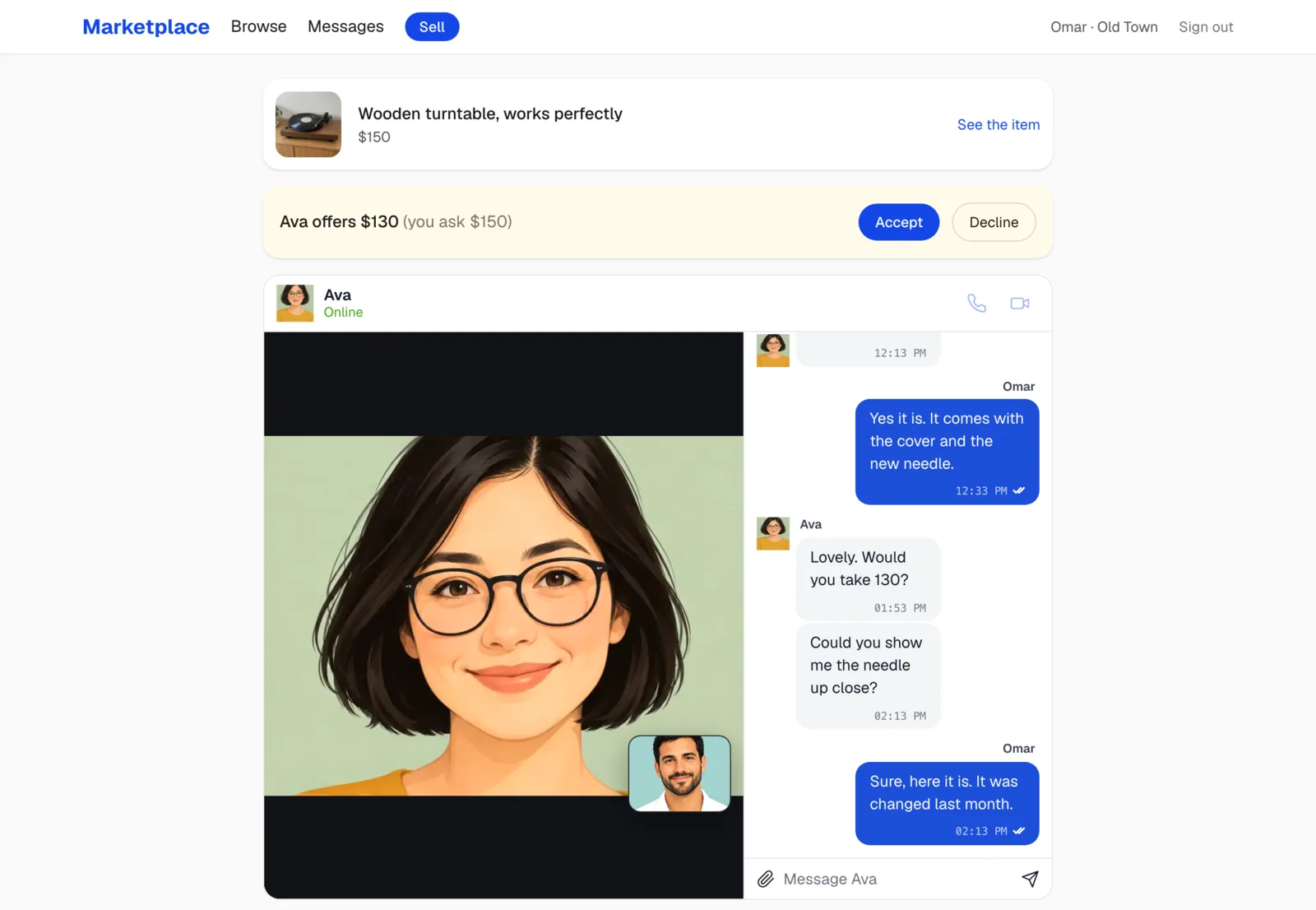
Try it live at marketplace.docs.wordplus.cloud: be Omar, who sells the turntable, then open the site in a private window as Ava, whose offer of $130 for it waits for an answer. Change the offer as Ava: Omar hears of it on whatever page Omar is, and takes it or declines it with one click, which Ava sees at once. The neighbours and their things there are yours alone for a day.
What it does
| On the site | What makes it |
|---|---|
| The market as it is now: an item put up, reserved, sold or repriced shows on every page at once | the room market, which every page joins and only your server speaks in, and useRoom asking the server for the page again (rooms) |
| How many others are looking at an item now, on its page | the room listing:{id}, public and counted by WordPlus Cloud, with no table of yours (counting) |
| A new price, an item reserved or sold, on every page of it at once | realtime.to( room ).emit() from the server action that keeps it (to a room) |
| A conversation about an item, between its seller and one buyer, kept, with typing, reactions and read ticks | <Chat> on the room deal:{id}, whose rule lets in those two alone (the ready-made chat) |
| Photos in the conversation, kept by your server and opened by the two alone | the chat's upload, your route asking the room's own rule with realtime.mayJoin (files) |
| A video call from the conversation, to see the item before coming over, beside the messages | <Chat to name avatar call>, and a calls rule of the same name, deal:{id} (the call in its chat) |
| Offers made, taken or declined with one click, both pages showing it at once | server actions that keep it, then say so in the conversation's room and to the other one (to a user) |
| A notice of a message, an offer or an answer, on whatever page someone is | realtime.toUser( id ).emit(), and useUserEvent in the layout (to a user) |
| Whether the seller is online, or when they were last seen | useOnline(): WordPlus Cloud tells the page as neighbours come and go (who is online) |
Run it
You need:
- Node.js 22 or newer.
- Postgres 15 or newer, with a database of its own for the site.
- An app in WordPlus Cloud. Apps are in early access, so first ask for it. Then in your account, go to Apps, then Add app, and give it the address
http://localhost:3000. You get its key and its secret (getting started).
cd examples/marketplace
cp .env.example .env.local    # the key and secret of your app, a local key, the database, and a secret for Better Auth
npm install
npm run db                    # the tables of Better Auth, then those of the site
npm run dev                   # http://localhost:3000
Then, in a second terminal, the ready-made neighbours:
npm run seed # eleven neighbours, eight items with their photos, and three conversations
They sign up through the site itself, so it runs first. Open http://localhost:3000/signup and click Omar, then the turntable: Omar sets its price, marks it sold, and sees who is asking about it, Ava with an offer of $130. Open the site again in a private window and click Ava, then the turntable: each of them sees one other person looking at it. As Ava, press Message Omar and change the offer: Omar hears of it on whatever page Omar is, and takes it or declines it with one click. Taken, the turntable is reserved for Ava at that price, on every page showing it. Leo, in a third window, gets no way into their conversation or its photos.
.env.local holds:
WORDPLUS_SITE, WORDPLUS_SECRET | the key and secret of your app |
WORDPLUS_LOCAL_KEY | a key of your own, which seals what goes through WordPlus Cloud: openssl rand -hex 32, kept as long as the app |
DATABASE_URL | your Postgres database |
BETTER_AUTH_SECRET, BETTER_AUTH_URL | a long random string for Better Auth, and the address of the site |
MARKET_DEMO | 1 for the demo: the ready-made neighbours in one click on the sign-up and sign-in pages, and How this page works under each page |
Only keeping the reactions waits for a webhook, so the rest works on localhost as it does online. A new price, an item put up, an offer and its answer are your server's own actions, which say so through WordPlus Cloud as they keep them. Each message is kept as its page tells your server it was sent, and the other one hears of it then. On a server WordPlus Cloud reaches, the message webhook keeps each message too, once, by its id, so it is kept even when its page closed first, and the reaction webhook keeps the reactions, which on localhost are not kept. A tunnel gives your computer a public address to try them (while you develop).
How it is built
The site is a Next.js app as create-next-app makes it, App Router, TypeScript and Tailwind, with four packages added:
npm install @wordplus/realtime @wordplus/realtime-ui better-auth pg
@wordplus/realtimeconnects your server and your pages to WordPlus Cloud: the rooms, who is online, the calls.@wordplus/realtime-uiholds the screens of Better Messages, in your own tree: the chat and the call screen.better-authsigns people up and in, its tables in your database.pgtalks to Postgres.
Sign-up and sign-in are ordinary Next.js and are left out here: they are app/account.ts, app/signin, app/signup and app/photos in the example, with proxy.ts, which sends a visitor who isn't signed in to sign in before a page of the market renders. What follows is the rest, a part at a time.
Who may use what
Three kinds of rooms, and one rule that matters. An item's page is open to look at, and anyone on it is counted. The market is for anyone signed in. A conversation about an item, and its call, are for its seller and that one buyer alone. The database holds the neighbours, the items with their photos, each conversation of a buyer about an item, the offers made in it, and its messages and photos:
-- The marketplace part of the database. Better Auth makes its own tables first (npx auth migrate), as this one refers to
-- "user", whose ids are numbers (generateId: 'serial' in lib/auth.ts).

-- A neighbour: where they are, and a line about them, beside the name they signed up with.
create table if not exists profile (
    user_id    integer primary key references "user" (id) on delete cascade,
    area       text not null default '',
    about      text not null default '',
    photo      bytea,
    created_at timestamptz not null default now()
);

-- An item for sale. Reserved or sold, for a buyer. Its live count of people looking is the room listing:{id}.
create table if not exists listing (
    id         serial primary key,
    seller     integer not null references "user" (id) on delete cascade,
    title      text not null,
    about      text not null default '',
    price      integer not null check (price >= 0),
    category   text not null default '',
    area       text not null default '',
    status     text not null default 'available' check (status in ('available', 'reserved', 'sold')),
    buyer      integer references "user" (id) on delete set null,
    created_at timestamptz not null default now()
);

-- An item's photos, in their order.
create table if not exists listing_photo (
    id         text primary key,
    listing_id integer not null references listing (id) on delete cascade,
    position   integer not null default 0,
    type       text not null,
    data       bytea not null
);

-- A conversation about an item, between its seller and one buyer: its messages and its calls are in the room deal:{id}.
create table if not exists deal (
    id         serial primary key,
    listing_id integer not null references listing (id) on delete cascade,
    buyer      integer not null references "user" (id) on delete cascade,
    created_at timestamptz not null default now(),
    unique (listing_id, buyer)
);

-- An offer a buyer makes in a conversation, until the seller answers it.
create table if not exists offer (
    id          serial primary key,
    deal_id     integer not null references deal (id) on delete cascade,
    amount      integer not null check (amount > 0),
    status      text not null default 'open' check (status in ('open', 'accepted', 'declined', 'withdrawn')),
    created_at  timestamptz not null default now(),
    answered_at timestamptz
);

-- The messages of every conversation, by the id of the room event that brought them, with their photos.
create table if not exists message (
    id        text primary key,
    deal_id   integer not null references deal (id) on delete cascade,
    sender    integer not null references "user" (id) on delete cascade,
    text      text not null,
    files     jsonb not null default '[]',
    at        bigint not null,
    reactions jsonb not null default '{}'
);
create index if not exists message_deal on message (deal_id, at);

-- A photo sent in a conversation: kept here, opened by its seller and its buyer alone.
create table if not exists file (
    id         text primary key,
    deal_id    integer not null references deal (id) on delete cascade,
    owner      integer not null references "user" (id) on delete cascade,
    name       text not null,
    type       text not null,
    size       integer not null,
    data       bytea not null,
    created_at timestamptz not null default now()
);
The rule of a conversation, and what it reads. Item 7 is looked at in the room listing:7, and conversation 3 is the room deal:3, its call of the same name. A buyer's conversation about an item is made the first time they write to its seller, and a seller has none about their own item:
/** The conversation of a buyer about an item: theirs, or a new one the first time they write to its seller. */
export async function dealFor(listing: string, buyer: string): Promise<string | null> {
    const item = await listingOf(listing);
    if (!item || item.seller === buyer) return null;
    await db.query(`insert into deal (listing_id, buyer) values ($1, $2) on conflict do nothing`, [listing, buyer]);
    const { rows } = await db.query(`select id::text as id from deal where listing_id = $1 and buyer = $2`, [listing, buyer]);
    return rows[0].id;
}

/** The two of a conversation: its item's seller, and its buyer. */
export async function partiesOf(deal: string): Promise<string[]> {
    const found = await dealOf(deal);
    return found ? [found.listing.seller, found.buyer] : [];
}

/** Whether someone may read and write in a conversation, and call in it: its seller and its buyer. */
export async function mayTalk(user: string | number | null, deal: string): Promise<boolean> {
    return user !== null && (await partiesOf(deal)).includes(String(user));
}

/** The number in a room's or call's name of a kind: 3 for deal:3 with 'deal', none for any other name. */
export function idIn(name: string, kind: 'listing' | 'deal'): string | null {
    const id = name.startsWith(`${kind}:`) ? name.slice(kind.length + 1) : '';
    return isNumber(id) ? id : null;
}
Your server and WordPlus Cloud
The realtime side of your server is one file: who is asking and what neighbours see of each other, the room of each item, the market's room, the room of each conversation with its rule, its call, and the webhooks. Those keep the messages and the reactions, and tell the other one of the conversation of each message, on whatever page they are.
- An item's room is public, with a count: anyone on its page is counted, signed in or not, and nobody is listed. Its rule needs no code, and as it names no
emit, no page says anything in it: only your server does. - The market's room lets in anyone signed in, and only your server speaks in it too.
- A conversation's room lets in its seller and its buyer alone (
mayTalkabove), and its call asks the same of both of them, the one who calls and the one called.
import { createRealtime } from '@wordplus/realtime/server';
import { currentUserId } from './auth';
import { dealOf, filesFor, idIn, keepMessage, mayTalk, nameOf, personOf, photoOf, react, type Message } from './market';

export const realtime = createRealtime({
    site: process.env.WORDPLUS_SITE!,
    secret: process.env.WORDPLUS_SECRET!,
    localKey: process.env.WORDPLUS_LOCAL_KEY!,
    // Who is asking: the signed-in neighbour, or null.
    user: () => currentUserId(),
    // What neighbours see of each other: in a conversation and its call.
    profile: async (user) => {
        const person = await personOf(String(user));
        return person ? { name: person.name, avatar: photoOf(person.id) } : null;
    },
});

// An item, listing:{id}: anyone on its page is in it, counted live, and hears its price or status change. Public: a
// count for anyone, signed in or not, with no list of who.
realtime.room('listing:{id}', { public: true, count: true });

// The market: every page of someone signed in joins it, and hears when an item is put up, reserved or sold, or its
// price changes, to show the market as it is now. Only the server says anything in it.
realtime.room('market', async (user) => user !== null);

// A conversation about an item, deal:{id}, between its seller and one buyer (mayTalk in lib/market.ts): messages with
// photos, typing, reactions and read ticks go from page to page sealed, and the messages and reactions come here too
// (below), to be kept. The server tells it of offers made and answered. A page asks to join at /api/realtime/auth.
realtime.room(
    'deal:{id}',
    { history: 50, emit: ['message', 'typing', 'reaction', 'read'], webhook: ['message', 'reaction'] },
    async (user, { id }) => mayTalk(user, id),
);

// Its call: to see the item before coming over. Both of them may use it. A page asks to call at /api/realtime/calls.
realtime.calls('deal:{id}', async (user, other, { id }) => (await mayTalk(user, id)) && (await mayTalk(other, id)));

/** Keeps a message, and the first time, tells the other one of the conversation, on whatever page they are. */
export async function keepAndTell(message: Message) {
    const deal = await dealOf(message.deal);
    if (!deal || !(await mayTalk(message.from, message.deal))) return;
    // Only the photos kept for this conversation, as they were kept: anyone may write anything into a message of their own.
    const files = await filesFor(message.deal, message.files);
    if (!message.text && !files.length) return;
    if (!(await keepMessage({ ...message, files }))) return; // kept before, so told before
    const other = message.from === deal.buyer ? deal.listing.seller : deal.buyer;
    await realtime.toUser(other).emit('message', {
        deal: deal.id,
        name: await nameOf(message.from),
        title: deal.listing.title,
        text: message.text ? message.text.slice(0, 140) : 'sent a photo',
    });
}

// The webhooks of the conversations: each message and reaction, as the cloud took it.
realtime.on('message', async ({ room, from, data, event_id, at }) => {
    const deal = idIn(room, 'deal');
    if (!from || !deal) return;
    await keepAndTell({ id: event_id, deal, from: String(from), text: String(data.text ?? ''), files: data.files as unknown[], at });
});
realtime.on('reaction', async ({ from, data }) => {
    if (from) await react(String(data.id), String(from), String(data.key ?? ''));
});
The rules run on your server, in two routes of your own, each time a page asks: to join a room, or to call. The page gets a pass signed with the app's secret, or why not.
// POST /api/realtime/auth: a page asks to join rooms, as { rooms: ['deal:3', 'listing:7', 'market'] }. This server runs
// each room's rule (realtime.room in lib/realtime.ts) for the neighbour signed in, and answers a pass for the rooms
// allowed, signed with the app's secret, with why each other was refused. The page shows the pass to WordPlus Cloud,
// which lets it in.
import { currentUserId } from '@/lib/auth';
import { realtime } from '@/lib/realtime';

export async function POST(request: Request) {
    // JSON only, which a page of another site can't send here.
    if (!request.headers.get('content-type')?.includes('application/json')) {
        return new Response(null, { status: 415 });
    }
    const { rooms } = await request.json();
    const user = await currentUserId();
    const pass = await realtime.authorize(rooms, user);
    return Response.json(pass);
}
// POST /api/realtime/calls: a page asks to call the other one of a conversation, to see the item on video, as
// { call: 'deal:3', to: '10', role: 'caller', … }, or to answer. This server runs the call's rule (realtime.calls in
// lib/realtime.ts) for the neighbour signed in, and answers a pass for it, signed with the app's secret, or why not.
// With the pass, WordPlus Cloud rings the other one.
import { currentUserId } from '@/lib/auth';
import { realtime } from '@/lib/realtime';

export async function POST(request: Request) {
    // JSON only, which a page of another site can't send here.
    if (!request.headers.get('content-type')?.includes('application/json')) {
        return new Response(null, { status: 415 });
    }
    const ask = await request.json();
    const user = await currentUserId();
    const pass = await realtime.authorizeCall(ask, user);
    return Response.json(pass);
}
The SDK's other routes, the webhooks among them, and the browser files:
// WordPlus Cloud's other routes: the keys of sealed rooms (POST /api/realtime/keys), the webhooks the cloud sends
// (POST /api/realtime/webhook), and the browser's files (GET). Joining rooms and calling are the site's own routes,
// auth/route.ts and calls/route.ts beside this one.
import { realtime } from '@/lib/realtime';

export const GET = realtime.route;
export const POST = realtime.route;
Every page connected
Every page of a neighbour connects through the layout of their pages: one connection for all of them, kept as they move between pages. The call screen is in it, so a call rings on any page and goes on in a window in the corner wherever a page has no place of its own for it. So are the market kept current and the notices:
import Link from 'next/link';
import { Suspense } from 'react';
import { redirect } from 'next/navigation';
import { connection } from 'next/server';
import { RealtimeProvider } from '@wordplus/realtime/react';
import { currentUserId } from '@/lib/auth';
import { personOf } from '@/lib/market';
import { realtime } from '@/lib/realtime';
import { signOut } from '../account';
import { MarketLive, Notices } from './live';
import { Screens } from './screens';

// Every page of a signed-in neighbour. One connection to WordPlus Cloud for all of them, kept as they move between
// pages, and the call screen, which rings on any of them.
export default function AppLayout({ children }: { children: React.ReactNode }) {
    return (
        <Suspense fallback={<p className="p-6 text-stone-500">Loading…</p>}>
            <Connected>{children}</Connected>
        </Suspense>
    );
}

async function Connected({ children }: { children: React.ReactNode }) {
    await connection(); // made for each request: the settings are signed for this neighbour, now
    const me = await currentUserId();
    if (!me) redirect('/signin');
    const person = await personOf(me);
    return (
        <RealtimeProvider options={await realtime.config(me)}>
            <Screens />
            <MarketLive />
            <header className="sticky top-0 z-10 border-b border-stone-200 bg-white/90 backdrop-blur">
                <nav className="mx-auto flex max-w-6xl flex-wrap items-center gap-x-5 gap-y-1 px-4 py-3">
                    <Link href="/market" className="text-xl font-bold text-blue-700">Marketplace</Link>
                    <Link href="/market" className="hover:text-blue-700">Browse</Link>
                    <Link href="/messages" className="hover:text-blue-700">Messages</Link>
                    <Link href="/sell" className="rounded-full bg-blue-700 px-3.5 py-1 text-sm font-medium text-white hover:bg-blue-800">Sell</Link>
                    <span className="ml-auto text-sm text-stone-600">{person?.name}{person?.area ? ` · ${person.area}` : ''}</span>
                    <form action={signOut}>
                        <button className="text-sm text-stone-500 hover:text-stone-900">Sign out</button>
                    </form>
                </nav>
            </header>
            <Notices />
            <main className="mx-auto w-full max-w-6xl flex-1 px-4 py-6">
                {children}
            </main>
        </RealtimeProvider>
    );
}
The call screen, with the look of the chat and the calls:
'use client';

// The look of the ready-made chat and call screens, and the call screen itself: it takes no place on the page, shows the
// ring over it, and a call in a window in the corner wherever the page has no place of its own for it.
import '@wordplus/realtime-ui/calls.css';
import '@wordplus/realtime-ui/chat.css';
import { useRealtime } from '@wordplus/realtime/react';
import { CallScreen } from '@wordplus/realtime-ui/react';

export function Screens() {
    return <CallScreen rt={useRealtime()} />;
}
The market as it is now
The market lists every item, those still for sale first, the newest first. It keeps itself current with no reload: every page of someone signed in joins the room market, and when an item is put up, reserved, sold or repriced, your server says changed in it, and every page asks the server for itself again. Nobody's page can say it, as the room's rule names no emit.
The page reads the items from the database, and grid.tsx draws them by category, with Sold and Reserved on their photos:
// Every item, those still for sale first, the newest first: the page asks again whenever one is put up, reserved, sold
// or repriced (MarketLive in live.tsx).
async function Market() {
    const all = await listings();
    return (
        <Grid items={all.map((item) => ({
            id: item.id, title: item.title, price: item.price, category: item.category, area: item.area, status: item.status,
            photo: item.photos[0] ?? null, seller: item.sellerName,
        }))} />
    );
}
Your server says so as it keeps a change, in the room of the item and in the market's:
/** Everyone looking at an item, and the market, see it as it is now. */
async function changed(listing: string) {
    await realtime.to(`listing:${listing}`).emit('changed');
    await realtime.to('market').emit('changed');
}
And the layout hears it, on every page:
/** The market as every page shows it: the page asks the server again when an item is put up, reserved, sold or repriced. */
export function MarketLive() {
    const router = useRouter();
    // What the server sends every page (realtime.to( 'market' ).emit( 'changed' ) in app/(app)/actions.ts).
    useRoom('market', { changed: () => router.refresh() });
    return null;
}
router.refresh()asks the server for the page again and keeps what the page holds: a message being written, a call on screen, the scroll.- On every page, not the market alone:
MarketLiveis in the layout, so the price on an item's page and the status of the item in a conversation keep up too. - The word alone: the room carries
changedand no data, and the page reads the rest from your server, which decides what this neighbour sees.
Looking at it now
An item's page says how many others have it open now. WordPlus Cloud counts them, with no table of yours: every page of the item joins its room, listing:{id}, public and counted (counting). The page also shows the item as it is, its seller with whether they are online, and Message to them, or for its seller, their own controls (below):
// An item: its photo, its price and what it is, how many others look at it now, and its seller, a message away. Its
// seller sets the price, marks it sold, and sees who is asking about it. A price or status changed shows on every page of
// it at once.
async function Listing({ params }: PageProps<'/listings/[id]'>) {
    const { id } = await params;
    const me = (await currentUserId())!;
    const item = await listingOf(id);
    if (!item) notFound();
    const mine = item.seller === me;
    const [seller, asking] = await Promise.all([personOf(item.seller), mine ? askingAbout(id) : Promise.resolve([])]);

    return (
        <article className="grid gap-8 lg:grid-cols-[minmax(0,1fr)_380px]">
            <div className="flex flex-col gap-3">
                <div className="relative overflow-hidden rounded-3xl bg-stone-100">
                    {item.photos[0] && (
                        // eslint-disable-next-line @next/next/no-img-element
                        <img src={item.photos[0]} alt={item.title} className={`aspect-square w-full object-cover ${item.status === 'sold' ? 'opacity-60 grayscale' : ''}`} />
                    )}
                    {item.status !== 'available' && (
                        <span className="absolute top-4 left-4 rounded-full bg-stone-900/85 px-4 py-1.5 font-medium text-white" id="status">
                            {item.status === 'sold' ? 'Sold' : item.buyer === me ? 'Reserved for you' : 'Reserved'}
                        </span>
                    )}
                </div>
            </div>
            <div className="flex flex-col gap-5">
                <div className="flex flex-col gap-1">
                    <p className="text-sm text-stone-500">{item.category} · {item.area}</p>
                    <h1 className="text-2xl font-semibold">{item.title}</h1>
                    <p className="text-3xl font-semibold" id="price">${item.price}</p>
                    {item.status !== 'sold' && <Looking id={item.id} />}
                </div>
                <p className="whitespace-pre-wrap text-stone-700">{item.about}</p>

                <div className="flex items-center gap-3 rounded-2xl bg-white p-4 shadow-sm">
                    {/* eslint-disable-next-line @next/next/no-img-element */}
                    <img src={photoOf(item.seller)} alt="" className="size-12 rounded-full object-cover" />
                    <div className="min-w-0 flex-1">
                        <p className="font-medium">{mine ? 'You are selling this' : item.sellerName}</p>
                        {!mine && <OnlineStatus id={item.seller} />}
                        {!mine && seller?.area && <p className="text-sm text-stone-500">{seller.area}</p>}
                    </div>
                </div>

                {mine ? (
                    <SellerControls id={item.id} price={item.price} status={item.status} buyerName={item.buyerName} asking={asking} />
                ) : item.status === 'sold' ? (
                    <p className="rounded-2xl bg-stone-100 p-4 text-stone-600">Sold. Have a look at the market for something like it.</p>
                ) : (
                    <form action={askSeller.bind(null, item.id)}>
                        <button className="w-full rounded-full bg-blue-700 px-6 py-3 font-medium text-white hover:bg-blue-800">
                            Message {item.sellerName}
                        </button>
                        <p className="mt-2 text-center text-sm text-stone-500">Ask a question, see it on a video call, or make an offer.</p>
                    </form>
                )}
                <Link href="/market" className="text-sm text-stone-500">Back to the market</Link>
            </div>
        </article>
    );
}
Looking joins the item's room with useRoom, which gives the count as it changes, and asks the server for the page again when your server says changed there. The count is everyone on the item's page, this one too, so the page shows the others:
/**
 * How many others are looking at an item now, on its page: every page of it is in its room, counted live by WordPlus
 * Cloud, this one too. The page also asks the server for itself again when the item's price or status changes.
 */
export function Looking({ id }: { id: string }) {
    const router = useRouter();
    // What the server says in the item's room (realtime.to( `listing:${ id }` ).emit( 'changed' ) in actions.ts).
    const { count } = useRoom(`listing:${id}`, { changed: () => router.refresh() });
    const others = count === null ? 0 : count - 1;
    if (others <= 0) return null;
    return (
        <span className="inline-flex items-center gap-1.5 text-sm text-blue-800" data-looking={others}>
            <span className="size-2 animate-pulse rounded-full bg-blue-500" />
            {others} other {others === 1 ? 'person is' : 'people are'} looking at this
        </span>
    );
}

/** A green dot while someone is online, else when they were last seen. */
export function OnlineStatus({ id }: { id: string }) {
    const { online, lastSeen } = useOnline([id]);
    const [, tick] = useState(0);
    useEffect(() => {
        const timer = setInterval(() => tick((n) => n + 1), 60_000);
        return () => clearInterval(timer);
    }, []);
    if (online[id]) return <span className="inline-flex items-center gap-1.5 text-sm text-emerald-700"><span className="size-2 rounded-full bg-emerald-500" />Online now</span>;
    return lastSeen[id] ? <span className="text-sm text-stone-500">Active {ago(lastSeen[id])}</span> : null;
}
- The count comes at most once a second, as people open the page and leave it.
- Public means no rule runs and nothing in it is sealed: keep such a room for what anyone may see, here a count and the word
changed(rooms). - A sold item shows no count: its page renders no
Looking, so it joins no room. - Online:
useOnline()tells the page whether the seller is online as they come and go, with no request to your server, and when they were last seen (who is online).
A price changed
The seller sees their own controls on the item's page: a new price, sold, or for sale again, and who is asking about it, each with the offer waiting. Each is a server action that checks the seller, keeps the change, then says changed in the item's room and the market's, so every page showing the item shows it at once: the buyers on its page, those in a conversation about it, the market.
/**
 * The seller's own: a new price, which every page of the item shows at once, sold or for sale again, and who is asking
 * about it, with their offer waiting.
 */
export function SellerControls({ id, price, status, buyerName, asking }: Props) {
    const [value, setValue] = useState(String(price));
    const [pending, start] = useTransition();
    const changed = Number(value) !== price && /^\d+$/.test(value);

    return (
        <div className="flex flex-col gap-4" id="seller">
            {status !== 'sold' && (
                <form className="flex items-center gap-2" onSubmit={(e) => { e.preventDefault(); start(async () => { await reprice(id, Number(value)); }); }}>
                    <label className="flex flex-1 items-center gap-2 rounded-xl border border-stone-300 bg-white px-3 py-2 focus-within:border-blue-600">
                        <span className="text-stone-500">$</span>
                        <input value={value} onChange={(e) => setValue(e.target.value.replace(/\D/g, ''))} inputMode="numeric" aria-label="Price" className="w-full outline-none" />
                    </label>
                    <button disabled={!changed || pending} className="rounded-full bg-blue-700 px-4 py-2 text-sm font-medium text-white hover:bg-blue-800 disabled:opacity-40">Change price</button>
                </form>
            )}
            {status === 'reserved' && <p className="text-sm text-stone-600">Reserved for {buyerName}.</p>}
            <div className="flex gap-2">
                {status !== 'sold'
                    ? <button onClick={() => start(() => mark(id, 'sold'))} disabled={pending} className="rounded-full border border-stone-300 px-4 py-2 text-sm hover:bg-stone-50">Mark as sold</button>
                    : <button onClick={() => start(() => mark(id, 'available'))} disabled={pending} className="rounded-full border border-stone-300 px-4 py-2 text-sm hover:bg-stone-50">Put it up again</button>}
                {status === 'reserved' && <button onClick={() => start(() => mark(id, 'available'))} disabled={pending} className="rounded-full border border-stone-300 px-4 py-2 text-sm hover:bg-stone-50">For sale again</button>}
            </div>
            <div>
                <h2 className="mb-2 text-sm font-semibold tracking-wide text-stone-500 uppercase">Asking about it</h2>
                {asking.length ? (
                    <ul className="flex flex-col gap-2">
                        {asking.map((one) => (
                            <li key={one.deal}>
                                <Link href={`/messages/${one.deal}`} className="flex items-center justify-between rounded-xl bg-white px-4 py-2.5 shadow-sm hover:ring-1 hover:ring-blue-200">
                                    <span>{one.name}</span>
                                    {one.offer !== null && <span className="rounded-full bg-amber-100 px-2.5 py-0.5 text-sm font-medium text-amber-900">Offers ${one.offer}</span>}
                                </Link>
                            </li>
                        ))}
                    </ul>
                ) : (
                    <p className="text-sm text-stone-500">Nobody yet.</p>
                )}
            </div>
        </div>
    );
}
The actions, each for the neighbour signed in. The database update itself checks that they sell the item (setPrice and setStatus in lib/market.ts update only the seller's own), and only a change that was kept is told:
/** The seller's new price, which every page showing the item takes at once. */
export async function reprice(listing: string, price: number): Promise<boolean> {
    const me = await currentUserId();
    if (!me || !Number.isInteger(price) || price < 0 || price > 1_000_000 || !(await setPrice(listing, me, price))) return false;
    await changed(listing);
    return true;
}

/** The seller marks the item sold, or for sale again. */
export async function mark(listing: string, status: Status) {
    const me = await currentUserId();
    if (!me || !(await setStatus(listing, me, status))) return;
    await changed(listing);
    // The conversations about it show it too.
    for (const { deal } of await dealsAbout(listing)) await realtime.to(`deal:${deal}`).emit('changed');
}
- Sold goes to the conversations about the item as well, each in its own room, so a buyer in one sees it there.
- For sale again lets go of whoever the item was reserved for (
setStatus), and every page shows it available.
A conversation and its photos
Message Omar, or whoever sells the item, opens the conversation of this buyer about it, made the first time (dealFor above):
/** A buyer writes to the seller about an item: their conversation, new the first time, opened. */
export async function askSeller(listing: string) {
    const me = await currentUserId();
    const deal = me ? await dealFor(listing, me) : null;
    if (deal) redirect(`/messages/${deal}`);
}
Its page is for its seller and its buyer alone: the item on top as it is now, the offer (below), and the conversation, whose room is deal:{id}:
// A conversation about an item, for its seller and its buyer alone: the item on top as it is now, the offer, and the
// messages with their photos and their call.
async function Deal({ params }: PageProps<'/messages/[id]'>) {
    const { id } = await params;
    const me = (await currentUserId())!;
    const deal = await dealOf(id);
    if (!deal || ![deal.buyer, deal.listing.seller].includes(me)) notFound();
    const selling = deal.listing.seller === me;
    const other = selling ? { id: deal.buyer, name: deal.buyerName } : { id: deal.listing.seller, name: deal.listing.sellerName };
    const item = deal.listing;

    return (
        <section className="mx-auto flex max-w-3xl flex-col gap-4">
            <Link href={`/listings/${item.id}`} className="flex items-center gap-4 rounded-2xl bg-white p-3 shadow-sm hover:ring-1 hover:ring-blue-200" id="item">
                {/* eslint-disable-next-line @next/next/no-img-element */}
                {item.photos[0] && <img src={item.photos[0]} alt="" className="size-16 rounded-xl object-cover" />}
                <span className="min-w-0 flex-1">
                    <span className="block truncate font-medium">{item.title}</span>
                    <span className="block text-sm text-stone-600">
                        ${item.price}
                        {item.status === 'sold' ? ' · Sold' : item.status === 'reserved' ? (item.buyer === me ? ' · Reserved for you' : item.buyer === deal.buyer ? ` · Reserved for ${deal.buyerName}` : ' · Reserved') : ''}
                    </span>
                </span>
                <span className="text-sm text-blue-700">See the item</span>
            </Link>
            <OfferPanel deal={id} selling={selling} other={other.name} status={item.status} reservedHere={item.buyer === deal.buyer} offer={deal.offer} price={item.price} />
            {/* Taller while a call is in it, the messages in a column beside the call. */}
            <div id="chat" className="h-[30rem] overflow-hidden rounded-2xl border border-stone-200 bg-white transition-[height] has-[[data-call]]:h-[38rem] [--realtime-chat-beside-call:300px]">
                <DealChat room={`deal:${id}`} to={other.id} name={other.name} avatar={photoOf(other.id)} />
            </div>
        </section>
    );
}
<Chat> is the conversation of Better Messages on that room: your server's messages paged back as the reader scrolls up, typing, reactions, read ticks and the composer. With upload, the composer gets its paperclip, and takes photos picked, pasted or dropped on the chat: each goes to your route as it is picked, and your server keeps it. The message carries only where the photo is, so WordPlus Cloud never has the photo itself. accept and maxFileSize say what the chat offers to send, as your route takes it:
'use client';

import { useRealtime } from '@wordplus/realtime/react';
import { Chat } from '@wordplus/realtime-ui/react';

type Props = { room: string; to: string; name: string; avatar: string };

/**
 * The conversation about the item, kept by this app's server, with typing, reactions, read ticks and photos, and its
 * call: the buyer sees the item on video before coming over. The other one's name and call buttons are on its top bar,
 * and a call shows in the chat itself, beside the messages. On localhost, where no webhook reaches this server, onSent
 * tells it of each message.
 */
export function DealChat({ room, to, name, avatar }: Props) {
    return (
        <Chat
            rt={useRealtime()}
            room={room}
            to={to}
            name={name}
            avatar={avatar}
            call
            placeholder={`Message ${name}`}
            messages={`/api/messages?room=${room}`}
            upload="/api/files"
            accept="image/jpeg,image/png,image/webp,image/gif"
            maxFileSize={15 * 1024 * 1024}
            onSent={(message) => {
                fetch('/api/chat/sent', {
                    method: 'POST',
                    headers: { 'Content-Type': 'application/json' },
                    body: JSON.stringify(message),
                });
            }}
        />
    );
}
Your route for the photos keeps one only from someone the room's own rule lets in, asked with realtime.mayJoin, so the rule is written once, in lib/realtime.ts. It takes photos alone, never a file a browser would run, and answers what the message will carry (files):
// POST /api/files: a photo for a conversation, from the chat's `upload`, as a form of the `file` and the chat's `room`.
// Kept here, for its seller and its buyer alone, and answered as the chat's message will carry it. WordPlus Cloud never
// sees it.
import { currentUserId } from '@/lib/auth';
import { idIn, keepFile } from '@/lib/market';
import { realtime } from '@/lib/realtime';

/** The largest photo this site keeps, as the chat says too (maxFileSize). */
const LARGEST = 15 * 1024 * 1024;
/** Photos only: nothing a browser would run, so no SVG. */
const KINDS = /^image\/(jpeg|png|webp|gif)$/;

export async function POST(request: Request) {
    const me = await currentUserId();
    const form = await request.formData().catch(() => null);
    const room = String(form?.get('room') ?? '');
    const deal = idIn(room, 'deal');
    const file = form?.get('file');
    // The room's own rule (lib/realtime.ts): the seller and the buyer may send their conversation a photo.
    if (!me || !deal || !(file instanceof File) || !(await realtime.mayJoin(room, me))) {
        return Response.json({ error: 'This photo is not for this conversation.' }, { status: 403 });
    }
    if (file.size > LARGEST) return Response.json({ error: 'Larger than 15 MB.' }, { status: 413 });
    if (!KINDS.test(file.type)) return Response.json({ error: 'Photos only: JPEG, PNG, WebP or GIF.' }, { status: 415 });
    const kept = await keepFile(deal, me, { name: file.name.slice(0, 200), type: file.type, data: Buffer.from(await file.arrayBuffer()) });
    return Response.json(kept, { status: 201 });
}
Each photo opens for the two of its conversation alone. Anyone else, or someone not signed in, gets nothing, whatever address they have, and the photo is served as what it is, so nothing in it runs as a page of your site:
// A photo sent in a conversation, for its seller and its buyer alone: anyone else, or someone not signed in, gets
// nothing, whatever address they have.
import { currentUserId } from '@/lib/auth';
import { fileOf, mayTalk } from '@/lib/market';

export async function GET(_request: Request, { params }: { params: Promise<{ id: string }> }) {
    const { id } = await params;
    const [me, file] = await Promise.all([currentUserId(), fileOf(id)]);
    if (!file || !(await mayTalk(me, file.deal))) return new Response(null, { status: 404 });
    return new Response(new Uint8Array(file.data), {
        headers: {
            'Content-Type': file.type,
            'Content-Disposition': `inline; filename*=UTF-8''${encodeURIComponent(file.name)}`,
            'Cache-Control': 'private, max-age=3600',
            // What it is, never what a browser guesses: no file runs as a page of this site.
            'X-Content-Type-Options': 'nosniff',
            'Content-Security-Policy': "default-src 'none'; img-src 'self'; style-src 'unsafe-inline'; sandbox",
        },
    });
}
Its messages come from your server, which keeps them, and only for the two of the conversation:
// A page of a conversation's messages: GET /api/messages?room=deal:3, with &before=<id> for older ones. Only its seller
// and its buyer may read it.
import { currentUserId } from '@/lib/auth';
import { idIn, mayTalk, messagesPage } from '@/lib/market';

export async function GET(request: Request) {
    const url = new URL(request.url);
    const deal = idIn(url.searchParams.get('room') ?? '', 'deal');
    const before = url.searchParams.get('before');
    const me = await currentUserId();
    if (!deal || !(await mayTalk(me, deal))) {
        return new Response(null, { status: 403 });
    }
    return Response.json(await messagesPage(deal, before));
}
Your server keeps each message as the message webhook brings it (keepAndTell in lib/realtime.ts above), once, by the id of its event. On localhost no webhook arrives, so each page also tells your server of the messages it sent, with onSent, and the server keeps them only from the seller or the buyer:
import { currentUserId } from '@/lib/auth';
import { idIn } from '@/lib/market';
import { keepAndTell } from '@/lib/realtime';

// A message this page's neighbour sent, from the chat's onSent: keep it, and tell the other one. The webhook does the
// same on a server the cloud reaches, and the message is kept once, by its id. On localhost no webhook arrives, so this
// is what keeps the conversations while you develop.
export async function POST(request: Request) {
    const me = await currentUserId();
    const sent = await request.json().catch(() => null);
    const deal = typeof sent?.room === 'string' ? idIn(sent.room, 'deal') : null;
    const whole = typeof sent?.id === 'string' && typeof sent.text === 'string' && typeof sent.at === 'number';
    if (!me || !deal || !whole) return new Response(null, { status: 400 });
    // keepAndTell keeps it only from the seller or the buyer, with only the photos kept for this conversation.
    await keepAndTell({ id: sent.id, deal, from: me, text: sent.text, files: sent.files ?? [], at: sent.at });
    return new Response(null, { status: 204 });
}
A message keeps only the photos your route kept for its conversation, as they were kept, whatever the message says of them, as anyone may write anything into a message of their own:
/** The files a message may carry: those kept for its conversation, as kept, whatever the message said of them. */
export async function filesFor(deal: string, given: unknown): Promise<KeptFile[]> {
    if (!Array.isArray(given)) return [];
    const ids = given.map((file) => (file as { id?: unknown })?.id).filter((id): id is string => typeof id === 'string').slice(0, 10);
    if (!ids.length) return [];
    const { rows } = await db.query(`select id, name, type, size from file where deal_id = $1 and id = any($2)`, [deal, ids]);
    return rows.map((row) => ({ id: row.id, url: fileUrl(row.id), name: row.name, type: row.type, size: row.size }));
}
- The room's rule lets the chat send what it uses,
message,typing,reactionandread, and namesmessageandreactioninwebhookfor your server to keep (the ready-made chat). - Sealed: what the two write goes through WordPlus Cloud sealed with keys from your local key, which never leaves your servers (encryption).
- Someone else who finds the address of a conversation gets the page of nothing found, and its messages and photos answer 403 and 404.
See it on a call
A buyer sees the item on video before coming over, from the conversation itself. Its call has the name of its room, deal:{id}, and its rule asks the same as the room's of both of them, the one who calls and the one called (lib/realtime.ts above):
// Its call: to see the item before coming over. Both of them may use it. A page asks to call at /api/realtime/calls.
realtime.calls('deal:{id}', async (user, other, { id }) => (await mayTalk(user, id)) && (await mayTalk(other, id)));
<Chat> with to puts the other one on its top bar, by the name and photo the page gives, with a video and an audio call button, and call shows their call in the chat itself, beside the messages (chat.tsx above). A page asks your calls route for a pass, which runs the rule, and with it WordPlus Cloud rings the other one, on whatever page of the site they are (the call in its chat).
- On any other page the call goes on in the corner, and comes back to the chat when its page opens again.
- Taller during a call: the page gives the chat more height while a call is in it,
has-[[data-call]]:h-[38rem], and the messages a column of 300px beside the call,--realtime-chat-beside-call. - Between the two of them, the call is encrypted end to end on every path, direct between their browsers or through our relays (encryption).
Offers
The buyer makes an offer and the seller takes it or declines it, with one click, and both pages show it at once. Your server keeps each before anyone hears of it: a server action checks who asks, keeps it, says changed in the conversation's room, which both pages of it join, and tells the other one with toUser, on whatever page they are.
What the database decides: an offer is the buyer's alone, for an item still available, and takes the place of their open one. An answer is the seller's alone, given once: taken, the item is reserved for its buyer at that price, and every other open offer on it is declined:
/** A buyer's offer, for an item still available: it takes the place of their open one. */
export async function makeOffer(deal: string, buyer: string, amount: number): Promise<Offer | string> {
    const found = await dealOf(deal);
    if (!found || found.buyer !== buyer) return 'Only the buyer of this conversation makes an offer.';
    if (found.listing.status !== 'available') return 'This item is no longer available.';
    if (!Number.isInteger(amount) || amount < 1 || amount > 1_000_000) return 'An offer is a whole amount.';
    await db.query(`update offer set status = 'withdrawn' where deal_id = $1 and status = 'open'`, [deal]);
    const { rows } = await db.query(`insert into offer (deal_id, amount) values ($1, $2) returning id::text as id, amount, status`, [deal, amount]);
    return rows[0];
}

/** An open offer declined as another on the same item was taken: its conversation, its buyer and its amount. */
export type Declined = { deal: string; buyer: string; amount: number };

/**
 * The seller's answer to the open offer, once: taken, the item is reserved for its buyer at that price, and every other
 * open offer on it is declined. The answered conversation with the offers it declined, or null.
 */
export async function answerOffer(deal: string, seller: string, accept: boolean): Promise<(Deal & { declined: Declined[] }) | null> {
    const found = await dealOf(deal);
    if (!found || found.listing.seller !== seller || found.offer?.status !== 'open') return null;
    await db.query(`update offer set status = $2, answered_at = now() where id = $1`, [found.offer.id, accept ? 'accepted' : 'declined']);
    let declined: Declined[] = [];
    if (accept) {
        await db.query(`update listing set status = 'reserved', buyer = $2, price = $3 where id = $1`, [found.listing.id, found.buyer, found.offer.amount]);
        const { rows } = await db.query(
            `update offer set status = 'declined', answered_at = now() from deal
             where offer.deal_id = deal.id and deal.listing_id = $1 and offer.status = 'open'
             returning deal.id::text as deal, deal.buyer::text as buyer, offer.amount`,
            [found.listing.id],
        );
        declined = rows;
    }
    return { ...(await dealOf(deal))!, declined };
}
What the actions say, and to whom. An offer goes to the conversation and to the seller. An answer goes to the conversation and to the buyer, and once taken, to every page of the item, to the other conversations about it, and to each buyer whose open offer it declined:
/** A buyer's offer: the conversation shows it, and the seller hears it on whatever page they are. */
export async function offer(deal: string, amount: number): Promise<{ error: string } | null> {
    const me = await currentUserId();
    if (!me) return { error: 'Sign in first.' };
    const made = await makeOffer(deal, me, amount);
    if (typeof made === 'string') return { error: made };
    const found = (await dealOf(deal))!;
    await realtime.to(`deal:${deal}`).emit('changed');
    await realtime.toUser(found.listing.seller).emit('offer', { deal, name: found.buyerName, amount, title: found.listing.title });
    return null;
}

/**
 * The seller's answer to the open offer. Taken, the item is reserved for its buyer at that price: every page showing it
 * says so, the other conversations about it show it is no longer available, and a buyer whose offer it declined hears
 * it on whatever page they are.
 */
export async function answer(deal: string, accept: boolean) {
    const me = await currentUserId();
    const answered = me ? await answerOffer(deal, me, accept) : null;
    if (!answered) return;
    const seller = await nameOf(me!);
    await realtime.to(`deal:${deal}`).emit('changed');
    await realtime.toUser(answered.buyer).emit('answer', {
        deal, name: seller, accepted: accept, amount: answered.offer?.amount ?? 0, title: answered.listing.title,
    });
    if (!accept) return;
    await changed(answered.listing.id);
    for (const other of await dealsAbout(answered.listing.id)) {
        if (other.deal !== deal) await realtime.to(`deal:${other.deal}`).emit('changed');
    }
    for (const other of answered.declined) {
        await realtime.toUser(other.buyer).emit('answer', {
            deal: other.deal, name: seller, accepted: false, amount: other.amount, title: answered.listing.title,
        });
    }
}
The offer above the chat joins the conversation's room too, and asks the server for the page again when your server says changed there. The buyer sees a box for an amount, with their offer waiting or declined. The seller sees the offer waiting, with Accept and Decline:
'use client';

import { useRouter } from 'next/navigation';
import { useState, useTransition } from 'react';
import { useRoom } from '@wordplus/realtime/react';
import { answer, offer as makeOffer } from '../../actions';

type Props = {
    deal: string;
    selling: boolean;
    other: string;
    status: 'available' | 'reserved' | 'sold';
    /** Whether the item is reserved for this conversation's buyer. */
    reservedHere: boolean;
    offer: { amount: number; status: 'open' | 'accepted' | 'declined' | 'withdrawn' } | null;
    price: number;
};

/**
 * The offer of the conversation: the buyer makes one, and the seller takes it or says no. The server keeps it and says
 * so in the conversation's room, and both pages show it as it is now, with no reload.
 */
export function OfferPanel({ deal, selling, other, status, reservedHere, offer, price }: Props) {
    const router = useRouter();
    // What the server says in the conversation's room (realtime.to( `deal:${ id }` ).emit( 'changed' ) in actions.ts).
    useRoom(`deal:${deal}`, { changed: () => router.refresh() });
    const [amount, setAmount] = useState('');
    const [error, setError] = useState('');
    const [pending, start] = useTransition();

    const send = () => start(async () => {
        setError('');
        const refused = await makeOffer(deal, Number(amount));
        if (refused) setError(refused.error);
        else setAmount('');
    });
    const reply = (accept: boolean) => start(() => answer(deal, accept));

    const box = (children: React.ReactNode, tone = 'bg-white') => <div className={`flex flex-wrap items-center gap-3 rounded-2xl ${tone} p-4 shadow-sm`} id="offer">{children}</div>;

    if (status === 'sold') return null;
    if (reservedHere && offer?.status === 'accepted') {
        return box(<p className="font-medium text-emerald-900">{selling ? `You accepted ${other}'s $${offer.amount}. The item is reserved for them: arrange the pickup here.` : `${other} accepted your $${offer.amount}. The item is reserved for you: arrange the pickup here.`}</p>, 'bg-emerald-50');
    }
    if (status === 'reserved') return box(<p className="text-stone-600">This item is reserved for someone else.</p>);

    if (selling) {
        if (offer?.status !== 'open') return null;
        return box(<>
            <p className="flex-1 font-medium" data-open="">{other} offers ${offer.amount} <span className="font-normal text-stone-500">(you ask ${price})</span></p>
            <button onClick={() => reply(true)} disabled={pending} className="rounded-full bg-blue-700 px-4 py-2 text-sm font-medium text-white hover:bg-blue-800">Accept</button>
            <button onClick={() => reply(false)} disabled={pending} className="rounded-full border border-stone-300 px-4 py-2 text-sm hover:bg-stone-50">Decline</button>
        </>, 'bg-amber-50');
    }

    return box(<>
        {offer?.status === 'open' && <p className="w-full text-sm text-stone-600" data-open="">Your offer of ${offer.amount} waits for {other}.</p>}
        {offer?.status === 'declined' && <p className="w-full text-sm text-stone-600">{other} declined your ${offer.amount}. Try another amount?</p>}
        <form className="flex flex-1 items-center gap-2" onSubmit={(e) => { e.preventDefault(); send(); }}>
            <label className="flex flex-1 items-center gap-2 rounded-xl border border-stone-300 bg-white px-3 py-2 focus-within:border-blue-600">
                <span className="text-stone-500">$</span>
                <input value={amount} onChange={(e) => setAmount(e.target.value.replace(/\D/g, ''))} inputMode="numeric" placeholder={`${other} asks $${price}`} aria-label="Your offer" className="w-full outline-none" />
            </label>
            <button disabled={!amount || pending} className="rounded-full bg-blue-700 px-4 py-2 text-sm font-medium text-white hover:bg-blue-800 disabled:opacity-40">{offer?.status === 'open' ? 'Change offer' : 'Make an offer'}</button>
        </form>
        {error && <p className="w-full text-sm text-red-600">{error}</p>}
    </>);
}
- The room says
changedalone, and each page reads the offer from your server, so each sees it as its own side: the buyer their offer, the seller theirs to answer. - Only the server speaks of offers: the conversation's rule lets the pages send
message,typing,reactionandread, and nothing else, so no page can make an offer look taken. - Reserved: once taken, the item is reserved for its buyer at that price on the item's page, in the market and in every conversation about it, which no longer takes offers.
Messages wherever you are
Your server tells a neighbour what concerns them, on whatever page they are: a message in one of their conversations (keepAndTell in lib/realtime.ts above), an offer on one of their items, and the answer to theirs (the actions above). Each is realtime.toUser( id ).emit(), sealed with the key of that user, so only their pages read it. Notices in the layout hears them with useUserEvent and shows a notice that opens the conversation, unless it is open already, and the inbox, when it is the page open, asks for itself again so the conversation comes first:
'use client';

import Link from 'next/link';
import { usePathname, useRouter } from 'next/navigation';
import { useEffect, useState } from 'react';
import { useOnline, useRoom, useUserEvent } from '@wordplus/realtime/react';

type Notice = { key: number; text: string; href: string };

/**
 * What the server tells this neighbour, on whatever page they are: a message in one of their conversations, unless it
 * is open, an offer on one of their items, and the answer to theirs.
 */
export function Notices() {
    const [notices, setNotices] = useState<Notice[]>([]);
    const path = usePathname();
    const router = useRouter();

    const drop = (key: number) => setNotices((list) => list.filter((notice) => notice.key !== key));
    const show = (text: string, href: string) => {
        const key = Date.now() + Math.random(); // its own, to drop it by
        setNotices((list) => [...list, { key, text, href }]);
        setTimeout(() => drop(key), 8000);
    };
    const elsewhere = (deal: string) => path !== `/messages/${deal}`;

    // What the server sends this neighbour (realtime.toUser( id ).emit( … ) in lib/realtime.ts and app/(app)/actions.ts).
    useUserEvent('message', (data: { deal: string; name: string; text: string }) => {
        if (elsewhere(data.deal)) show(`${data.name}: ${data.text}`, `/messages/${data.deal}`);
        if (path === '/messages') router.refresh(); // the inbox puts it first
    });
    useUserEvent('offer', (data: { deal: string; name: string; amount: number; title: string }) => {
        if (elsewhere(data.deal)) show(`${data.name} offers $${data.amount} for ${data.title}`, `/messages/${data.deal}`);
    });
    useUserEvent('answer', (data: { deal: string; name: string; accepted: boolean; amount: number; title: string }) => {
        if (elsewhere(data.deal)) {
            show(data.accepted ? `${data.name} accepted your $${data.amount} for ${data.title}` : `${data.name} declined your $${data.amount} for ${data.title}`, `/messages/${data.deal}`);
        }
    });

    return (
        <div className="fixed bottom-4 left-1/2 z-20 flex w-[min(92vw,24rem)] -translate-x-1/2 flex-col gap-2">
            {notices.map((notice) => (
                <Link key={notice.key} href={notice.href} className="rounded-2xl bg-stone-900 px-4 py-3 text-sm text-white shadow-lg">{notice.text}</Link>
            ))}
        </div>
    );
}
Messages lists the conversations of a neighbour, about what they buy and what they sell, the latest first, with the last message of each (threadsOf in lib/market.ts):
// My conversations, about what I buy and what I sell, the latest first: a new message puts its conversation first, as
// the page asks again (Notices in live.tsx).
async function Messages() {
    const me = (await currentUserId())!;
    const threads = await threadsOf(me);
    return (
        <section className="mx-auto flex max-w-3xl flex-col gap-4">
            <h1 className="text-2xl font-semibold">Messages</h1>
            {threads.length ? (
                <ul className="flex flex-col gap-2" id="threads">
                    {threads.map((thread) => (
                        <li key={thread.deal}>
                            <Link href={`/messages/${thread.deal}`} className="flex items-center gap-4 rounded-2xl bg-white p-3 shadow-sm hover:ring-1 hover:ring-blue-200">
                                {/* eslint-disable-next-line @next/next/no-img-element */}
                                {thread.photo ? <img src={thread.photo} alt="" className="size-14 shrink-0 rounded-xl object-cover" /> : <span className="size-14 shrink-0 rounded-xl bg-stone-100" />}
                                <span className="min-w-0 flex-1">
                                    <span className="flex items-baseline justify-between gap-2">
                                        <span className="truncate font-medium">{thread.otherName}</span>
                                        {thread.last && <span className="shrink-0 text-xs text-stone-500"><Ago at={thread.last.at} /></span>}
                                    </span>
                                    <span className="block truncate text-sm text-stone-500">{thread.selling ? 'Asking about your ' : ''}{thread.title}</span>
                                    {thread.last && <span className="block truncate text-sm text-stone-700">{thread.last.mine ? 'You: ' : ''}{thread.last.text}</span>}
                                </span>
                            </Link>
                        </li>
                    ))}
                </ul>
            ) : (
                <p className="rounded-2xl bg-white p-5 text-stone-600 shadow-sm">No conversations yet. <Link href="/market" className="text-blue-700">Find something you like</Link>, and write to its seller.</p>
            )}
        </section>
    );
}
- Once a message:
keepAndTelltells the other one only the first time it keeps a message, so the webhook andonSentbringing the same one tell once. - Only to who has a page open: a neighbour with none gets nothing, and finds it in Messages next time. Send an email for what must reach them (to a user).
Putting an item up
Sell takes what the item is, its price, its category and up to four photos. The form posts to a route of your own, as photos from a phone are larger than a server action takes. The route checks them, keeps the item with its photos, then says changed in the market's room, so every market page shows it at once, first:
// POST /api/listings: an item put up for sale, as a form of its title, price, category, about and up to four photos.
// Kept here, then every market page hears of it and shows it (realtime.to('market')).
import { currentUserId } from '@/lib/auth';
import { sell } from '@/lib/market';
import { realtime } from '@/lib/realtime';

const PHOTOS = /^image\/(jpeg|png|webp)$/;
const LARGEST = 15 * 1024 * 1024;

export async function POST(request: Request) {
    const me = await currentUserId();
    const form = await request.formData().catch(() => null);
    if (!me || !form) return Response.json({ error: 'Sign in first.' }, { status: 401 });
    const title = String(form.get('title') ?? '').trim();
    const price = Number(form.get('price'));
    const photos = form.getAll('photos').filter((file): file is File => file instanceof File).slice(0, 4);
    if (!title || !Number.isInteger(price) || price < 0 || price > 1_000_000) return Response.json({ error: 'A title and a whole price, please.' }, { status: 422 });
    if (!photos.length || photos.some((file) => !PHOTOS.test(file.type) || file.size > LARGEST)) {
        return Response.json({ error: 'One to four photos, JPEG, PNG or WebP, up to 15 MB each.' }, { status: 422 });
    }
    const id = await sell(me, {
        title,
        about: String(form.get('about') ?? ''),
        price,
        category: String(form.get('category') ?? 'Other'),
        photos: await Promise.all(photos.map(async (file) => ({ type: file.type, data: Buffer.from(await file.arrayBuffer()) }))),
    });
    await realtime.to('market').emit('changed');
    return Response.json({ id }, { status: 201 });
}
The form sends it with the photos it shows, then opens the item's page:
    const submit = async (event: React.FormEvent<HTMLFormElement>) => {
        event.preventDefault();
        setError('');
        setSending(true);
        const form = new FormData(event.currentTarget);
        form.delete('photos');
        for (const file of photos) form.append('photos', file);
        const answer = await fetch('/api/listings', { method: 'POST', body: form });
        const sent = await answer.json().catch(() => null);
        if (!answer.ok) {
            setError(sent?.error ?? 'That did not go up. Try again.');
            setSending(false);
            return;
        }
        router.push(`/listings/${sent.id}`);
    };
An item's photos are served to anyone, signed in or not, as the market shows them (app/item-photos/[id]/route.ts), where a photo sent in a conversation opens for its two alone.
Make it yours
- Who may use what is
mayTalkinlib/market.ts, which the rules oflib/realtime.ts, the photos route and the pages ask. - Other files in a conversation, a PDF or a receipt: widen
acceptandmaxFileSizeon the chat, andKINDSandLARGESTinapp/api/files/route.tswith them. Serve each asapp/files/[id]/route.tsdoes, as what it is. - Where photos are kept:
keepFileandfileOfinlib/market.tskeep them in Postgres. Put them in your own storage there, and/files/{id}goes on askingmayTalk. - Who is counted:
listing:{id}counts anyone on the page. A rule of its own in place ofpublic: truecounts only those it lets in, and seals what is said there (rooms). - Your own sign-in:
currentUserId()inlib/auth.tsis all the realtime side asks of it. - Its look is Tailwind's in your pages, and in the call screen and the chat their CSS custom properties, and their classes for more (customizing).
- Take out the demo:
MARKET_DEMOoff, thendb/people.json,db/seed.mjs,db/fill.mjs,db/items,public/portraits,app/demo-people.tsx,how-it-works.md,app/how-it-works.tsx,app/how-it-works-cards.tsx,app/api/how-it-works,scripts/how-it-works.mjs, thepredevandprebuildscripts that run it, the.how-it-works-codeand.how-it-works-textstyles inapp/globals.css,lib/worlds.tsanddb/worlds.sql(the public demo's own), and their lines in the layout, the home page,lib/db.ts,lib/realtime.ts,proxy.ts,app/account.ts, and the sign-up and sign-in pages.
Put it online
- A host that runs Next.js, Vercel or your own: nothing realtime is kept on your servers (deploying).
- A Postgres database your host gives you, its address in
DATABASE_URL, thennpm run dbonce against it. - Its settings as in
.env.local, withBETTER_AUTH_URLyour address andMARKET_DEMOleft out. - Its address among those of your app in WordPlus Cloud, such as
https://your-site.example. A page anywhere else is refused. - The webhook address on the app page,
https://your-site.example/api/realtime/webhook, so each message is kept even when its page closes first, and the reactions are kept.