Build a live lessons site
A site of live lessons on Next.js: teachers of cooking, music and fitness go live in their lessons from the browser, or from OBS, and students watch with a chat and reactions, raise a hand to come on stage with their camera, and hear on any page when a lesson they may watch goes live. Its accounts are Better Auth's and its data is in Postgres. Everything live is WordPlus Cloud: the streams, their studio and player, the stage, the chat, and the notices.
The whole site is in the package, examples/lessons: sign-up, three teachers with a course each and eight students to try it with, and on its demo, How this page works under each page, which shows the code that makes it, a step at a time, with the values of the page open. This page runs it, then goes through how it is built, a part at a time, with every file of its realtime side in full.
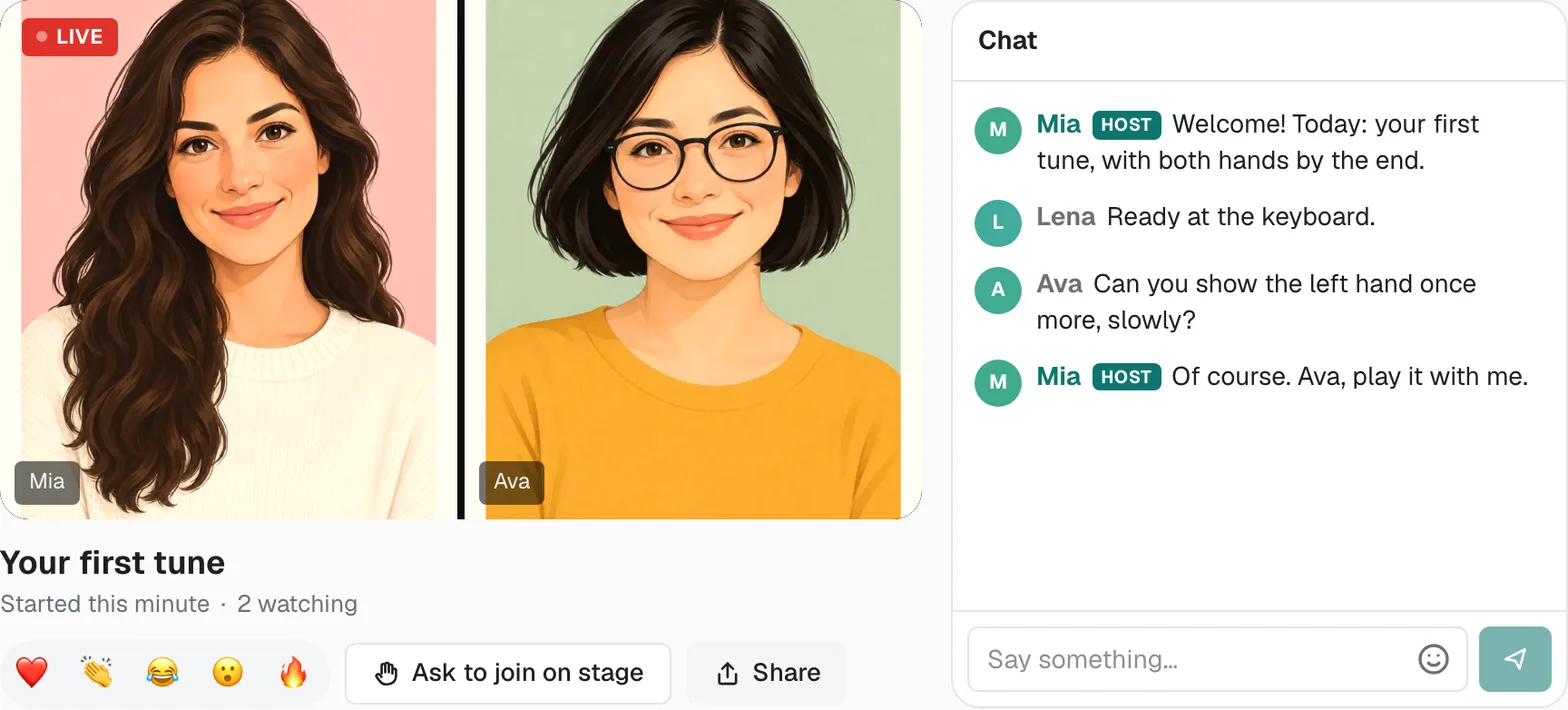
Try it live at lessons.docs.wordplus.cloud: be Mia and go live from her studio, then open her lesson in a private window as Ava, one of her students, to watch and raise a hand. The people there are yours alone for a day.
What it does
| On the site | What makes it |
|---|---|
| A teacher's studio, the lessons they teach, each a click from going live | a page of yours, with what realtime.listStreams() says is live |
| A teacher goes live in a lesson, from the browser or OBS, with the chat and the hands raised beside the picture | <LiveStream view="studio-page"> on the lesson's stream, lesson:{id}: WordPlus Cloud's studio as a page of its own (the studio as a page of its own) |
| Students watch, with a chat and reactions | <LiveStream> on the same stream, the player and its chat, for whoever your rule lets watch (live streams) |
| An open lesson for anyone, signed in or not, the others for the course's students | one rule, mayWatch, which the stream and the lesson's page both ask |
| A hand raised, and the student on stage with their camera | the stream's stage: true: the ready-made player and studio do the rest (guests on stage) |
| A notice when a lesson they may watch goes live, on whatever page they are | the stream.live webhook, and realtime.toUser( ids ).emit() (webhooks) |
| What is live now, with how many watch each, current on every page as lessons go live and end | realtime.listStreams(): WordPlus Cloud knows, with no table of yours. The stream.live and stream.ended webhooks, told to a room every page joins (rooms) |
| Leaving a course takes the student out of its lessons live now | realtime.stream( name ).kick(), and your rule from then on (taking access away) |
Run it
You need:
- Node.js 22 or newer.
- Postgres 15 or newer, with a database of its own for the site.
- An app in WordPlus Cloud. Apps are in early access, so first ask for it. Then in your account, go to Apps, then Add app, and give it the address
http://localhost:3000. You get its key and its secret (getting started).
cd examples/lessons
cp .env.example .env.local    # the key and secret of your app, a local key, the database, and a secret for Better Auth
npm install
npm run db                    # the tables of Better Auth, then those of the site
npm run dev                   # http://localhost:3000
Then, in a second terminal, the ready-made people:
npm run seed # three teachers with a course each, and eight students
They sign up through the site itself, so it runs first. Open http://localhost:3000/signup and click Mia: a teacher starts in their studio. Press Go live beside her first lesson, Your first tune, turn on the camera and microphone and press Go live. Open the site again in a private window, click Ava, one of her students, and open the lesson: it plays, and Ask to join on stage brings her hand up under Guests in Mia's studio, where Invite brings her on stage.
.env.local holds:
WORDPLUS_SITE, WORDPLUS_SECRET | the key and secret of your app |
WORDPLUS_LOCAL_KEY | a key of your own, which seals what goes through WordPlus Cloud: openssl rand -hex 32, kept as long as the app |
DATABASE_URL | your Postgres database |
BETTER_AUTH_SECRET, BETTER_AUTH_URL | a long random string for Better Auth, and the address of the site |
LESSONS_DEMO | 1 for the demo: the ready-made people in one click on the sign-up and sign-in pages, and How this page works under each page |
The notice of a lesson going live, and the lists of what is live keeping up by themselves, come by webhook, which needs the site at an address WordPlus Cloud reaches. On localhost none arrives, so the lists show a lesson live only on a reload and nobody is told, unless a tunnel gives your computer a public address (while you develop).
How it is built
The site is a Next.js app as create-next-app makes it, App Router, TypeScript and Tailwind, with four packages added:
npm install @wordplus/realtime @wordplus/realtime-ui better-auth pg
@wordplus/realtimeconnects your server and your pages to WordPlus Cloud, and draws the stream: its studio, its player and its chat.@wordplus/realtime-uiholds those screens, which the stream loads as it starts.better-authsigns people up and in, its tables in your database.pgtalks to Postgres.
Sign-up and sign-in are ordinary Next.js and are left out here: they are app/account.ts, app/signin, app/signup and app/photos in the example. What follows is the rest, a part at a time.
Who may watch a lesson
One rule decides who may watch each lesson, the same for the stream and for the lesson's page: its teacher teaches it, anyone may watch an open lesson, signed in or not, and only the students of its course the others. The database holds the people, the courses and their lessons, who is in which course, and who follows whom:
-- The lessons part of the database. Better Auth makes its own tables first (npx auth migrate), as this one refers to
-- "user", whose ids are numbers (generateId: 'serial' in lib/auth.ts).

-- What others see of a person, beside the name they signed up with.
create table if not exists profile (
    user_id integer primary key references "user" (id) on delete cascade,
    about   text not null default '',
    photo   bytea
);

-- A course: what a teacher teaches, as a run of lessons.
create table if not exists course (
    id      serial primary key,
    teacher integer not null references "user" (id) on delete cascade,
    subject text not null check (subject in ('cooking', 'music', 'fitness')),
    title   text not null,
    about   text not null default ''
);

-- A lesson of a course, streamed live as lesson:{id}. An open one anyone may watch, signed in or not, the others only
-- the course's students.
create table if not exists lesson (
    id        serial primary key,
    course_id integer not null references course (id) on delete cascade,
    position  integer not null,
    title     text not null,
    open      boolean not null default false
);

-- The students of each course.
create table if not exists enrollment (
    course_id integer not null references course (id) on delete cascade,
    user_id   integer not null references "user" (id) on delete cascade,
    at        timestamptz not null default now(),
    primary key (course_id, user_id)
);

-- Who follows which teacher, to be told when they go live.
create table if not exists follow (
    who     integer not null references "user" (id) on delete cascade,
    teacher integer not null references "user" (id) on delete cascade,
    primary key (who, teacher)
);
The rule, and what it reads:
/** The stream of a lesson: lesson:7. */
export function roomOf(lesson: string): string {
    return `lesson:${lesson}`;
}

/** The lesson a stream's name is of: 7 for lesson:7, null for any other. */
export function lessonIn(room: string): string | null {
    const id = room.startsWith('lesson:') ? room.slice('lesson:'.length) : '';
    return isNumber(id) ? id : null;
}

export async function isEnrolled(user: string, course: string): Promise<boolean> {
    const { rowCount } = await db.query('select 1 from enrollment where course_id = $1 and user_id = $2', [course, user]);
    return (rowCount ?? 0) > 0;
}

/**
 * Who may watch a lesson: its teacher, anyone for an open one, signed in or not, and otherwise the students of its
 * course. The same rule decides the stream (lib/realtime.ts) and what the lesson's page shows.
 */
export async function mayWatch(user: string | null, lesson: Lesson): Promise<boolean> {
    if (user === lesson.teacher) return true;
    if (lesson.open) return true;
    if (user === null) return false;
    return isEnrolled(user, lesson.course);
}
Your server and WordPlus Cloud
The realtime side of your server is one file: who is asking, what others see of them, the stream of each lesson with its rule, what is live now with the room that tells every page, and the webhooks of a lesson going live and ending. The stream's rule answers host for its teacher, with the picture up to 1080p, viewer for whoever mayWatch lets in, signed in or not, and false for anyone else. Its settings let the stream take guests on stage, and reactions.
import { createRealtime } from '@wordplus/realtime/server';
import { currentUserId } from './auth';
import { followersOf, lessonIn, lessonOf, mayWatch, personOf, studentsOf } from './lessons';

export const realtime = createRealtime({
    site: process.env.WORDPLUS_SITE!,
    secret: process.env.WORDPLUS_SECRET!,
    localKey: process.env.WORDPLUS_LOCAL_KEY!,
    // Who is asking: the signed-in user, or null for a visitor.
    user: () => currentUserId(),
    // What others see of them in a lesson: on stage, in its chat, in the teacher's list of hands.
    profile: async (user) => {
        const person = await personOf(String(user));
        return person ? { name: person.name, avatar: `/photos/${person.id}` } : null;
    },
});

// The stream of each lesson: lesson:{id}, where {id} is the lesson's number. Its teacher goes live in it, and whoever
// may watch the lesson (mayWatch in lib/lessons.ts) watches: anyone for an open lesson, else the course's students.
// A student signed in may raise a hand, and the teacher brings them on stage. A page asks to join at
// /api/realtime/calls.
realtime.streams(
    'lesson:{id}',
    async (user, { id }) => {
        const lesson = await lessonOf(id);
        if (!lesson) return false;
        const me = user === null ? null : String(user);
        if (me === lesson.teacher) return { role: 'host', quality: '1080p' };
        return (await mayWatch(me, lesson)) ? 'viewer' : false;
    },
    { stage: true, reactions: true },
);

// What is live: every page joins it, a visitor's too, to hear when a lesson goes live or ends and show its lists as they
// are now. Only the server says anything in it.
realtime.room('live', { public: true });

/** The lessons live now, and how many watch each: WordPlus Cloud knows, with no table here. */
export async function liveNow(): Promise<Map<string, number>> {
    const live = new Map<string, number>();
    for (const stream of await realtime.listStreams()) {
        const lesson = lessonIn(stream.name);
        if (lesson) live.set(lesson, stream.viewers);
    }
    return live;
}

// The webhook of a lesson going live: every page shows it live, and those who may watch it hear at once, on whatever
// page they are. The course's students, and for an open lesson the teacher's followers too.
realtime.on('stream.live', async ({ stream }) => {
    const id = lessonIn(stream);
    const lesson = id ? await lessonOf(id) : null;
    if (!lesson) return;
    await realtime.to('live').emit('changed');
    const students = await studentsOf(lesson.course);
    const followers = lesson.open ? await followersOf(lesson.teacher) : [];
    const told = [...new Set([...students, ...followers])].filter((user) => user !== lesson.teacher);
    await realtime.toUser(told).emit('live', {
        lesson: lesson.id,
        title: lesson.title,
        teacher: lesson.teacherName,
    });
});

// The webhook of a lesson ending: every page shows it gone from what is live.
realtime.on('stream.ended', async ({ stream }) => {
    if (lessonIn(stream)) await realtime.to('live').emit('changed');
});
The rule runs on your server, in a route of your own, each time a page asks to join a lesson's stream: the page gets a pass signed with the app's secret, or why not. A visitor who isn't signed in asks too, with user null.
// POST /api/realtime/calls: a page asks to join a lesson's stream, as { stream: 'lesson:7' }. This server runs the
// stream's rule (realtime.streams in lib/realtime.ts) for whoever asks, signed in or not, and answers a pass for the
// stream, signed with the app's secret, or why not: the teacher's to go live, a viewer's to watch.
import { currentUserId } from '@/lib/auth';
import { realtime } from '@/lib/realtime';

export async function POST(request: Request) {
    // JSON only, which a page of another site can't send here.
    if (!request.headers.get('content-type')?.includes('application/json')) {
        return new Response(null, { status: 415 });
    }
    const ask = await request.json();
    const user = await currentUserId();
    const pass = await realtime.authorizeCall(ask, user);
    return Response.json(pass);
}
The SDK's other routes, the webhooks among them, and the browser files:
// WordPlus Cloud's other routes: the webhooks the cloud sends (POST /api/realtime/webhook), among them a lesson going
// live, and the browser's files (GET). Joining a lesson's stream is the site's own route, calls/route.ts beside this one.
import { realtime } from '@/lib/realtime';

export const GET = realtime.route;
export const POST = realtime.route;
Every page connected
Every page of the site connects, a visitor's as well as a member's, so an open lesson needs no account, and every page hears a lesson going live. One connection for all of them, kept as people move between pages:
import Link from 'next/link';
import { Suspense } from 'react';
import { connection } from 'next/server';
import { RealtimeProvider } from '@wordplus/realtime/react';
import { currentUserId } from '@/lib/auth';
import { coursesOf, personOf } from '@/lib/lessons';
import { realtime } from '@/lib/realtime';
import { signOut } from '../account';
import { LiveNow, Notices } from './live';

// Every page of the site, for a visitor and a member alike: an open lesson needs no account to watch. One connection
// to WordPlus Cloud for all of them, kept as people move between pages.
export default function SiteLayout({ children }: { children: React.ReactNode }) {
    return (
        <Suspense fallback={<p className="p-6 text-stone-500">Loading…</p>}>
            <Connected>{children}</Connected>
        </Suspense>
    );
}

async function Connected({ children }: { children: React.ReactNode }) {
    await connection(); // made for each request: the settings are signed for this person, now
    const me = await currentUserId();
    const person = me ? await personOf(me) : null;
    // A teacher goes live from their studio, a link away on every page.
    const teaches = me ? (await coursesOf(me)).length > 0 : false;
    return (
        <RealtimeProvider options={await realtime.config(me)}>
            <header className="sticky top-0 z-10 border-b border-stone-200 bg-white/90 backdrop-blur">
                <nav className="site-width mx-auto flex max-w-4xl flex-wrap items-center gap-x-5 gap-y-1 px-4 py-3">
                    <Link href="/" className="text-xl font-bold text-teal-700">Live Lessons</Link>
                    <Link href="/lessons" className="hover:text-teal-700">Courses</Link>
                    {teaches && <Link href="/studio" className="font-medium text-teal-700 hover:text-teal-800">Your studio</Link>}
                    {person ? (
                        <>
                            <span className="ml-auto text-sm text-stone-600">{person.name}</span>
                            <form action={signOut}>
                                <button className="text-sm text-stone-500 hover:text-stone-900">Sign out</button>
                            </form>
                        </>
                    ) : (
                        <Link href="/signin" className="ml-auto text-sm text-teal-700">Sign in</Link>
                    )}
                </nav>
            </header>
            <LiveNow />
            <Notices />
            <main className="site-width mx-auto w-full max-w-4xl flex-1 px-4 py-6">
                {children}
            </main>
        </RealtimeProvider>
    );
}
What is live now
WordPlus Cloud knows which streams are live and how many watch each (liveNow above), and the database what each lesson is. The home page lists them, made for each request, as what is live is of this moment:
// The lessons live now: WordPlus Cloud says which streams are live, and the database what they are.
async function LiveLessons() {
    await connection(); // what is live is of this moment: made for each request
    const live = await liveNow();
    const lessons = await lessonsIn([...live.keys()]);
    if (lessons.length === 0) return null;
    return (
        <section>
            <h2 className="mb-3 text-lg font-semibold">Live now</h2>
            <ul className="grid gap-3 sm:grid-cols-2">
                {lessons.map((lesson) => (
                    <li key={lesson.id}>
                        <Link href={`/lessons/${lesson.id}`} className="flex flex-col gap-1 rounded-2xl bg-white p-4 shadow-sm hover:shadow">
                            <LiveMark viewers={live.get(lesson.id) ?? 0} />
                            <span className="font-medium">{lesson.title}</span>
                            <span className="text-sm text-stone-600">{lesson.teacherName} · {lesson.courseTitle}</span>
                        </Link>
                    </li>
                ))}
            </ul>
        </section>
    );
}
The list keeps up by itself. When a lesson goes live or ends, WordPlus Cloud sends your server the stream.live or stream.ended webhook, and the server says so in the room live, which anyone may join and only the server speaks in (lib/realtime.ts above). Every page is in it through LiveNow in the layout, and asks the server for its lists again, with no reload (app/(site)/live.tsx, below). The courses, a course's lessons and the teacher's studio mark what is live the same way.
A lesson: the stream, or the way in
The lesson's page asks the same rule. Whoever may watch gets <LiveStream>, the player and its chat. Its teacher sees the way to their studio over the player, at the address studioUrl gives: Go live in the studio, and while live Open the studio. Anyone else is told the lesson is for the course's students, and how to join it.
import Link from 'next/link';
import { notFound } from 'next/navigation';
import { Suspense } from 'react';
import { LiveStream } from '@wordplus/realtime/react';
import { currentUserId } from '@/lib/auth';
import { lessonOf, mayWatch, roomOf } from '@/lib/lessons';
import { joinCourse } from '../../actions';

export default function LessonPage({ params }: PageProps<'/lessons/[id]'>) {
    return (
        <Suspense fallback={<p className="text-stone-500">Loading…</p>}>
            <Lesson params={params} />
        </Suspense>
    );
}

// A lesson: its stream for whoever may watch it, its teacher the way to their studio, and for anyone else, the way in.
async function Lesson({ params }: { params: Promise<{ id: string }> }) {
    const { id } = await params;
    const lesson = await lessonOf(id);
    if (!lesson) notFound();
    const me = await currentUserId();
    const teaches = me === lesson.teacher;

    return (
        <article className="flex flex-col gap-5">
            <header className="flex flex-col gap-1">
                <Link href={`/courses/${lesson.course}`} className="text-sm text-teal-700">{lesson.courseTitle} · {lesson.teacherName}</Link>
                <h1 className="text-3xl font-semibold">{lesson.position}. {lesson.title}</h1>
            </header>

            {(await mayWatch(me, lesson)) ? (
                // The player and its chat: WordPlus Cloud's ready-made screens, which ask this server for the stream's
                // pass (/api/realtime/calls) with the rule of lib/realtime.ts. Its teacher goes live in the studio
                // (/studio/{id}), which the player shows them the way to.
                <LiveStream name={roomOf(lesson.id)} title={lesson.title} loginUrl="/signin" studioUrl={teaches ? `/studio/${lesson.id}` : undefined} />
            ) : (
                <div className="rounded-3xl bg-white p-8 text-center shadow-sm">
                    <p className="text-lg font-medium">This lesson is for the students of {lesson.courseTitle}.</p>
                    {me === null ? (
                        <p className="mt-2 text-stone-600"><Link href="/signin" className="text-teal-700">Sign in</Link> to join the course.</p>
                    ) : (
                        <form action={joinCourse.bind(null, lesson.course)} className="mt-4">
                            <button className="rounded-full bg-teal-700 px-6 py-3 font-medium text-white hover:bg-teal-800">Join the course</button>
                        </form>
                    )}
                </div>
            )}
        </article>
    );
}
A teacher's studio
A teacher goes live from a studio of their own. Its first page lists the lessons they teach, each with Go live, and which are live now. Every page links to it for a teacher, in the header above, and signing in takes a teacher there (app/account.ts).
import Link from 'next/link';
import { redirect } from 'next/navigation';
import { connection } from 'next/server';
import { Suspense } from 'react';
import { currentUserId } from '@/lib/auth';
import { coursesOf, followersOf, lessonsOf, studentsOf, type Course } from '@/lib/lessons';
import { liveNow } from '@/lib/realtime';
import { LiveMark } from '../live';

export default function StudioPage() {
    return (
        <Suspense fallback={<p className="text-stone-500">Loading…</p>}>
            <Studio />
        </Suspense>
    );
}

// A teacher's studio: the lessons they teach, each with the way to go live in it, those live now marked.
async function Studio() {
    await connection(); // what is live is of this moment: made for each request
    const me = await currentUserId();
    if (me === null) redirect('/signin');
    const [teaching, live, followers] = await Promise.all([coursesOf(me), liveNow(), followersOf(me)]);
    if (teaching.length === 0) {
        return (
            <div className="rounded-3xl bg-white p-8 text-center shadow-sm">
                <p className="text-lg font-medium">The studio is for teachers, to go live in their lessons.</p>
                <p className="mt-2 text-stone-600"><Link href="/lessons" className="text-teal-700">See the courses</Link> to watch one.</p>
            </div>
        );
    }

    return (
        <div className="flex flex-col gap-6">
            <header className="flex flex-col gap-2">
                <h1 className="text-3xl font-semibold">Your studio</h1>
                <p className="text-stone-600">
                    Pick a lesson and go live. The course’s students hear at once, on whatever page they are
                    {followers.length > 0 && `, and for an open lesson your ${followers.length === 1 ? 'follower' : `${followers.length} followers`} too`}.
                </p>
            </header>
            {teaching.map((course) => (
                <CourseLessons key={course.id} course={course} live={live} />
            ))}
        </div>
    );
}

async function CourseLessons({ course, live }: { course: Course; live: Map<string, number> }) {
    const [lessons, students] = await Promise.all([lessonsOf(course.id), studentsOf(course.id)]);
    return (
        <section className="rounded-2xl bg-white p-5 shadow-sm">
            <div className="flex flex-wrap items-baseline justify-between gap-2">
                <Link href={`/courses/${course.id}`} className="text-lg font-semibold hover:text-teal-700">{course.title}</Link>
                <span className="text-sm text-stone-600">{students.length === 1 ? '1 student' : `${students.length} students`}</span>
            </div>
            <ol className="mt-2 divide-y divide-stone-100">
                {lessons.map((lesson) => (
                    <li key={lesson.id} className="flex flex-wrap items-center gap-x-3 gap-y-2 py-3">
                        <span className="flex flex-col">
                            <span className="font-medium">{lesson.position}. {lesson.title}</span>
                            <span className="text-sm text-stone-500">{lesson.open ? 'Open to anyone' : 'For the course’s students'}</span>
                        </span>
                        {live.has(lesson.id) && <LiveMark viewers={live.get(lesson.id) ?? 0} />}
                        <Link
                            href={`/studio/${lesson.id}`}
                            className="ml-auto rounded-full bg-teal-700 px-5 py-2 text-sm font-medium text-white hover:bg-teal-800"
                        >
                            {live.has(lesson.id) ? 'Back to the studio' : 'Go live'}
                        </Link>
                    </li>
                ))}
            </ol>
        </section>
    );
}
Each lesson's studio is a page with WordPlus Cloud's studio in it, drawn ready as a page of its own, view="studio-page": the picture as large as fits, with the camera and microphone, the screen, OBS and Go live under it, and beside it, in tabs, the chat, the guests (the hands raised, and who is on stage) and the stream, with the link to the lesson to share. url is the lesson's page, and backUrl the way back to the studio's first page. Only the lesson's teacher stays: anyone else goes to the lesson.
import { notFound, redirect } from 'next/navigation';
import { Suspense } from 'react';
import { LiveStream } from '@wordplus/realtime/react';
import { currentUserId } from '@/lib/auth';
import { lessonOf, roomOf } from '@/lib/lessons';

export default function LessonStudioPage({ params }: PageProps<'/studio/[id]'>) {
    return (
        <Suspense fallback={<p className="text-stone-500">Loading…</p>}>
            <LessonStudio params={params} />
        </Suspense>
    );
}

// A lesson's studio, for its teacher alone: WordPlus Cloud's studio as a page of its own, the picture large with Go live
// under it, and beside it the chat, the hands raised and the lesson's link. Anyone else is sent to the lesson.
async function LessonStudio({ params }: { params: Promise<{ id: string }> }) {
    const { id } = await params;
    const lesson = await lessonOf(id);
    if (!lesson) notFound();
    const me = await currentUserId();
    if (me === null) redirect('/signin');
    if (me !== lesson.teacher) redirect(`/lessons/${lesson.id}`);

    return (
        <LiveStream
            name={roomOf(lesson.id)}
            view="studio-page"
            title={`${lesson.position}. ${lesson.title}`}
            url={`/lessons/${lesson.id}`}
            backUrl="/studio"
            // As tall as the window leaves under the site's header.
            className="lesson-studio block h-[calc(100dvh-7rem)] min-h-[34rem] overflow-hidden rounded-2xl border border-stone-200"
        />
    );
}
It is as tall as the window under the header, and takes the window's whole width, the header's links with it:
/* A lesson's studio (app/(site)/studio/[id]) takes the window's whole width, and the header's links with it. */
body:has(.lesson-studio) .site-width {
  max-width: none;
}
A hand raised, and the stage
Coming on stage needs no code of yours: the rule's stage: true lets the stream take guests, and WordPlus Cloud's ready-made player and studio do the rest.
- While the lesson is live, the player offers a student who is signed in Ask to join on stage. A visitor who isn't signed in is never offered it, and neither is anyone where the rule's settings say
stage: false. - The teacher's studio lists each hand raised under Guests, with Invite. The student accepts with Join stage, and everyone watching sees them beside the teacher, camera and microphone.
- The teacher can Mute a guest, or Remove from stage, and the student can Leave stage: either way they are back watching, without reloading the page.
A screen of your own does all of it on the same stream: hand(), invite(), joinStage(), unstage() (guests on stage).
Going live, and who hears it
When a teacher goes live, WordPlus Cloud sends your server the stream.live webhook. The server says so in the room live, and tells those who may watch the lesson, on whatever page they are: the course's students, and for an open lesson the teacher's followers too (lib/realtime.ts above). LiveNow keeps every page's lists current from the room, and Notices shows a notice that opens the lesson:
'use client';

import Link from 'next/link';
import { usePathname, useRouter } from 'next/navigation';
import { useState } from 'react';
import { useRoom, useUserEvent } from '@wordplus/realtime/react';

type Notice = { key: number; text: string; href: string };
type WentLive = { lesson: string; title: string; teacher: string };

/** What is live, as every page lists it: the page asks the server again when a lesson goes live or ends. */
export function LiveNow() {
    const router = useRouter();
    // What the server sends every page (realtime.to( 'live' ).emit( 'changed' ) in lib/realtime.ts).
    useRoom('live', { changed: () => router.refresh() });
    return null;
}

/** What the server tells this person, on whatever page they are: a lesson they may watch has gone live. */
export function Notices() {
    const [notices, setNotices] = useState<Notice[]>([]);
    const path = usePathname();

    const drop = (key: number) =>
        setNotices((list) => list.filter((notice) => notice.key !== key));

    // What the server sends them (realtime.toUser( ids ).emit( 'live', … ) in lib/realtime.ts).
    useUserEvent('live', (data: WentLive) => {
        if (path === `/lessons/${data.lesson}`) return; // its page shows it already
        const key = Date.now() + Math.random(); // its own, to drop it by
        setNotices((list) => [...list, { key, text: `${data.teacher} is live: ${data.title}`, href: `/lessons/${data.lesson}` }]);
        setTimeout(() => drop(key), 10000);
    });

    return (
        <div className="fixed bottom-4 left-1/2 z-20 flex w-[min(92vw,24rem)] -translate-x-1/2 flex-col gap-2">
            {notices.map((notice) => (
                <Link key={notice.key} href={notice.href} className="rounded-2xl bg-stone-900 px-4 py-3 text-sm text-white shadow-lg">
                    <span className="mr-2 inline-block size-2 rounded-full bg-red-500" />
                    {notice.text}
                </Link>
            ))}
        </div>
    );
}

/** The mark of a lesson live now, with how many watch it. */
export function LiveMark({ viewers }: { viewers: number }) {
    return (
        <span className="inline-flex w-fit items-center gap-1.5 rounded-full bg-red-600 px-2.5 py-0.5 text-xs font-semibold text-white">
            <span className="size-1.5 rounded-full bg-white" />
            Live{viewers > 0 ? ` · ${viewers} watching` : ''}
        </span>
    );
}
Joining a course, and following a teacher
Joining a course and following a teacher are rows in your database, which the rule and the webhook read. Leaving a course goes further: your rule says no from then on, and your server takes the student out of the course's lessons live now, as the rule would on their next try.
'use server';

import { revalidatePath } from 'next/cache';
import { redirect } from 'next/navigation';
import { currentUserId } from '@/lib/auth';
import { courseOf, enroll, follow, leave, lessonsOf, roomOf } from '@/lib/lessons';
import { liveNow, realtime } from '@/lib/realtime';

/** The signed-in person, or off to sign in. */
async function me(): Promise<string> {
    const id = await currentUserId();
    if (!id) redirect('/signin');
    return id;
}

/** Join a course: its lessons are theirs to watch from now on, those live now too, on their next try. */
export async function joinCourse(course: string) {
    const id = await me();
    if ((await courseOf(course))?.teacher === id) return;
    await enroll(id, course);
    revalidatePath('/', 'layout'); // every page shows it
}

/** Leave a course: out of its lessons live now at once, as the rule says no to them from here on. */
export async function leaveCourse(course: string) {
    const id = await me();
    await leave(id, course);

    const live = await liveNow();
    for (const lesson of await lessonsOf(course)) {
        if (!lesson.open && live.has(lesson.id)) await realtime.stream(roomOf(lesson.id)).kick(id);
    }
    revalidatePath('/', 'layout'); // every page shows it
}

/** Follow a teacher, to be told when they go live, or stop. */
export async function followTeacher(teacher: string, on: boolean) {
    const id = await me();
    if (teacher === id) return;
    await follow(id, teacher, on);
    revalidatePath('/', 'layout'); // every page shows it
}
Make it yours
- Who may watch is
mayWatchinlib/lessons.ts, which the stream and the lesson's page ask. A plan of your own, a lesson's date or a course with few places are each a line there. - What students may do is the rule's answer:
{ role: 'viewer', chat: 'read' }keeps someone from writing, and{ role: 'viewer', mod: true }makes a teacher's assistant keep the chat (live streams in depth). - The stage is off for a stream whose settings say
stage: false. - The studio may also be in the lesson's page itself: leave out
studioUrl, and its teacher sees the studio under the player there. - Your own sign-in:
currentUserId()inlib/auth.tsis all the realtime side asks of it. - Its look is Tailwind's in your pages, and in the player and the studio the
--estream-*tokens inapp/globals.css, such as--estream-accent(customizing). - Take out the demo:
LESSONS_DEMOoff, thendb/people.json,db/seed.mjs,public/people,app/demo-people.tsx,how-it-works.md,app/how-it-works.tsx,app/how-it-works-cards.tsx,app/api/how-it-works,scripts/how-it-works.mjs, thepredevandprebuildscripts that run it, the.how-it-works-codestyles inapp/globals.css,lib/worlds.ts,db/worlds.sqlandproxy.ts(the public demo's own), and their lines in the layout, the home page,lib/db.ts,lib/realtime.ts, and the sign-up and sign-in pages.
Put it online
- A host that runs Next.js, Vercel or your own: nothing realtime is kept on your servers (deploying).
- A Postgres database your host gives you, its address in
DATABASE_URL, thennpm run dbonce against it. - Its settings as in
.env.local, withBETTER_AUTH_URLyour address andLESSONS_DEMOleft out. - Its address among those of your app in WordPlus Cloud, such as
https://your-site.example. A page anywhere else is refused. - The webhook address on the app page,
https://your-site.example/api/realtime/webhook, so students hear their lessons go live, and every page's lists keep up.