Chat
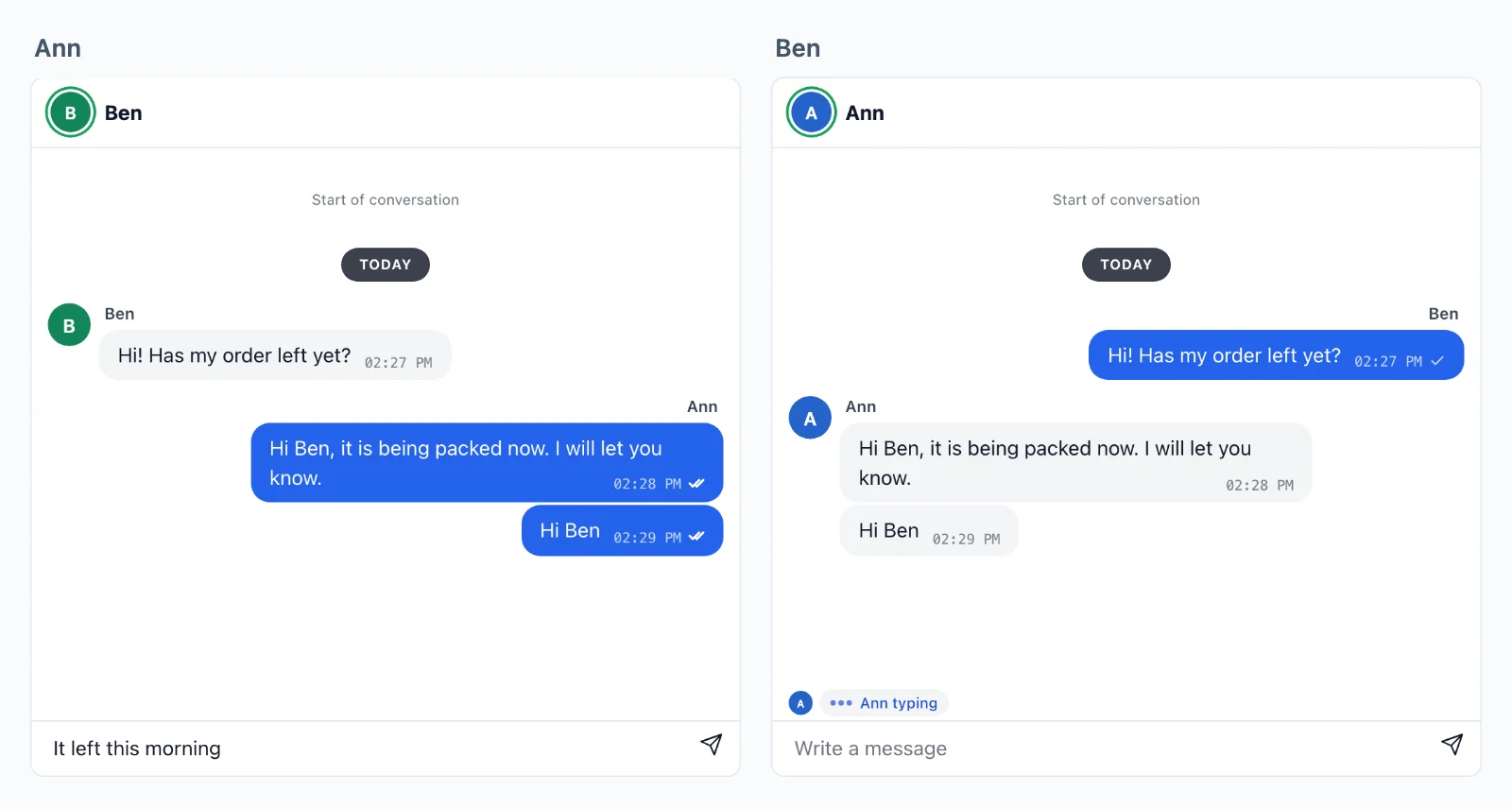
Conversations between two people and in groups: messages that arrive at once on every device, who is typing, read ticks and reactions. The pages send to each other straight through WordPlus Cloud, sealed, and your server keeps the conversation in its own database from the webhook, so it is yours to search, moderate and show again.
The rooms
A room for each conversation, named after it: chat:34:42 for the two people 34 and 42, the smaller id first, and group:7 for a group. A page joins the room of a conversation to send and receive in it.
Your server decides who may join. A page that joins asks your server first, and a rule answers: a function your server registers once for every room whose name fits a pattern, such as chat:{a}:{b}. WordPlus Cloud then holds the page to the answer (permissions). These rules say:
- A conversation of two lets in only the two people its name holds.
- A group lets in its members, who also see who else is in it.
- Node
- PHP
- Python
- WordPress
// What every conversation carries, explained below the code.
const chat = { history: 50, emit: [ 'message', 'typing', 'read', 'reaction' ], webhook: [ 'message', 'reaction' ] };

// 1. Two people, such as chat:34:42: only the two in the name.
realtime.room( 'chat:{a}:{b}', chat, ( user, { a, b } ) => [ a, b ].includes( String( user ) ) );

// 2. A group, such as group:7: its members, who see each other in it.
realtime.room( 'group:{id}', { ...chat, presence: true }, async ( user, { id } ) => isMemberOf( id, user ) );
// What every conversation carries, explained below the code.
$chat = [ 'history' => 50, 'emit' => [ 'message', 'typing', 'read', 'reaction' ], 'webhook' => [ 'message', 'reaction' ] ];

// 1. Two people, such as chat:34:42: only the two in the name.
$realtime->room( 'chat:{a}:{b}', function ( $user, array $p ) {
    return in_array( (string) $user, [ $p['a'], $p['b'] ], true );
}, $chat );

// 2. A group, such as group:7: its members, who see each other in it.
$realtime->room( 'group:{id}', function ( $user, array $p ) {
    return is_member_of( $p['id'], $user );
}, [ ...$chat, 'presence' => true ] );
# What every conversation carries, explained below the code.
chat = {"history": 50, "emit": ["message", "typing", "read", "reaction"], "webhook": ["message", "reaction"]}

# 1. Two people, such as chat:34:42: only the two in the name.
def may_join_pair(user, p):
    return str(user) in (p["a"], p["b"])

# 2. A group, such as group:7: its members, who see each other in it.
def may_join_group(user, p):
    return is_member_of(p["id"], user)

realtime.room("chat:{a}:{b}", may_join_pair, **chat)
realtime.room("group:{id}", may_join_group, presence=True, **chat)
// What every conversation carries, explained below the code.
$chat = array( 'history' => 50, 'emit' => array( 'message', 'typing', 'read', 'reaction' ), 'webhook' => array( 'message', 'reaction' ) );

// 1. Two people, such as chat:34:42: only the two in the name.
wordplus_realtime()->room( 'chat:{a}:{b}', function ( $user_id, array $p ) {
	return in_array( (string) $user_id, array( $p['a'], $p['b'] ), true );
}, $chat );

// 2. A group, such as group:7: its members, who see each other in it.
wordplus_realtime()->room( 'group:{id}', function ( $user_id, array $p ) {
	return my_group_has_member( (int) $p['id'], $user_id );
}, $chat + array( 'presence' => true ) );
emitlists what the pages may send to each other, and nothing else gets through.webhooknames what your server gets too, to keep.historycarries the last 50 for 5 minutes, for a page that reconnects. Your database keeps the rest.
Keeping the conversation
Your server saves each message by its event_id, the id the pages saw, so a webhook delivered twice saves it once:
- Node
- PHP
- Python
- WordPress
// A guest in a public room sends with no `from`: kept here from signed-in people alone.
realtime.on( 'message', ( { room, from, data, event_id, at } ) => from && db.messages.upsert( { id: event_id, room, from, text: data.text, at } ) );
realtime.on( 'reaction', ( { from, data } ) => from && db.reactions.set( data.id, from, data.key ) );   // an empty key takes it back
$realtime->on( 'message', fn ( array $e ) => save_message( $e['event_id'], $e['room'], $e['from'], $e['data']['text'], $e['at'] ) );
$realtime->on( 'reaction', fn ( array $e ) => save_reaction( $e['data']['id'], $e['from'], $e['data']['key'] ) );
realtime.on("message", lambda e: save_message(e["event_id"], e["room"], e["from"], e["data"]["text"], e["at"]))
realtime.on("reaction", lambda e: save_reaction(e["data"]["id"], e["from"], e["data"]["key"]))
wordplus_realtime()->on( 'message', function ( array $e ) {
	my_save_message( $e['event_id'], $e['room'], $e['from'], $e['data']['text'], $e['at'] );
} );
wordplus_realtime()->on( 'reaction', function ( array $e ) {
	my_save_reaction( $e['data']['id'], $e['from'], $e['data']['key'] );
} );
And a route of yours gives a conversation back, the newest 50 messages, or the 50 before ?before=<id>, as { messages: [ { id, from, text, at, reactions } ], more }, only to the people in it (events from the page).
The page, ready-made
The chat of Better Messages, with the history from your route, typing, read ticks and reactions:
<wordplus-chat room="chat:34:42" messages="/api/chat/34/42/messages" style="height: 520px"></wordplus-chat>
<wordplus-typing room="chat:34:42"></wordplus-typing>
In React, <Chat rt={ rt } room="chat:34:42" messages="/api/chat/34/42/messages" /> of @wordplus/realtime-ui/react, with its chat.css (elements, React).
The page, your own
const chat = rt.join( 'chat:34:42' );

form.onsubmit = async () => {
    const { id, at } = await chat.emitWithAck( 'message', { text: input.value } );   // checked, kept and sent on
    draw( { id, from: me, text: input.value, at } );
};
input.oninput = () => chat.volatile.emit( 'typing', { on: input.value !== '' } );   // never queued or kept

chat.on( 'message', ( data, meta ) => {
    draw( { id: meta.id, from: meta.from, text: data.text, at: meta.at } );
    chat.volatile.emit( 'read', { id: meta.id } );
} );
chat.on( 'typing', ( data, meta ) => showTyping( meta.from, data.on ) );
chat.on( 'read', ( data, meta ) => markRead( meta.from, data.id ) );
meta.fromis the sender as your server vouched for them: a page cannot write as someone else.- A refused message rejects with its code:
not_allowed,rate_limited,too_large(errors). - Pictures and files may ride in the data as binary, up to 1 MB an event, or as a link to your storage for anything larger.
Telling the other person
A message shows at once only on a page that has its conversation open. Ben writes to Cara while she is on another page of your app, and she sees nothing there. So tell her yourself:
- Your server hears the message: from its webhook, as it keeps it.
- It sends Cara a notice of her own with
toUser(), which reaches every page and app she has open. - Her page shows it: a toast with the name, the text and a link, or a count beside the conversation.
- Node
- PHP
- Python
- WordPress
// After keeping it (above): the other one of the two, told on every page they have open.
realtime.on( 'message', async ( { room, from, data, event_id } ) => {
    const [ kind, a, b ] = room.split( ':' );           // chat:34:42
    if ( kind !== 'chat' ) return;
    const to = String( from ) === a ? b : a;
    await realtime.toUser( to ).emit( 'new_message', { room, from, text: data.text.slice( 0, 140 ), id: event_id } );
} );
$realtime->on( 'message', function ( array $e ) use ( $realtime ) {
    [ $kind, $a, $b ] = explode( ':', $e['room'] ) + [ '', '', '' ];
    if ( 'chat' !== $kind ) {
        return;
    }
    $to = (string) $e['from'] === $a ? $b : $a;
    $realtime->toUser( $to )->emit( 'new_message', [ 'room' => $e['room'], 'from' => $e['from'], 'text' => mb_substr( $e['data']['text'], 0, 140 ), 'id' => $e['event_id'] ] );
} );
def tell_the_other(e):
    kind, a, b = (e["room"].split(":") + ["", "", ""])[:3]
    if kind != "chat":
        return
    to = b if str(e["from"]) == a else a
    realtime.to_user(to).emit("new_message", {"room": e["room"], "from": e["from"], "text": e["data"]["text"][:140], "id": e["event_id"]})

realtime.on("message", tell_the_other)
wordplus_realtime()->on( 'message', function ( array $e ) {
	list( $kind, $a, $b ) = array_pad( explode( ':', $e['room'] ), 3, '' );
	if ( 'chat' !== $kind ) {
		return;
	}
	$to = (int) ( (string) $e['from'] === $a ? $b : $a );
	wordplus_realtime()->to_user( $to )->emit( 'new_message', array( 'room' => $e['room'], 'from' => $e['from'], 'text' => mb_substr( $e['data']['text'], 0, 140 ), 'id' => $e['event_id'] ) );
} );
Every page of a signed-in user listens, and leaves out the conversation it has open:
// React, in the layout of your signed-in pages, beside the provider.
useUserEvent( 'new_message', ( m ) => {
    if ( m.room !== openRoom ) toast( nameOf( m.from ), m.text, `/messages/${ m.room }` );
} );
In plain JavaScript, rt.on( 'new_message', ( m ) => … ) does the same (sending).
- A count of new messages: add one to the conversation in your list for each notice, and clear it as the user opens it.
- Nothing open, nothing heard:
toUser()reaches the pages and apps open now. For someone away, send an email from your server after a while.
Without a webhook, as on localhost
A webhook needs an address on the internet, so your server on localhost never gets one. While you build, the page can tell your server itself: onSent hears each message the room took, with its id.
<Chat rt={ rt } room="chat:34:42" messages="/api/chat/34/42/messages"
      onSent={ ( m ) => fetch( '/api/chat/sent', { method: 'POST', headers: { 'Content-Type': 'application/json' }, body: JSON.stringify( m ) } ) } />
<wordplus-chat> says the same with its sent event: chat.addEventListener( 'sent', ( e ) => send( e.detail ) ). Your route /api/chat/sent then does what the webhook does above: it checks the user of the session is one of the two in m.room, keeps the message by m.id, and tells the other one. The webhook stays the one to trust where it reaches you, as WordPlus Cloud signs it, and keeping by the id lets both run without keeping a message twice.
- Both on at once? Keep the message from either, by its id, but send the notice from one alone: the route of
onSentwhile you build, the webhook once it reaches you. Or let the page show one notice for eachid. - In Next.js,
<Chat>goes in a client component ('use client') of your own (Next.js).
Groups
- Who is in the group comes from the presence of its room:
chat.members, thenjoinandleave(presence). - Someone removed from the group goes at once: take them off the group in your data, so your rule says no for them, then
realtime.in( 'group:7' ).kick( 34 ). Their token is refused from then on, a reload asks your rule again, and newer messages are sealed with a key they never get (encryption). - Someone added joins when their page next asks: your rule says yes from then on.
- A reader who may not write, such as a supervisor: the rule answers
{ readOnly: true }for them (permissions).
Variations
- A support chat beside a call: a
<wordplus-call>button in the header of the conversation (calls from a button). - The same conversations in iOS and Android apps, on the same rooms (iOS events, Android events).
- In a WordPress plugin: the same rooms with
wordplus_realtime()->room()(WordPress events).