Live updates and notifications
A page that changes as things happen: an order moving from packed to shipped, a dashboard of the sales of the day, the progress of an export, and a notice that reaches one user in every tab and app they have open. Your server sends once it has saved the change, every page that follows the thing updates at once, and a page that was away for a moment gets what it missed.
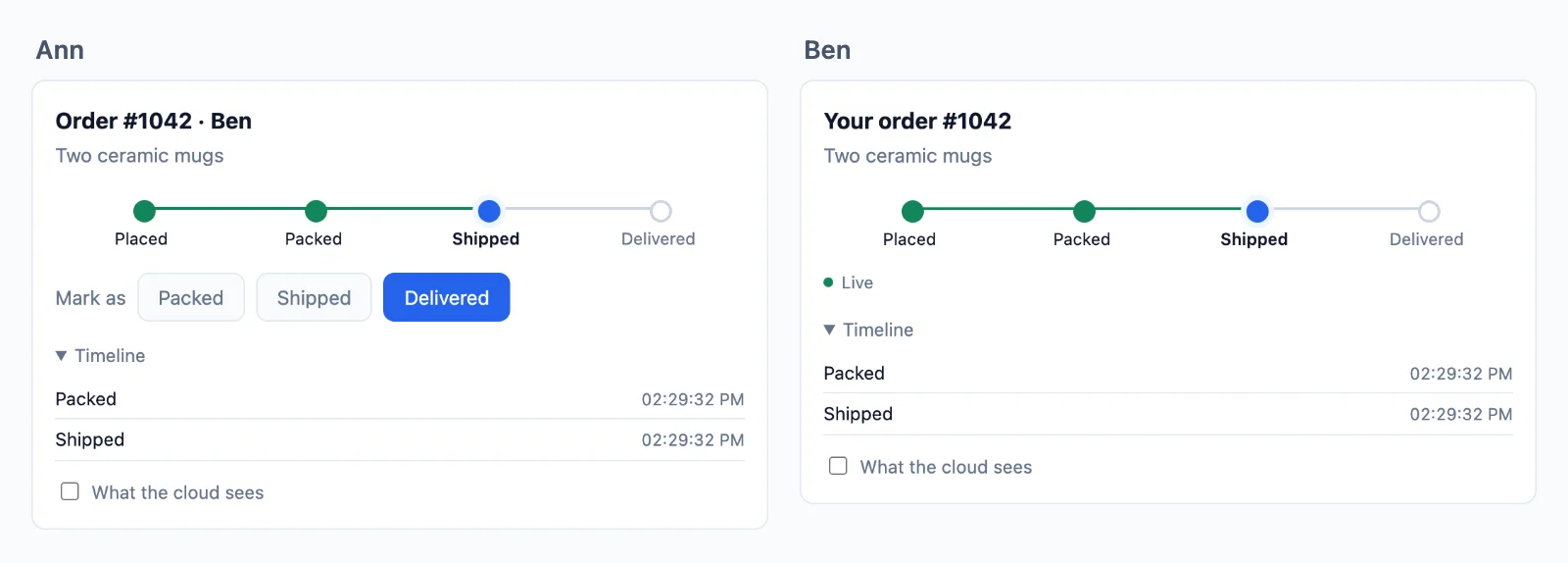
The rooms
A room for each thing a page follows, named after it: order:1042 for an order, sales for the dashboard of the day, job:9 for an export. Your server sends to a room, and every page in it gets what was sent.
Your server decides who may follow what. A page that joins a room asks your server first, and a rule answers: a function your server registers once for every room whose name fits a pattern, such as order:{id}. WordPlus Cloud then holds the page to the answer (permissions). These rules say:
- An order is followed only by the customer who placed it.
- The sales dashboard only by your staff.
- An export only by the user who started it.
- Node
- PHP
- Python
- WordPress
// 1. An order, such as order:1042: only its customer.
realtime.room( 'order:{id}', { history: 20 }, async ( user, { id } ) => ( await findOrder( id ) )?.userId === user );

// 2. The sales dashboard: only your staff.
realtime.room( 'sales', { history: 1 }, ( user ) => isStaff( user ) );

// 3. An export, such as job:9: only the user who started it.
realtime.room( 'job:{id}', { history: 1 }, async ( user, { id } ) => ( await findJob( id ) )?.userId === user );
// 1. An order, such as order:1042: only its customer.
$realtime->room( 'order:{id}', function ( $user, array $p ) {
    return find_order( $p['id'] )?->user_id === $user;
}, [ 'history' => 20 ] );

// 2. The sales dashboard: only your staff.
$realtime->room( 'sales', function ( $user ) {
    return is_staff( $user );
}, [ 'history' => 1 ] );

// 3. An export, such as job:9: only the user who started it.
$realtime->room( 'job:{id}', function ( $user, array $p ) {
    return find_job( $p['id'] )?->user_id === $user;
}, [ 'history' => 1 ] );
# 1. An order, such as order:1042: only its customer.
def may_follow_order(user, p):
    order = find_order(p["id"])
    return order is not None and order.user_id == user

# 2. The sales dashboard: only your staff.
def may_follow_sales(user, p):
    return is_staff(user)

# 3. An export, such as job:9: only the user who started it.
def may_follow_job(user, p):
    job = find_job(p["id"])
    return job is not None and job.user_id == user

realtime.room("order:{id}", may_follow_order, history=20)
realtime.room("sales", may_follow_sales, history=1)
realtime.room("job:{id}", may_follow_job, history=1)
// 1. An order, such as order:1042: only its customer.
wordplus_realtime()->room( 'order:{id}', function ( $user_id, array $p ) {
	$order = wc_get_order( (int) $p['id'] );

	return $user_id > 0 && $order && $order->get_customer_id() === $user_id;
}, array( 'history' => 20 ) );

// 2. The sales dashboard: only your shop managers.
wordplus_realtime()->room( 'sales', function ( $user_id ) {
	return user_can( $user_id, 'manage_woocommerce' );
}, array( 'history' => 1 ) );

// 3. An export, such as job:9: only the user who started it.
wordplus_realtime()->room( 'job:{id}', function ( $user_id, array $p ) {
	return $user_id > 0 && my_job_owner( (int) $p['id'] ) === $user_id;
}, array( 'history' => 1 ) );
historykeeps the last updates of a room for 5 minutes, for a page that reloads or reconnects: 20 of an order, and the last one of the dashboard and of an export, so the page shows where things are.- Anyone else is refused, whatever their page tries.
Sending from your server
After the change is saved, from the code that saved it:
- Node
- PHP
- Python
- WordPress
await realtime.to( 'order:' + order.id ).emit( 'updated', { status: 'shipped', tracking: order.tracking } );
await realtime.to( 'sales' ).emit( 'sale', { total: todayTotal } );
await realtime.to( 'job:' + job.id ).emit( 'progress', { done: 340, total: 1000 } );
await realtime.toUser( order.userId ).emit( 'notice', { text: 'Your order shipped' } );   // every tab and app they have open
$realtime->to( 'order:' . $order->id )->emit( 'updated', [ 'status' => 'shipped', 'tracking' => $order->tracking ] );
$realtime->to( 'job:' . $job->id )->emit( 'progress', [ 'done' => 340, 'total' => 1000 ] );
$realtime->toUser( $order->user_id )->emit( 'notice', [ 'text' => 'Your order shipped' ] );
realtime.to(f"order:{order.id}").emit("updated", {"status": "shipped", "tracking": order.tracking})
realtime.to(f"job:{job.id}").emit("progress", {"done": 340, "total": 1000})
realtime.to_user(order.user_id).emit("notice", {"text": "Your order shipped"})
wordplus_realtime()->to( 'order:' . $order->get_id() )->emit( 'updated', array( 'status' => 'shipped' ) );
wordplus_realtime()->to( 'job:' . $job_id )->emit( 'progress', array( 'done' => 340, 'total' => 1000 ) );
wordplus_realtime()->to_user( $order->get_customer_id() )->emit( 'notice', array( 'text' => 'Your order shipped' ) );
A worker that sends many updates sends them together: realtime.batch( [ … ] ), up to 100 events a request (sending).
The page
const order = rt.join( 'order:42' );
order.on( 'updated', ( data ) => showStatus( data.status ) );

const job = rt.join( 'job:9' );
job.on( 'progress', ( { done, total } ) => ( bar.value = done / total ) );

rt.on( 'notice', ( data ) => toast( data.text ) );   // what your server sends this user
In React:
const [ status, setStatus ] = useState( order.status );
useRoom( `order:${ order.id }`, { updated: ( data ) => setStatus( data.status ) } );
useUserEvent( 'notice', ( data ) => toast( data.text ) );
- A reconnect gets what it missed, in order, from the history of the room: a phone that went through a tunnel, a laptop that woke up.
history: 1keeps only the latest, which is all a progress bar needs. - Send after you save. A failed send is a missed live update, never a lost change: the page reads the order from your server when it opens.
- Not back to the tab that made the change:
except( tab ), with theX-Realtime-Tabheader the page sends (sending). - A user with nothing open gets nothing from
toUser(). Keep what they must see in your database, and show it when they come back.
Variations
- A board many people watch, such as the scores of a game or the stock of a sale: one public room (
public: true), which a page joins without signing in and a CDN may cache. - A count of who looks at it: add
count: true, and the page showsroom.count(who is online and who is here). - The same updates in an iOS or Android app: the app joins the same rooms (iOS, Android).
- In a WordPress plugin:
wordplus_realtime()->room()and->to()->emit()(WordPress rooms).