Who is online and who is here
Three things people see of each other: a dot on every avatar of someone online anywhere in your app, the people in a room right now with what you show of them, and how many look at a page, at any size. Each comes live, and none needs a request to your server once the page is up.
Online anywhere
Every page whose user your server vouched for makes that user online, and they go offline 10 seconds after their last tab or app closes, so a reload does not flicker. A user who chose to hide their status stays hidden:
- Node
- PHP
- Python
- WordPress
const realtime = createRealtime( { /* … */ hidden: async ( user ) => ( await settingsOf( user ) ).hideStatus } );
$realtime = Realtime::fromEnvironment( [ 'hidden' => fn ( $user ) => settings_of( $user )->hide_status ] );
realtime = Realtime.from_environment(hidden=lambda user: settings_of(user).hide_status)
add_filter( 'wordplus_realtime_hidden', function ( $hidden, $user_id ) {
	return (bool) get_user_meta( $user_id, 'my_hide_status', true );
}, 10, 2 );
The page watches the people it shows:
rt.online.watch( [ 34, 43 ] ).on( 'change', ( { id, online, at } ) => dot( id, online, at ) );   // now, then every change
rt.online.on( 'count', ( n ) => ( onlineNow.textContent = n + ' online' ) );
In React, const { online, lastSeen } = useOnline( [ 34, 43 ] ).
Who is in a room
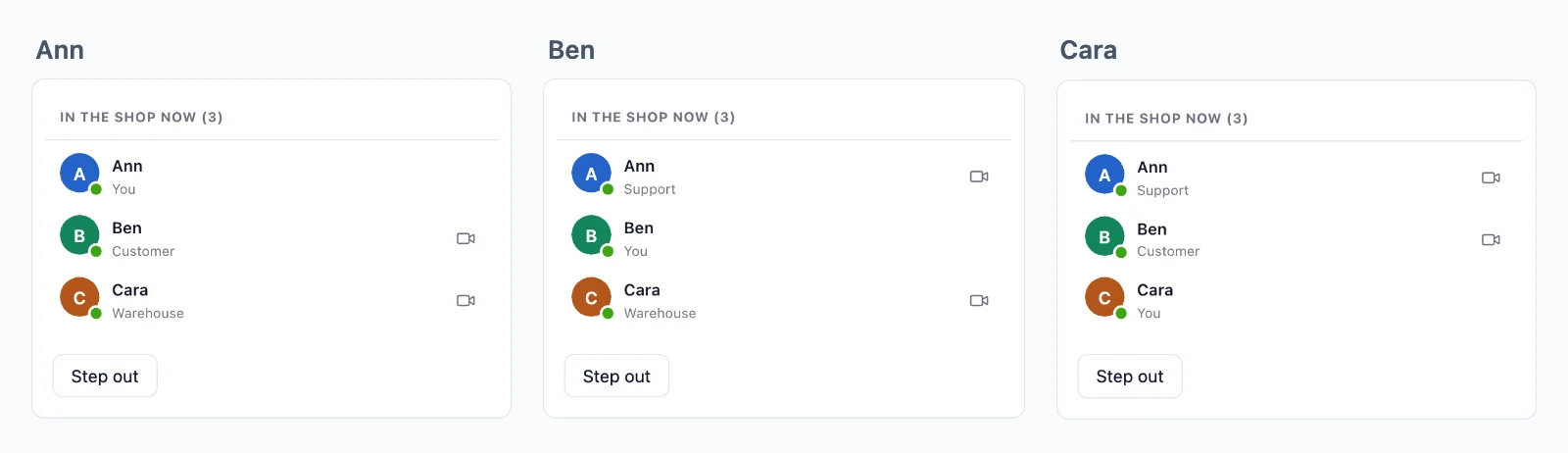
A presence room lists who is in it to everyone in it, each with what your rule gives about them, such as a name and a role. Here one room for the whole shop, named shop.
Your server decides who may join and what the others see of them. A page that joins asks your server first, and a rule answers: a function your server registers once for the room. WordPlus Cloud then holds the page to the answer (permissions). This rule says:
- Signed-in users join, and visitors do not.
- Each one is shown with their name and their role.
- Node
- PHP
- Python
- WordPress
realtime.room( 'shop', { presence: true }, async ( user ) => {
    // 1. Signed-in users only.
    if ( user === null ) return false;

    // 2. What the others see of them.
    return { info: { name: await nameOf( user ), role: await roleOf( user ) } };
} );
$realtime->room( 'shop', function ( $user ) {
    // 1. Signed-in users only.
    if ( null === $user ) {
        return false;
    }

    // 2. What the others see of them.
    return [ 'info' => [ 'name' => name_of( $user ), 'role' => role_of( $user ) ] ];
}, [ 'presence' => true ] );
def shop_member(user, p):
    # 1. Signed-in users only.
    if user is None:
        return False

    # 2. What the others see of them.
    return {"info": {"name": name_of(user), "role": role_of(user)}}

realtime.room("shop", shop_member, presence=True)
wordplus_realtime()->room( 'shop', function ( $user_id ) {
	// 1. Signed-in users only.
	if ( $user_id <= 0 ) {
		return false;
	}

	// 2. What the others see of them.
	$user = get_userdata( $user_id );

	return array( 'info' => array( 'name' => $user->display_name, 'role' => implode( ', ', $user->roles ) ) );
}, array( 'presence' => true ) );
The page draws the list and follows it:
const shop = rt.join( 'shop' );
shop.on( 'joined', () => drawAll( [ ...shop.members ] ) );   // [ [ id, info ], … ]
shop.on( 'join', ( { id, info } ) => add( id, info ) );
shop.on( 'leave', ( { id } ) => remove( id ) );
Ready-made, with a call button on each row: <wordplus-online room="shop" call="support:{pair}" type="video"></wordplus-online>. In React, usePresence( 'shop' ), or <OnlineList rt={ rt } room="shop" call="support:{pair}" /> of @wordplus/realtime-ui/react.
- A user with several tabs or devices is one member: they leave when the last one closes.
- Up to 1,000 members are listed in full. Past that, the room counts them, and
members()pages through them. - Info is sealed with the room key, so WordPlus Cloud lists people without reading what you show of them.
How many look at a page
A count needs no list and no sign in: a product page that says "12 people are looking at this". The room has no rule, so anyone joins it, signed in or not, and the page gets only how many are in it, never who.
- Node
- PHP
- Python
- WordPress
realtime.room( 'product:{id}', { public: true, count: true } );
$realtime->room( 'product:{id}', null, [ 'public' => true, 'count' => true ] );
realtime.room("product:{id}", public=True, count=True)
wordplus_realtime()->room( 'product:{id}', null, array( 'public' => true, 'count' => true ) );
const product = rt.join( 'product:42' );
product.on( 'count', ( n ) => ( looking.textContent = n > 1 ? n + ' people are looking at this' : '' ) );
Ready-made: <wordplus-online-count room="product:42"></wordplus-online-count>. Your server asks too, with realtime.in( 'product:42' ).count().
Variations
- Who is looking at a profile, for its owner: a presence room per profile whose rule lets in any signed-in user, and a
jointhat shows them. - Agents on duty for support: a presence room the agents join while they work, read by the page that offers a call (calls from a button).
- A list of online friends:
rt.online.watch( friendIds ), up to 1,000 users a connection.