Team meetings
A video meeting for each team, project or event: people join from a button, see and hear each other, share their screens, and leave. Your server decides who may join, and the lead ends the meeting for everyone from a button of their own.
This page builds it with you from an empty folder: a small Node.js app with a design team that Ann leads and Ben is on. Cara is not on the team, so the meeting turns her away. Every file is here in full, and you run it in three browser windows at the end. Then your own app changes three things.
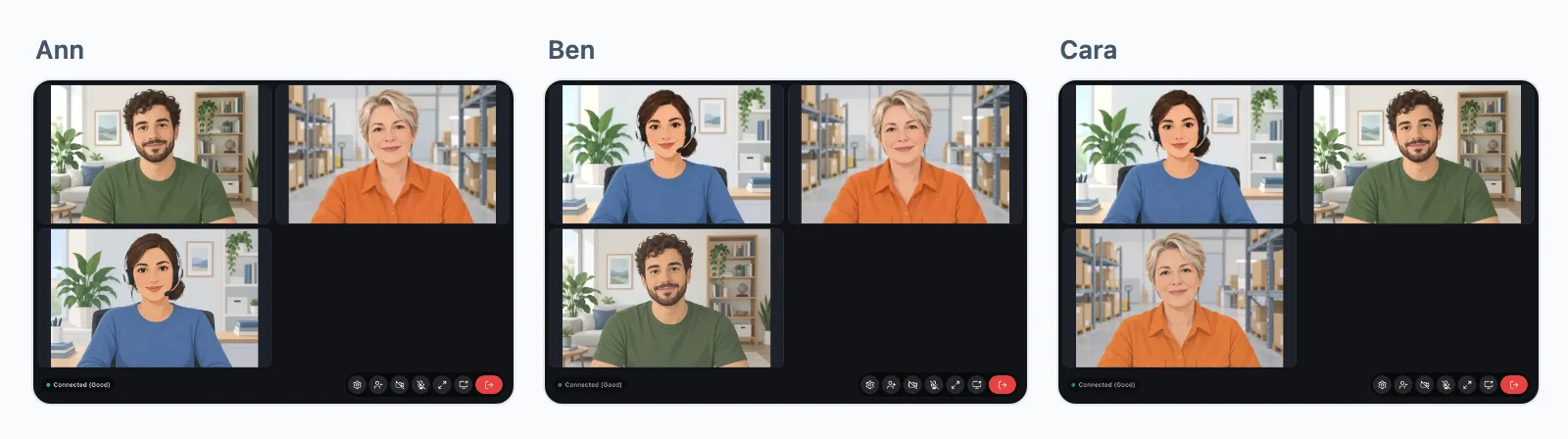
How it goes
Ann leads the design team, user 34 in your app. Ben is on the team, user 42. Cara is not, user 43.
- Ann presses Join the meeting. The button names the meeting
team:7, the group call of team 7. There is nothing to create first: the first one to join opens it. - Her page asks your server whether Ann may join
team:7: the SDK sends a request to/api/realtime/callson your own server, with her usual cookie. It is your own route, not ours: WordPlus Cloud never sees this request. - Your server runs your rule for Ann and team 7. She is on the team, so it says yes, and your server signs the answer with your secret.
- With that answer, Ann is in the meeting, on our media servers, with her camera and microphone.
- Ben joins the same way, and each sees and hears the other. Their video and sound are encrypted end to end, with a key your server gives only to those your rule lets in.
- Cara presses Join the meeting too. Your rule says no, as she is not on the team, and her page shows You cannot make this call.
- Ann presses End the meeting for everyone. Her page posts to a route of your own, which checks that she leads the team and ends the meeting: Ben is out at once.
A meeting also closes on its own once the last person leaves, and the same name opens a new one later.
You write none of the requests of steps 2 to 4: the SDK in the page and the WordPlus package on your server make them. You write the rule, one line for the route, the route that ends the meeting, and a page with the buttons, as below.
What you need
- Node.js 22 or newer.
- An app in WordPlus Cloud. Apps are in early access, so first ask for it. Then in your account, go to Apps, then Add app, and give it the address
http://localhost:3000. You get its key and its secret (getting started). - Three browser windows, each signed in as someone else: a normal window, a private one, and one of another browser.
Step 1. Make the project
Make a folder, and in it the file package.json:
mkdir team-meetings
cd team-meetings
{
  "name": "team-meetings",
  "private": true,
  "type": "module",
  "scripts": {
    "postinstall": "npm run build",
    "build": "esbuild page.js --bundle --format=esm --target=es2022 --outfile=public/page.js",
    "start": "node --env-file-if-exists=.env server.mjs"
  },
  "dependencies": {
    "@wordplus/realtime": "^1.0.0",
    "express": "5.3.0",
    "express-session": "1.19.0"
  },
  "devDependencies": {
    "esbuild": "0.28.2"
  }
}
- The dependencies: the WordPlus SDK, Express for the server, and express-session for who is signed in.
postinstallruns afternpm install: it bundles your page script. The browser files of the SDK, its worker, room client and ready-made parts, come from the package routes, so there is nothing to copy.buildbundlespage.jswith esbuild intopublic/page.js, which the browser loads.startstarts the server, with your keys from.env.
Step 2. Your keys
Make the file .env, with the key and secret of your app:
# Your app in WordPlus Cloud: Apps, then Add app,
# with http://localhost:3000 among its addresses.
WORDPLUS_SITE=
WORDPLUS_SECRET=
# Your own: openssl rand -hex 32. Keep it as long as the app.
WORDPLUS_LOCAL_KEY=
# Signs the session cookie: any long random string.
SESSION_SECRET=
WORDPLUS_SITEis the key of your app, such ass1500000007.WORDPLUS_SECRETis its secret. It stays on your server, and signs every answer of your rule.WORDPLUS_LOCAL_KEYis a key of your own, which seals what goes through WordPlus Cloud and makes the keys of encrypted meetings. Make one withopenssl rand -hex 32.SESSION_SECRETsigns the session cookie of this example: any long random string.
Step 3. The server
The file server.mjs. Read it from the top: each part has a comment, and the notes under it say more.
// Team meetings: a video meeting for the design team. Ann leads it, Ben is
// on the team, and Cara is not. The tutorial:
// https://docs.wordplus.cloud/use-cases/meetings/
//
//   cp .env.example .env   # your app key and secret, and a local key
//   npm install            # bundles page.js
//   npm start              # http://localhost:3000
import express from 'express';
import session from 'express-session';
import { createRealtime } from '@wordplus/realtime/server';

// Your users and your team. A real app has them in its database.
const USERS = {
    34: { name: 'Ann' },
    42: { name: 'Ben' },
    43: { name: 'Cara' },
};
const TEAM = { id: 7, name: 'Design team', lead: 34, members: [34, 42] };

// The WordPlus package, with your keys from .env.
const realtime = createRealtime({
    site: process.env.WORDPLUS_SITE,
    secret: process.env.WORDPLUS_SECRET,
    localKey: process.env.WORDPLUS_LOCAL_KEY,
    // The name the others see in the meeting.
    profile: (id) => (USERS[id] ? { name: USERS[id].name } : null),
});

// The rule: who may join the meeting of a team, such as team:7.
// It runs each time someone joins.
realtime.groupCalls('team:{id}', (user, { id }) => {
    // The members of the team, and nobody else.
    if (!(Number(id) === TEAM.id && TEAM.members.includes(user))) return false;
    // The lead hosts it: mute, let speak and remove, from the call screen.
    return user === TEAM.lead ? { admin: true } : true;
}, { encrypt: true }); // its video and sound encrypted end to end

const app = express();

// Who is signed in, kept in a session cookie.
// Your app has its own sign-in: this stands in for it.
app.use(session({
    secret: process.env.SESSION_SECRET || 'change me',
    resave: false,
    saveUninitialized: false,
}));

// The route the page asks before it joins, /api/realtime/calls,
// and the others the package answers, for the user of the session.
app.use('/api/realtime', realtime.node((req) => req.session.user ?? null));

app.use(express.urlencoded({ extended: false }));
app.use(express.static('public'));

// Sign in as Ann, Ben or Cara.
app.get('/login', (req, res) => res.send(`<!doctype html>
<html lang="en">
<head><meta charset="utf-8"><title>Sign in</title></head>
<body>
    <h1>Sign in</h1>
    <form method="post" action="/login">
        <button name="as" value="34">Ann, who leads the team</button>
        <button name="as" value="42">Ben, on the team</button>
        <button name="as" value="43">Cara, not on the team</button>
    </form>
</body>
</html>`));

app.post('/login', (req, res) => {
    if (USERS[req.body.as]) req.session.user = Number(req.body.as);
    res.redirect('/');
});

// Ending the meeting, for the lead alone: the button of Ann posts here,
// and your server ends the call for everyone in it.
app.post('/meetings/7/end', async (req, res) => {
    if (req.session.user !== TEAM.lead) return res.sendStatus(403);
    await realtime.call('team:7').end();
    res.redirect('/');
});

// The button that joins the meeting, for everyone: the rule decides.
const JOIN_BUTTON = `<wordplus-room room="team:7" type="video" title="Design team">
        Join the meeting
    </wordplus-room>`;
// The button that ends it, for the lead.
const END_BUTTON = `<form method="post" action="/meetings/7/end">
        <button>End the meeting for everyone</button>
    </form>`;

// The page: the settings of the user, then the buttons.
app.get('/', async (req, res) => {
    const me = req.session.user;
    if (!USERS[me]) return res.redirect('/login');

    const config = await realtime.config(me);
    const settings = JSON.stringify(config).replace(/</g, '\\u003c');

    res.send(`<!doctype html>
<html lang="en">
<head>
    <meta charset="utf-8">
    <title>${TEAM.name}</title>
    <script type="application/json" id="realtime">${settings}</script>
    <script type="module" src="/page.js"></script>
</head>
<body>
    <h1>Hello, ${USERS[me].name}</h1>
    ${JOIN_BUTTON}
    ${me === TEAM.lead ? END_BUTTON : ''}
</body>
</html>`);
});

const port = Number(process.env.PORT || 3000);
app.listen(port, () => console.log(`http://localhost:${port}`));
What each part does:
- Your users and your team. Ann, Ben and Cara, and the design team, team 7, which Ann leads and Ben is on. In your app, they come from your database.
- The WordPlus package.
createRealtime()takes your keys, where the page finds the browser files (roomsis the client of group calls), andprofile: the name the others see in the meeting. - The rule.
realtime.groupCalls()is called once, for every group call whose name fitsteam:{id}. It runs each time someone joins, withuserthe one joining andidthe team: yes for a member of team 7, no for anyone else. For Ann, who leads it, the yes is{ admin: true }: she hosts, and the call screen gives her Mute Microphone, Block and Allow Broadcast and Kick User on the tile of each of the others. Each asks your route, which runs this rule again for her.encrypt: trueencrypts the video and sound end to end. - The route.
app.use( '/api/realtime', … )is the one line that answers the page when it asks before joining (step 2 of how it goes). It gives the package the user of the session, and the package runs your rule for them./api/realtimeis only the usual address: any other works, as any address you like shows. - Signing in. Three buttons, for Ann, Ben and Cara. Your app has its own sign-in instead.
- Ending the meeting.
POST /meetings/7/endchecks that the one asking leads the team, thenrealtime.call( 'team:7' ).end()takes everyone out of the meeting at once. A page cannot end a meeting for the others by itself: it asks your server, which decides. - The buttons.
JOIN_BUTTONis the<wordplus-room>element, which joinsteam:7. Everyone gets it, Cara too, to show that the rule decides, not the page.END_BUTTONis a form that posts to the route of part 6, and only Ann gets it. - The page.
realtime.config( me )is what the page needs to connect as the signed-in user, and goes into the page as JSON. Then the buttons.
Step 4. The page script
The file page.js. It runs on every page:
// The script of every page: it connects, then starts the call screen,
// which shows the meeting once you join it.
import { connect } from '@wordplus/realtime';

// The settings your server wrote into the page: the user and their keys.
const settings = JSON.parse(document.getElementById('realtime').textContent);

const rt = await connect(settings);
await rt.callScreen();
connect()connects the page as the signed-in user, with the settings your server wrote into the page.rt.callScreen()starts the call screen. It makes the<wordplus-room>button work, and shows the meeting once you join: a grid of everyone, the one speaking marked, the camera, the microphone, screen sharing and Leave.
Step 5. Install and start
npm install
npm start
npm install also bundles public/page.js. npm start prints http://localhost:3000.
Step 6. Meet
- Be Ann. Open
http://localhost:3000in a normal window, and press Ann, who leads the team. You see Hello, Ann, Join the meeting, and End the meeting for everyone. - Be Ben. Open it in a private window, and press Ben, on the team. You see Hello, Ben, and Join the meeting.
- Be Cara. Open it in another browser, and press Cara, not on the team. She sees Join the meeting too.
- Ann joins. As Ann, press Join the meeting, and let the browser use the camera. The meeting opens, with her own camera.
- Ben joins. As Ben, press Join the meeting. Each window now shows the other person beside its own camera.
- Cara tries. As Cara, press Join the meeting. She sees You cannot make this call, and stays out.
- Ann ends it. As Ann, press End the meeting for everyone. The meeting closes for Ben too.
What happened
Each step of how it goes, and the code that did it:
| Step | What happened | The code |
|---|---|---|
| 1 | Ann pressed Join the meeting | <wordplus-room room="team:7"> in her page, from server.mjs |
| 2 | Her page asked your server | the SDK, started by connect() and rt.callScreen() in page.js, posting to /api/realtime/calls |
| 3 | Your server ran your rule, and signed a yes | app.use( '/api/realtime', realtime.node( … ) ), then realtime.groupCalls( 'team:{id}', … ) |
| 4, 5 | Ann, then Ben, were in the meeting | WordPlus Cloud, on its media servers, encrypted end to end by encrypt: true |
| 6 | Cara was turned away | the same rule, which said no for her |
| 7 | Ann ended it for everyone | END_BUTTON, then app.post( '/meetings/7/end', … ) and realtime.call( 'team:7' ).end() |
More on steps 2 to 4: how a page asks your server.
If it does not work
- Ann or Ben sees You cannot make this call: your rule said no. They must be in
TEAM.members, and the button must nameteam:7. - The meeting window opens, but nobody shows: group calls need the room client, which the package routes serve at
/api/realtime/files/…. They must answer GET too:app.use( '/api/realtime', realtime.node( … ) )does. - End the meeting answers Forbidden: only the lead may end it. Sign in as Ann.
- No page connects:
.envmust hold the key and secret of your app, andhttp://localhost:3000must be among its addresses in WordPlus Cloud. - No camera: a browser gives the camera only to
httpspages and tolocalhost.
Into your own app
The same pieces, with three changes:
- Your users and teams.
USERSandTEAMread your database, and the rule asks it whether the user is on the team named byid. - Your sign-in. In
realtime.node( ( req ) => … ), give the user your own sign-in found, in place ofreq.session.user. - The buttons. Show Join the meeting to the members of the team, and the buttons that run it to its lead. Your rule and your routes still decide, whatever the page shows.
On another stack, the guide of each sets up the route and the settings in the page: Next.js, Laravel, Django, FastAPI and WordPress. The rule is then the same in each language:
- Node
- PHP
- Python
- WordPress
// The members of the team, and nobody else.
realtime.groupCalls( 'team:{id}', async ( user, { id } ) => isMemberOf( id, user ), { encrypt: true } );   // encrypted end to end
// The members of the team, and nobody else.
$realtime->groupCalls( 'team:{id}', function ( $user, array $p ) {
    return is_member_of( $p['id'], $user );
}, [ 'encrypt' => true ] );   // encrypted end to end
# The members of the team, and nobody else.
def team_call(user, p):
    return is_member_of(p["id"], user)

realtime.group_calls("team:{id}", team_call, encrypt=True)   # encrypted end to end
// The members of the team, and nobody else.
wordplus_realtime()->group_calls( 'team:{id}', function ( $user_id, array $p ) {
	return my_team_has( (int) $p['id'], $user_id );
}, array( 'encrypt' => true ) );   // encrypted end to end
encrypt: trueencrypts its media end to end, with a key your server makes.- An answer for one person may say more:
{ hidden: true }for someone who listens unseen,{ publish: false }for someone who only watches (permissions).
Running it from your server
A lead the rule answers admin: true gets mute, let speak and remove on each tile of the call screen, with nothing more to write. Beyond those, the lead runs the meeting through routes of yours, as /meetings/7/end does above: mute someone, take them out, or end it. Each route checks that the lead asks, then calls one of these (buttons for the host):
- Node
- PHP
- Python
- WordPress
const meeting = realtime.call( 'team:7' );
await meeting.get();                       // who is in it, and what each sends
await meeting.mute( 42, 'microphone' );    // a microphone left on
await meeting.remove( 42 );                // out now, and their tokens from before refused
await meeting.end();                       // over, for everyone
$realtime->call( 'team:7' )->mute( 42, 'microphone' );
$realtime->call( 'team:7' )->remove( 42 );
$realtime->call( 'team:7' )->end();
realtime.call("team:7").mute(42, "microphone")
realtime.call("team:7").remove(42)
realtime.call("team:7").end()
wordplus_realtime()->call( 'team:7' )->mute( 42, 'microphone' );
wordplus_realtime()->call( 'team:7' )->remove( 42 );
wordplus_realtime()->call( 'team:7' )->end();
realtime.listCalls() lists the meetings going on, for a page that says which teams meet now.
Your own interface instead
The call screen and the button are optional. The same meeting with screens of your own, on the calls API, after connect():
const calls = await rt.calls();
const meeting = await calls.group( 'team:7', { type: 'video' } );

const media = await navigator.mediaDevices.getUserMedia( { video: true, audio: true } );
await meeting.setTrack( 'camera', media.getVideoTracks()[ 0 ] );
await meeting.setTrack( 'microphone', media.getAudioTracks()[ 0 ] );

meeting.on( 'person', ( person ) => {                                          // arrived, or what they send changed
    person.camera?.attach( tileOf( person.user ).video );
    person.screen?.attach( tileOf( person.user ).screen );
    person.microphone?.attach( tileOf( person.user ).audio );
} );
meeting.on( 'person_left', ( person ) => removeTile( person.user ) );
meeting.on( 'speakers', ( people ) => highlight( people.map( ( p ) => p.user ) ) );

shareButton.onclick = async () => {
    const screen = await navigator.mediaDevices.getDisplayMedia( { video: true } );
    await meeting.setTrack( 'screen_share', screen.getVideoTracks()[ 0 ] );
};
muteButton.onclick = () => meeting.setTrack( 'microphone', null );   // stops sending it
leaveButton.onclick = () => meeting.leave();
Group calls need the room client, which the package routes serve and the settings name, so connect( settings ) finds it (calls).
Variations
- A meeting with an agenda and notes: a room of the same name beside it, with
emit: [ 'note' ](editing together). - Invite someone who is not on the team: a call between two people that someone adds to becomes a group call of its own (calls).
- Speakers and an audience: most people listening, a few speaking (classes and audio rooms).
- A lobby before the meeting: the lead admits each guest (waiting rooms).
- Credits: up to 32 people on video at once take no credits with 1,000 connections, and each one above takes a credit a minute (limits).