Calls from a button
A customer presses Call support on your site, and it rings for their support agent, in every tab the agent has open. The agent answers, and the two talk on video, encrypted end to end.
This page builds it with you from an empty folder: a small Node.js app where Ben, a customer, calls Ann, his support agent. Every file is here in full, and you run it in two browser windows at the end. Then your own app changes three things.
How it goes
Ann is a support agent, user 34 in your app. Ben is a customer, user 42.
- Ben presses Call support on a page of your site. The button names Ann, and the call
support:34:42: the ids of the two of them, the smaller first. - His page asks your server whether Ben may call Ann: the SDK sends a request to
/api/realtime/callson your own server, with his usual cookie. It is your own route, not ours: WordPlus Cloud never sees this request. - Your server runs your rule for Ben and Ann. It says yes, and your server signs the answer with your secret.
- With that answer, WordPlus Cloud rings Ann in every tab she has open, for up to 45 seconds.
- Ann presses Answer. Her page asks your server the same way, and your rule says yes again.
- They talk on video, encrypted end to end. The call connects on any network: directly between their devices, through our relays when a firewall blocks that, or through our media servers when even the relays cannot reach (how it connects).
- Either one hangs up, and the call ends for both.
You write none of these requests. The SDK in the page and the WordPlus package on your server make them. You write the rule, one line for the route, and a page with a button, as below.
What you need
- Node.js 22 or newer.
- An app in WordPlus Cloud. Apps are in early access, so first ask for it. Then in your account, go to Apps, then Add app, and give it the address
http://localhost:3000. You get its key and its secret (getting started). - Two browser windows, a normal one and a private one, so you can be Ben in one and Ann in the other.
Step 1. Make the project
Make a folder, and in it the file package.json:
mkdir support-calls
cd support-calls
{
  "name": "support-calls",
  "private": true,
  "type": "module",
  "scripts": {
    "postinstall": "npm run build",
    "build": "esbuild page.js --bundle --format=esm --target=es2022 --outfile=public/page.js",
    "start": "node --env-file-if-exists=.env server.mjs"
  },
  "dependencies": {
    "@wordplus/realtime": "^1.0.0",
    "express": "5.3.0",
    "express-session": "1.19.0"
  },
  "devDependencies": {
    "esbuild": "0.28.2"
  }
}
- The dependencies: the WordPlus SDK, Express for the server, and express-session for who is signed in.
postinstallruns afternpm install: it bundles your page script. The browser files of the SDK, its worker, room client and ready-made parts, come from the package routes, so there is nothing to copy.buildbundlespage.jswith esbuild intopublic/page.js, which the browser loads.startstarts the server, with your keys from.env.
Step 2. Your keys
Make the file .env, with the key and secret of your app:
# Your app in WordPlus Cloud: Apps, then Add app,
# with http://localhost:3000 among its addresses.
WORDPLUS_SITE=
WORDPLUS_SECRET=
# Your own: openssl rand -hex 32. Keep it as long as the app.
WORDPLUS_LOCAL_KEY=
# Signs the session cookie: any long random string.
SESSION_SECRET=
WORDPLUS_SITEis the key of your app, such ass1500000007.WORDPLUS_SECRETis its secret. It stays on your server, and signs every answer of your rule.WORDPLUS_LOCAL_KEYis a key of your own, which seals what goes through WordPlus Cloud. Make one withopenssl rand -hex 32.SESSION_SECRETsigns the session cookie of this example: any long random string.
Step 3. The server
The file server.mjs. Read it from the top: each part has a comment, and the notes under it say more.
// Calls from a button: Ben, a customer, calls Ann, his support agent.
// The tutorial: https://docs.wordplus.cloud/use-cases/support-calls/
//
//   cp .env.example .env   # your app key and secret, and a local key
//   npm install            # bundles page.js
//   npm start              # http://localhost:3000
import express from 'express';
import session from 'express-session';
import { createRealtime } from '@wordplus/realtime/server';

// Your users. A real app has them in its database.
const USERS = {
    34: { name: 'Ann', agent: true },
    42: { name: 'Ben', agent: false },
};
const isAgent = (id) => USERS[id]?.agent === true;

// The WordPlus package, with your keys from .env.
const realtime = createRealtime({
    site: process.env.WORDPLUS_SITE,
    secret: process.env.WORDPLUS_SECRET,
    localKey: process.env.WORDPLUS_LOCAL_KEY,
    // The name the other person sees in the call.
    profile: (id) => (USERS[id] ? { name: USERS[id].name } : null),
});

// The rule: who may call whom.
// It runs when Ben calls, and again when Ann answers.
realtime.calls('support:{a}:{b}', (user, withUser, { a, b }) => {
    // 1. Both people are the two in the name, such as support:34:42.
    const named = [a, b];
    if (!named.includes(String(user))) return false;
    if (!named.includes(String(withUser))) return false;

    // 2. One of them is an agent: customers never call each other.
    return isAgent(user) || isAgent(withUser);
});

const app = express();

// Who is signed in, kept in a session cookie.
// Your app has its own sign-in: this stands in for it.
app.use(session({
    secret: process.env.SESSION_SECRET || 'change me',
    resave: false,
    saveUninitialized: false,
}));

// The route the page asks before a call, /api/realtime/calls,
// and the others the package answers, for the user of the session.
app.use('/api/realtime', realtime.node((req) => req.session.user ?? null));

app.use(express.urlencoded({ extended: false }));
app.use(express.static('public'));

// Sign in as Ben or Ann.
app.get('/login', (req, res) => res.send(`<!doctype html>
<html lang="en">
<head><meta charset="utf-8"><title>Sign in</title></head>
<body>
    <h1>Sign in</h1>
    <form method="post" action="/login">
        <button name="as" value="42">Ben, a customer</button>
        <button name="as" value="34">Ann, a support agent</button>
    </form>
</body>
</html>`));

app.post('/login', (req, res) => {
    if (USERS[req.body.as]) req.session.user = Number(req.body.as);
    res.redirect('/');
});

// The button that calls Ann, user 34, for Ben. A note for Ann.
const CALL_BUTTON = `<wordplus-call to="34" call="support:{pair}" type="video" name="Ann">
        Call support
    </wordplus-call>`;
const ON_DUTY = '<p>You are on duty. Calls from customers ring here.</p>';

// The page: the settings of the user, then the button or the note.
app.get('/', async (req, res) => {
    const me = req.session.user;
    if (!USERS[me]) return res.redirect('/login');

    const config = await realtime.config(me);
    const settings = JSON.stringify(config).replace(/</g, '\\u003c');

    res.send(`<!doctype html>
<html lang="en">
<head>
    <meta charset="utf-8">
    <title>Support</title>
    <script type="application/json" id="realtime">${settings}</script>
    <script type="module" src="/page.js"></script>
</head>
<body>
    <h1>Hello, ${USERS[me].name}</h1>
    ${isAgent(me) ? ON_DUTY : CALL_BUTTON}
</body>
</html>`);
});

const port = Number(process.env.PORT || 3000);
app.listen(port, () => console.log(`http://localhost:${port}`));
What each part does:
- Your users. Ann, an agent, and Ben, a customer. In your app, they are your users from your database.
- The WordPlus package.
createRealtime()takes your keys, where the page finds the browser files, andprofile: the name the other person sees in the call. - The rule.
realtime.calls()is called once, for every call whose name fitssupport:{a}:{b}. When Ben calls, it runs withuser42 (Ben) andwithUser34 (Ann). When Ann answers, the other way round. It says yes only when both people are the two in the name, and one of them is an agent. - The route.
app.use( '/api/realtime', … )is the one line that answers the page when it asks before a call (step 2 of how it goes). It gives the package the user of the session, and the package runs your rule for them./api/realtimeis only the usual address: any other works, as any address you like shows. - Signing in. Two buttons, Ben and Ann. Your app has its own sign-in instead.
- The button and the note.
CALL_BUTTONis the<wordplus-call>element: a button that calls user34, Ann, in the callsupport:{pair}, which becomessupport:34:42.ON_DUTYis the note Ann sees instead: her page only waits for calls. - The page.
realtime.config( me )is what the page needs to connect as the signed-in user, and goes into the page as JSON. Then the button for Ben, or the note for Ann.
Step 4. The page script
The file page.js. It runs on every page, for Ben and for Ann:
// The script of every page: it connects,
// then starts the call screen, which rings here and shows the call.
import { connect } from '@wordplus/realtime';

// The settings your server wrote into the page: the user and their keys.
const settings = JSON.parse(document.getElementById('realtime').textContent);

const rt = await connect(settings);
await rt.callScreen();
connect()connects the page as the signed-in user, with the settings your server wrote into the page.rt.callScreen()starts the call screen. For Ann, it rings when someone calls. For Ben, it makes the<wordplus-call>button work, and shows the call window. A page without it neither calls nor rings.
Step 5. Install and start
npm install
npm start
npm install also bundles public/page.js. npm start prints http://localhost:3000. Your folder now holds:
support-calls/
├── .env
├── package.json
├── page.js
├── server.mjs
└── public/          made by npm install: page.js bundled
Step 6. Make the call
- Be Ben. Open
http://localhost:3000in a normal window, and press Ben, a customer. You see Hello, Ben, and the Call support button. - Be Ann. Open
http://localhost:3000in a private window, and press Ann, a support agent. You see Hello, Ann. You are on duty. - Call. As Ben, press Call support, and let the browser use the camera. Ben sees the call window, calling Ann.
- It rings. The window of Ann shows Ben calling, with a green button to answer and a red one to decline.
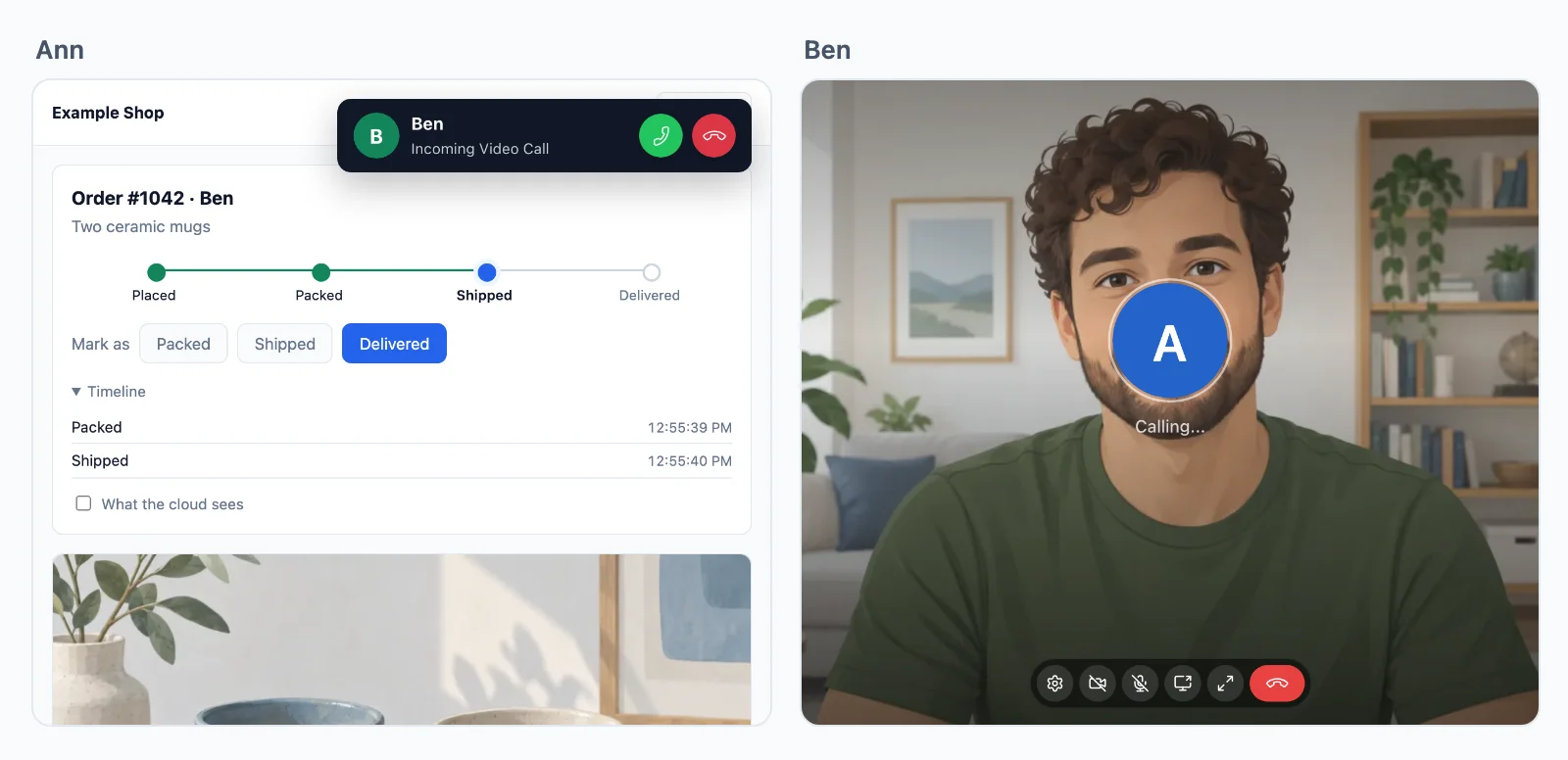
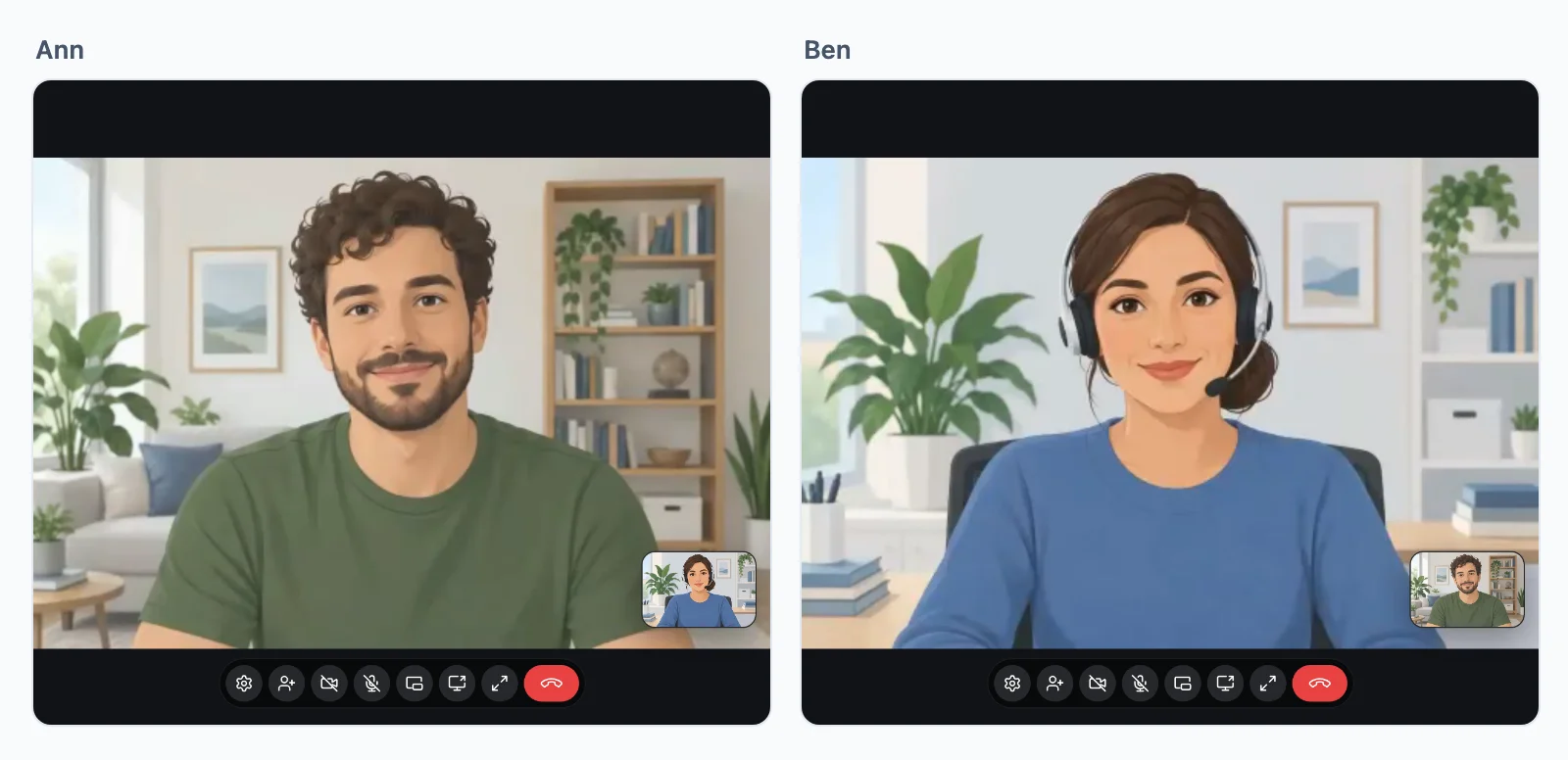
- Answer. As Ann, press the green button, and let the browser use the camera. Each window shows the other person, and their own camera in a corner.
- Hang up. Move the pointer over the call, and press the red button. The call ends in both windows.
What happened
Each step of how it goes, and the code that did it:
| Step | What happened | The code |
|---|---|---|
| 1 | Ben pressed Call support | <wordplus-call to="34" call="support:{pair}"> in the page of Ben, from server.mjs |
| 2 | His page asked your server | the SDK, started by connect() and rt.callScreen() in page.js, posting to /api/realtime/calls |
| 3 | Your server ran your rule, and signed a yes | app.use( '/api/realtime', realtime.node( … ) ), then realtime.calls( 'support:{a}:{b}', … ) |
| 4 | It rang for Ann | rt.callScreen() in the page of Ann |
| 5 | Ann answered, and your rule ran again | the same rule, with user 34 and withUser 42 |
| 6 | They talked | WordPlus Cloud, directly or through our relays or media servers |
More on steps 2 to 4: how a page asks your server.
If it does not work
- Nothing rings for Ann: her window must be open on
http://localhost:3000, signed in as Ann. The call screen ofpage.jsis what rings, so a page without it never rings. - Ben sees You cannot make this call: your rule said no. The name of the call must hold both ids, and one of the two must be an agent.
- No page connects:
.envmust hold the key and secret of your app, andhttp://localhost:3000must be among its addresses in WordPlus Cloud. - No camera: a browser gives the camera only to
httpspages and tolocalhost.
Into your own app
The same four pieces, with three changes:
- Your users.
USERSandisAgent()read your own database. - Your sign-in. In
realtime.node( ( req ) => … ), give the user your own sign-in found, in place ofreq.session.user. - The agent to call. Your server writes into
tothe agent your app gives this customer, or one on duty (variations).
On another stack, the guide of each sets up the route and the settings in the page: Next.js, Laravel, Django, FastAPI and WordPress. The rule is then the same in each language:
- Node
- PHP
- Python
- WordPress
// Calls named after their two people, such as support:34:42.
realtime.calls( 'support:{a}:{b}', async ( user, withUser, { a, b } ) => {
    // 1. Both people are the two in the name.
    const named = [ a, b ];
    if ( !named.includes( String( user ) ) || !named.includes( String( withUser ) ) ) {
        return false;
    }

    // 2. One of them is an agent.
    return ( await isAgent( user ) ) || ( await isAgent( withUser ) );
}, {
    // Whom Add person offers once the call runs: an agent may add the other agents.
    people: async ( user ) => ( ( await isAgent( user ) ) ? agentIds() : [] ),
} );
// Calls named after their two people, such as support:34:42.
$realtime->calls( 'support:{a}:{b}', function ( $user, $with, array $p ) {
    // 1. Both people are the two in the name.
    $named = [ $p['a'], $p['b'] ];
    if ( ! in_array( (string) $user, $named, true ) || ! in_array( (string) $with, $named, true ) ) {
        return false;
    }

    // 2. One of them is an agent.
    return is_agent( $user ) || is_agent( $with );
}, [
    // Whom Add person offers once the call runs: an agent may add the other agents.
    'people' => fn ( $user ) => is_agent( $user ) ? agent_ids() : [],
] );
# Calls named after their two people, such as support:34:42.
def may_call_support(user, with_user, p):
    # 1. Both people are the two in the name.
    named = (p["a"], p["b"])
    if str(user) not in named or str(with_user) not in named:
        return False

    # 2. One of them is an agent.
    return is_agent(user) or is_agent(with_user)

# Whom Add person offers once the call runs: an agent may add the other agents.
def people_to_add(user, call):
    return agent_ids() if is_agent(user) else []

realtime.calls("support:{a}:{b}", may_call_support, people=people_to_add)
// Calls named after their two people, such as support:34:42.
wordplus_realtime()->calls( 'support:{a}:{b}', function ( $user_id, $with, array $p ) {
	// 1. Both people are the two in the name.
	$named = array( (int) $p['a'], (int) $p['b'] );
	if ( ! in_array( $user_id, $named, true ) || ! in_array( $with, $named, true ) ) {
		return false;
	}

	// 2. One of them is an agent.
	return user_can( $user_id, 'my_support' ) || user_can( $with, 'my_support' );
}, array(
	// Whom Add person offers once the call runs: an agent may add the other agents.
	'people' => function ( $user_id ) {
		if ( ! user_can( $user_id, 'my_support' ) ) {
			return array();
		}

		return array_map( 'intval', get_users( array( 'capability' => 'my_support', 'fields' => 'ID' ) ) );
	},
) );
peopleis whom Add person offers once the call runs: an agent may add the other agents, who join it as a call of three, and a customer nobody.- Any user id your app gives works: numbers, and ids of text such as UUIDs or Auth0 ids, which is why the rule compares them as text (calls).
Your own interface instead
The call screen and the button are optional. The same flow with screens of your own, on the calls API, after connect():
const calls = await rt.calls();
On the page of Ben, steps 1 to 3:
callButton.onclick = async () => {
    const camera = await navigator.mediaDevices.getUserMedia( { video: true, audio: true } );
    const call = await calls.start( 'support:34:42', { to: 34, type: 'video' } );   // your rule runs here
    call.setTrack( 'camera', camera.getVideoTracks()[ 0 ] );
    call.setTrack( 'microphone', camera.getAudioTracks()[ 0 ] );
    call.on( 'state', ( state ) => showState( state ) );    // ringing, connecting, connected, reconnecting, ended
    call.on( 'remote', () => call.remote.camera?.attach( theirVideo ) );
    hangUp.onclick = () => call.end();                      // step 7
};
On every page of Ann, steps 4 and 5:
calls.on( 'incoming', ( incoming ) => {
    showRinging( incoming.info.name, incoming.type );                       // step 4
    answerButton.onclick = async () => showCall( await incoming.accept() ); // step 5, your rule runs again
    declineButton.onclick = () => incoming.decline( 'busy' );
} );
- Adding a colleague:
await call.add( 56 )rings them in, and both sides getgroup, the call going on as a group call (calls). - A connection may drop for 45 seconds during a call and come back without ending it.
- Why it ended:
call.endReason, such ashangup,rejected,busyorno_answer(calls).
Variations
- Voice only, for a helpline:
type="audio"on the button, and no camera asked for. - A time limit of your own:
calls.on( 'call', ( call ) => setTimeout( () => call.end(), 20 * 60 * 1000 ) ). - The agent on duty: a presence room the agents join while they work, and the button calls one of them, shown while someone is in it (who is online and who is here).
- On the phone of the agent: the iOS and Android apps ring and answer the same calls, with the native call screen of Better Messages (iOS calls, Android calls).