Presence and who is online
Three ways to show people: a presence room lists who is in it to everyone in it. A count says how many are in a room, at any size. And who is online is known across your whole app.
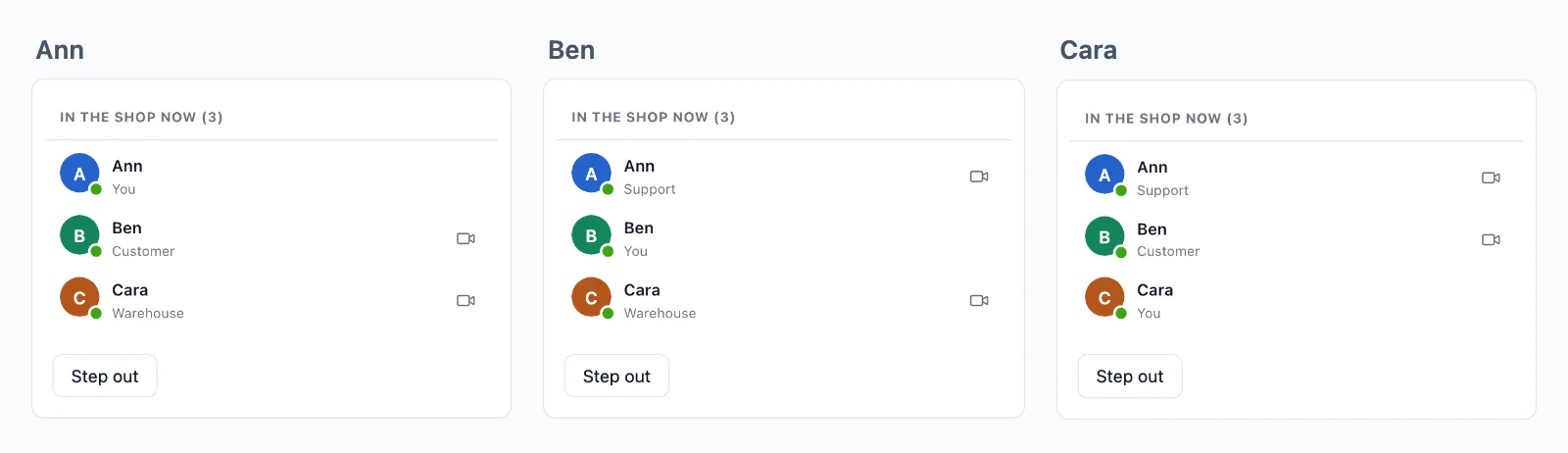
A presence room
A presence room is named after the place people are in: room:7 for room 7. A page that joins it asks your server first, and a rule answers: a function your server declares once for every room whose name fits room:{id}. WordPlus Cloud then holds the page to the answer (permissions). This rule says:
- Visitors who are not signed in stay out.
- Those who may enter the room join, and nobody else.
mayEnteris your own check. - Each one is shown to the others with their name and their role, your profile when the rule gives nothing.
- Node
- PHP
- Python
realtime.room( 'room:{id}', async ( user, { id } ) => {
    // 1. Visitors stay out.
    if ( user === null ) return false;

    // 2. Those who may enter, and nobody else.
    if ( !( await mayEnter( user, id ) ) ) return false;

    // 3. What the others see of them.
    return { info: { name: await nameOf( user ), role: 'agent' } };
}, { presence: true } );
$realtime->room( 'room:{id}', function ( $user, array $p ) {
    // 1. Visitors stay out.
    if ( null === $user ) {
        return false;
    }

    // 2. Those who may enter, and nobody else.
    if ( ! may_enter( $user, $p['id'] ) ) {
        return false;
    }

    // 3. What the others see of them.
    return [ 'info' => [ 'name' => name_of( $user ), 'role' => 'agent' ] ];
}, [ 'presence' => true ] );

// Laravel: routes/channels.php, where an array is the info of the member and makes the room a presence room.
Broadcast::channel( 'room.{id}', function ( User $user, string $id ) {
    // 1. A visitor never gets here. 2. Those who may enter, and nobody else.
    if ( ! $user->canEnter( $id ) ) {
        return false;
    }

    // 3. What the others see of them.
    return [ 'name' => $user->name, 'role' => 'agent' ];
} );
def may_enter_room(user, p):
    # 1. Visitors stay out.
    if user is None:
        return False

    # 2. Those who may enter, and nobody else.
    if not may_enter(user, p["id"]):
        return False

    # 3. What the others see of them.
    return {"info": {"name": name_of(user), "role": "agent"}}

realtime.room("room:{id}", may_enter_room, presence=True)
- A member is the asking user, by their id as a string. A user with several tabs or devices is one member: they leave when their last connection does.
infois at most 4 KB, sealed with the room key: WordPlus Cloud lists members without reading it.truein a presence room gives them your profile.- Up to 1,000 members are listed in full, with
joinandleave. Past that, the room counts them, andmembers()pages through them, up to 100,000.
const room = rt.join( 'room:7' );
room.on( 'joined', () => draw( [ ...room.members ] ) );   // [ [ id, info ], … ]
room.on( 'join', ( { id, info } ) => add( id, info ) );
room.on( 'leave', ( { id } ) => remove( id ) );
A move to another server shows nobody leaving. In React, usePresence( 'room:7' ) gives the members and updates with them (React).
Counting
count: true gives a room a live count, without a list: room.on( 'count', ( n ) => … ), at most once a second, and room.count holds the latest. A presence room counts its members. Any other room its connections. Your server asks with realtime.room( room ).count().
Who is online, across your app
- Online: every connection whose user your server vouched for (its identity, which
config()and the keys route give) makes that user online. They go offline 10 seconds after their last connection closes, so a reload does not flicker. - Who appears: every identified user, unless your server marks them
hidden, for a "Hide my status" setting. - Who may watch: identified users only, up to 1,000 users a connection.
rt.online.watch( [ 34, 43 ] ).on( 'change', ( { id, online, at } ) => dot( id, online ) );   // their status now, then every change
rt.online.has( 34 );                                         // for a user watched
rt.online.lastSeen( 43 );                                    // when, in ms, for one offline
rt.online.on( 'count', ( n ) => showOnline( n ) );           // how many are online, live
const { ids, next } = await rt.online.list();                // a page of who is online
Your server says who stays hidden, with hidden, which answers for each user, and asks who is online itself:
- Node
- PHP
- Python
const realtime = createRealtime( { /* … */ hidden: async ( user ) => ( await settingsOf( user ) ).hideStatus } );   // "Hide my status"
await realtime.online.has( 42 );   // and .count(), .list(), .states( [ 42, 43 ] )
$realtime = Realtime::fromEnvironment( [ 'hidden' => fn ( $user ) => settings_of( $user )->hide_status ] );   // "Hide my status"
$realtime->online()->has( 42 );   // and ->count(), ->list(), ->states( [ 42, 43 ] )
realtime = Realtime.from_environment(hidden=lambda user: settings_of(user).hide_status)   # "Hide my status"
realtime.online.has(42)   # and .count(), .list(), .states([42, 43])
In React, useOnline( [ 34, 43 ], { count: true } ), from @wordplus/realtime/react.
Ready-made
Optional, as every ready-made part: the presence room above is all a list needs, drawn your way (your own interface). These are the ready-made ones.
The Better Messages members list on a presence room, with a call button for each of the others, and a live count:
<online-list room="room:7" title="In the room" token-url="/api/call-token" type="video"></online-list>
<online-count room="product:7"></online-count>
await rt.callScreen() loads them with the call screen, rt.ui() without. In React, <OnlineList tokenUrl> and <OnlineCount> (React). token-url is your route for a call: pressing the call button on a row asks it ?to=34&type=video, and it checks whatever your app needs and answers { token } (who may call). Each of the others has the button, and someone your route refuses is told so as they press. Without token-url, the list has no call buttons.
Use cases
Each with the rules of your server and the code of the page:
- Who is online and who is here: a dot on every avatar, the people in a room, and a live count
- Editing together: who is in a document, their cursors and their changes