The Laravel example
A whole shop on Laravel, in the package examples/laravel: sign in as Ann (support), Ben (a customer) or Cara (the warehouse), each in a browser of their own, and try everything this guide covers.
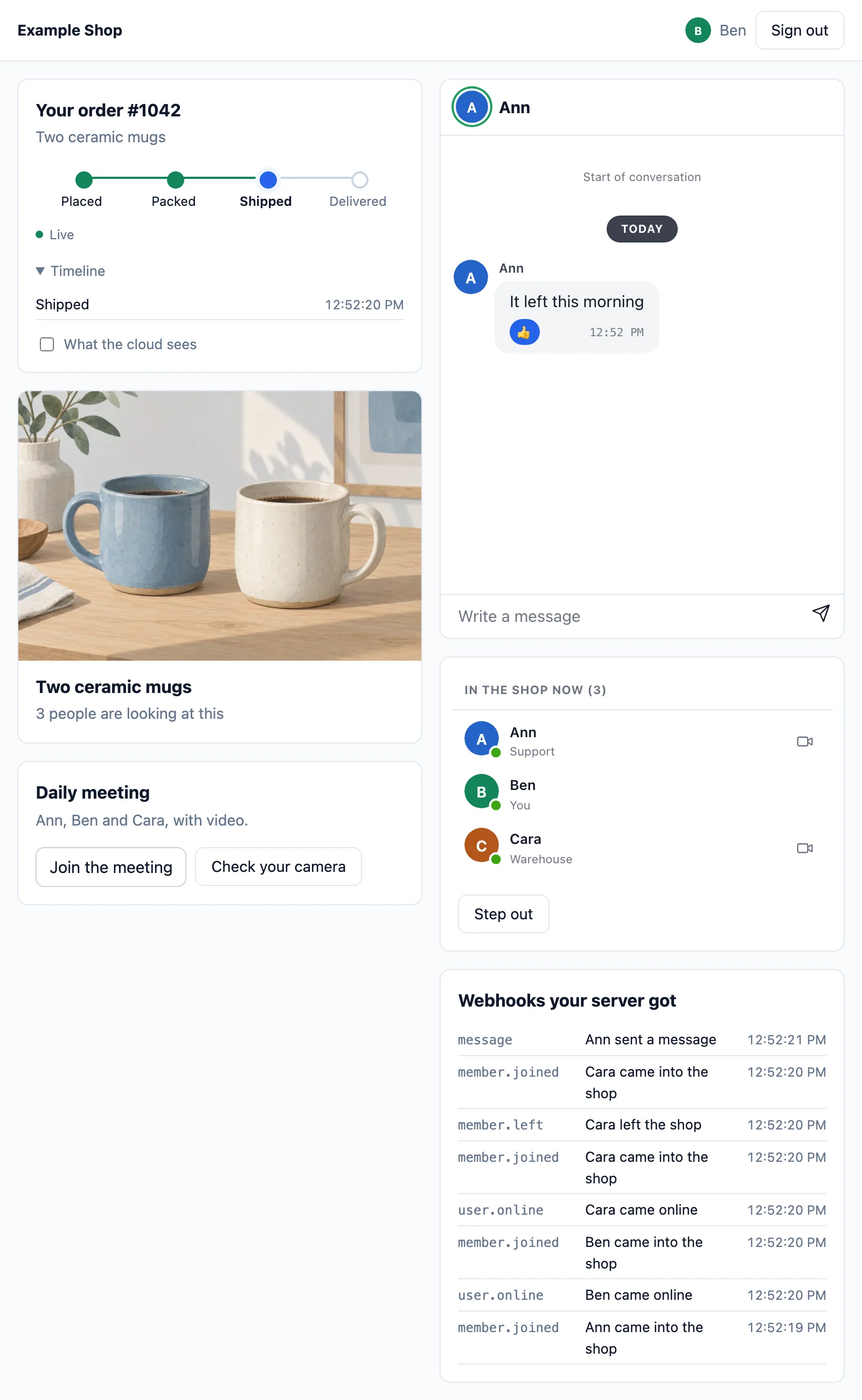
| On the page | What makes it |
|---|---|
| The order of Ben follows as Ann moves it on, and Ben alone gets a notice | orders.{order} in routes/channels.php, the OrderUpdated event broadcast toOthers(), and Realtime::toUser() (sending) |
| The chat of Ann and Ben, with typing, reactions and read ticks | <wordplus-chat> on the chat.{a}.{b} room, which lets pages send them. The app keeps the conversation from the webhook and gives it back from GET /chat/messages (keeping the conversation). The name and picture of the other side above it from the directory |
| Who is in the shop, with a call button for each | <wordplus-online> on the shop presence room, the name and role of each member |
| The daily meeting | <wordplus-room>, a group call. AppServiceProvider says who may call whom |
| The order timeline, and what the cloud carried of it | the order room history. GET /orders/{order}/wire seals the update as the app sends it, with the room key (encryption) |
| How many are looking at the mugs | product.{id}, a public channel with 'count' => true (counting) |
| The webhooks the app got | Realtime::on('*') in AppServiceProvider, which sends each on to the shop webhooks room (webhooks) |
Try it online at laravel.docs.wordplus.cloud: this example as a demo, where every visitor gets a shop of their own for a day, and its links open Ben and Cara in windows of their own. Its calls end after 10 minutes and its meetings after 15 (limits in the demo part, which the page keeps to).
Run it
cd examples/laravel
cp .env.example .env       # then the key and secret of your app (http://localhost:8000 among its addresses) and a local key
composer setup             # composer install, the app key, the database with Ann, Ben and Cara, npm install and the build
php artisan serve          # http://localhost:8000
Open it in two browsers (or a private window), sign in as Ann in one and Ben in the other, and move the order on, chat, and call. It takes wordplus/realtime-php from this repository. In your own app, composer require wordplus/realtime-php.
Its files
| File | |
|---|---|
config/broadcasting.php, .env.example | the wordplus connection, and the app credentials |
routes/channels.php | the rooms of the order, the chat, the shop, the product and the webhooks: who may join, and what each keeps and allows |
app/Events/OrderUpdated.php | the order update, broadcast now |
app/Http/Controllers/ShopController.php | the shop page, moving the order on, and what the cloud carried of it |
app/Providers/AppServiceProvider.php | who may call whom, the daily meeting, and the webhooks |
app/Support/Shop.php | the shops, by number: their people, order and room names |
app/Support/Demo.php, app/Http/Middleware/DemoWindow.php | the demo part alone (WORDPLUS_DEMO=1): a shop for each visitor, its windows, and the frame around the page |
resources/views/shop.blade.php | @wordplusRealtime, and the shop data for the page |
resources/js/shop.js | the page: connect(), the order, the product, the chat, who is in the shop, the webhooks, the meeting and the call screen. The same file runs the shop in every example |
database/seeders/DatabaseSeeder.php | Ann (34), Ben (42) and Cara (43), and the order of Ben |