Getting started
The WordPlus realtime SDK gives any WordPress plugin, theme or custom code realtime features on a site with a WordPlus Cloud subscription:
- Rooms: events from your server to browsers and between browsers, with presence, live counts and 5 minutes of history for pages that reconnect. Who is online across the site. And sending to a user. See rooms, presence, sending from your server and events from the page.
- Calls between two people: they ring in the browser, run directly between the two browsers, and fall back to TURN, then to a media server, when the network needs it. See calls.
- Group calls: a room on the WordPlus Cloud media servers. See group calls.
- The Better Messages screens, ready-made: the call screen, who is in a room, and the chat, with no JavaScript to write. See the call screen.
- Encryption and the WordPress users: what you send is sealed with keys only the site and its users hold, and the site users are one directory every plugin shares. See encryption.
Everything rides the one connection a page shares with the WordPlus plugins. That connection goes straight to a realtime server and moves to another one without a drop when a server restarts.
Try it live at wordpress.docs.wordplus.cloud: the example plugin as a demo, a shop of your own for a day, with Ben and Cara opening in windows of their own.
1. Install
composer require wordplus/realtime
The Composer autoloader includes realtime.php. Without Composer, unzip the package into your plugin, for example into its vendor folder, and require its realtime.php from your plugin main file. The zip of each version is on GitHub and packages.wordplus.cloud.
WordPlus mirrors every version on its own Composer repository. To install from there instead of Packagist, run composer config repositories.wordplus composer https://packages.wordplus.cloud/composer first.
Every plugin may bundle its own copy. The newest copy on the site answers wordplus_realtime(), and the newest connector serves every page, so plugins built on different versions work side by side. Call wordplus_realtime() from plugins_loaded on.
2. The site credentials
The SDK works on a site that has its WordPlus Cloud credentials: a site key and a secret. Every WordPlus plugin on the site shares them in the option wordplus_cloud_license.
- A site running a WordPlus plugin (Better Messages, for example) has them once its licence is active.
- Any other site connects once, from your plugin settings page:
if ( ! wordplus_realtime()->available() ) {
	printf(
		'<a class="button" href="%s">%s</a>',
		esc_url( wordplus_realtime()->connect()->url( admin_url( 'admin.php?page=my-plugin' ) ) ),
		esc_html__( 'Connect to WordPlus Cloud', 'my-plugin' )
	);
}
The administrator approves in their WordPlus Cloud account, which uses one of their subscription sites. They come back to your page with wordplus_realtime=connected, or denied or failed.
The secret never leaves the site server, and it signs nothing itself. Tokens, publishes and calls each use their own key derived from it.
Only the pages of the site connect. A page on another address, a subdomain included, is refused with wrong_origin. So neither the site key, which every page carries, nor its secret works on another website.
3. A first room
Declare the rooms your plugin owns, by pattern, and say who may join them:
add_action( 'plugins_loaded', function () {
	wordplus_realtime()->room( 'order:{id}', function ( $user_id, array $p ) {
		return $user_id > 0 && my_shop_customer_of( (int) $p['id'] ) === $user_id;
	}, array( 'history' => 20 ) );
} );
Send an event from your server:
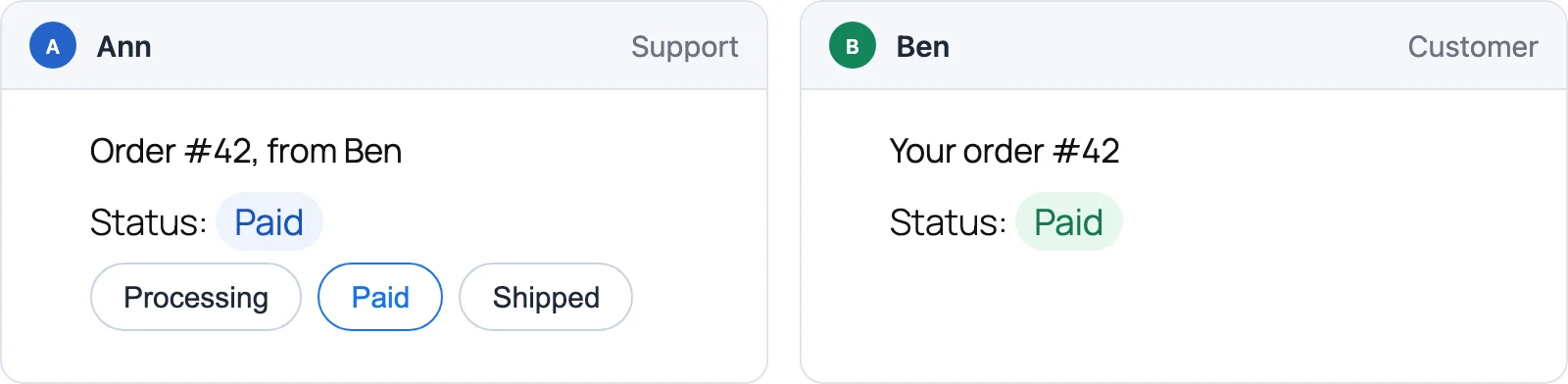
wordplus_realtime()->to( 'order:42' )->emit( 'updated', array( 'status' => 'paid' ) );
Listen in the browser. Your script depends on the SDK handle:
wp_enqueue_script( 'my-shop', plugins_url( 'shop.js', __FILE__ ), array( wordplus_realtime()->script() ), '1.0.0', true );
// Null on a site without its credentials: there is nothing to listen to there.
const rt = wordplusRealtimeClient.page();

if ( rt ) {
	rt.join( 'order:42' ).on( 'updated', ( data ) => showStatus( data.status ) );
}
script()always returns a handle. On a site without credentials it returns an empty one, so your script still loads andpage()answersnull.page()is the rooms of the page, made once fromwindow.wordplusRealtimeConfig, whichscript()prints. The code of every plugin and the call screen share them, so the page is one tab on the connection.
4. A first call
Own the calls your plugin names, by pattern:
add_action( 'plugins_loaded', function () {
	wordplus_realtime()->calls( 'support:{a}:{b}', function ( $user_id, $with, array $p ) {
		return my_support_may_call( $user_id, $with );
	} );
} );

add_action( 'wp_enqueue_scripts', function () {
	if ( is_user_logged_in() ) {
		wordplus_realtime()->call_screen();
	}
} );
Put a call button on a page:
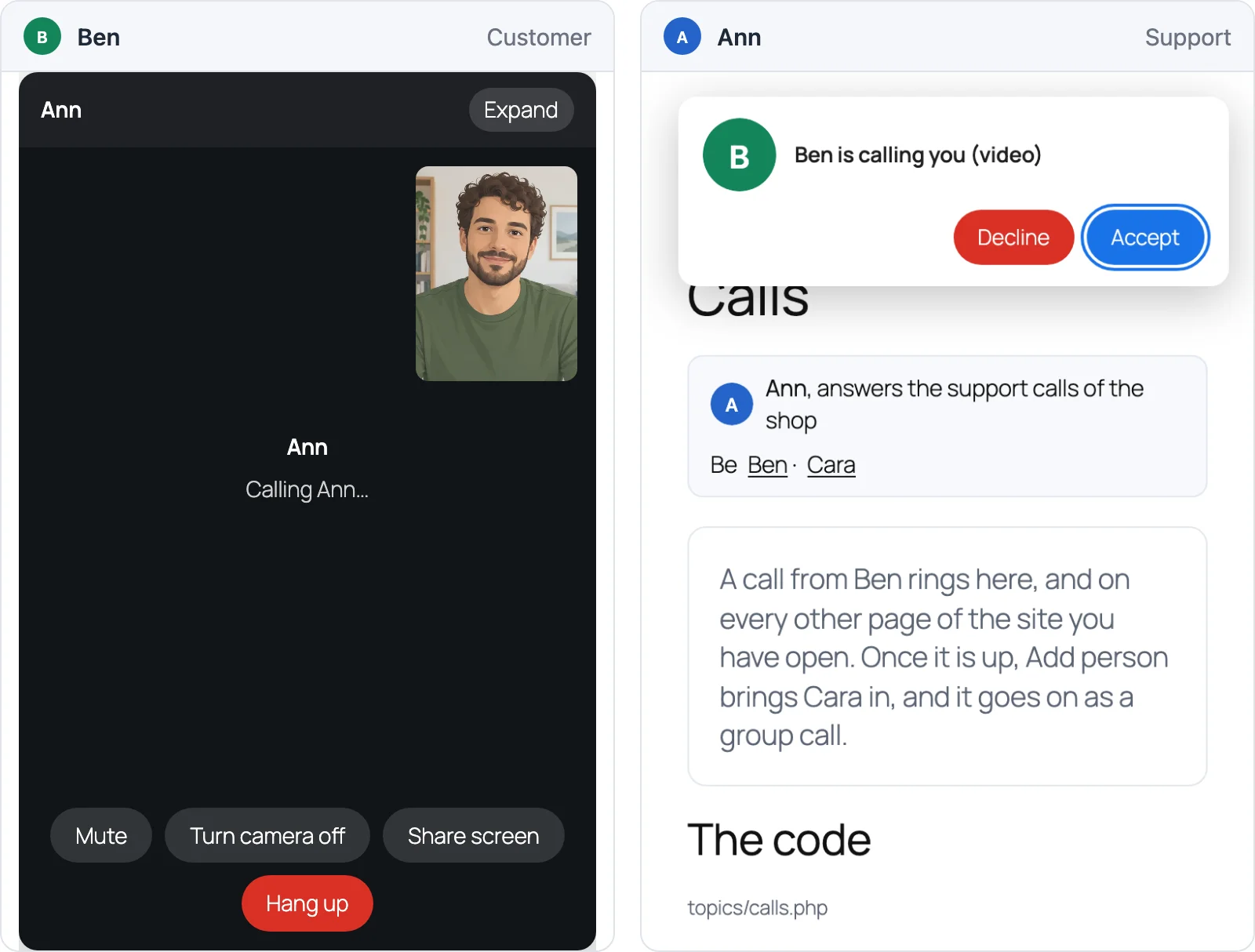
<call-button to="34" call="support:34:42" type="video" name="Ann">Call Ann</call-button>
Every open page of user 34 that loads the call screen rings. When they accept, the call window opens on both sides. calls.md explains the rule, and call-screen.md the elements.
What it needs
- WordPlus Cloud: a subscription that includes realtime and calls. Without them the connection is refused with
not_included. - PHP 7.4 or newer.
- Browsers: any current browser. Calls need WebRTC, which every current browser has.
Next
- Look at a complete plugin:
examples/live-comments(rooms and presence) andexamples/video-support(calls, group calls and the call screen). - Coding with an AI agent? Point it at
skills/wordplus-realtime.