Presence
A presence room lists who is in it, to everyone in it: who is reading a post, who is in a support queue, who is in the shop. And across the whole site, who is online. The use case who is online builds all three, the WordPress rules among them.
A presence room
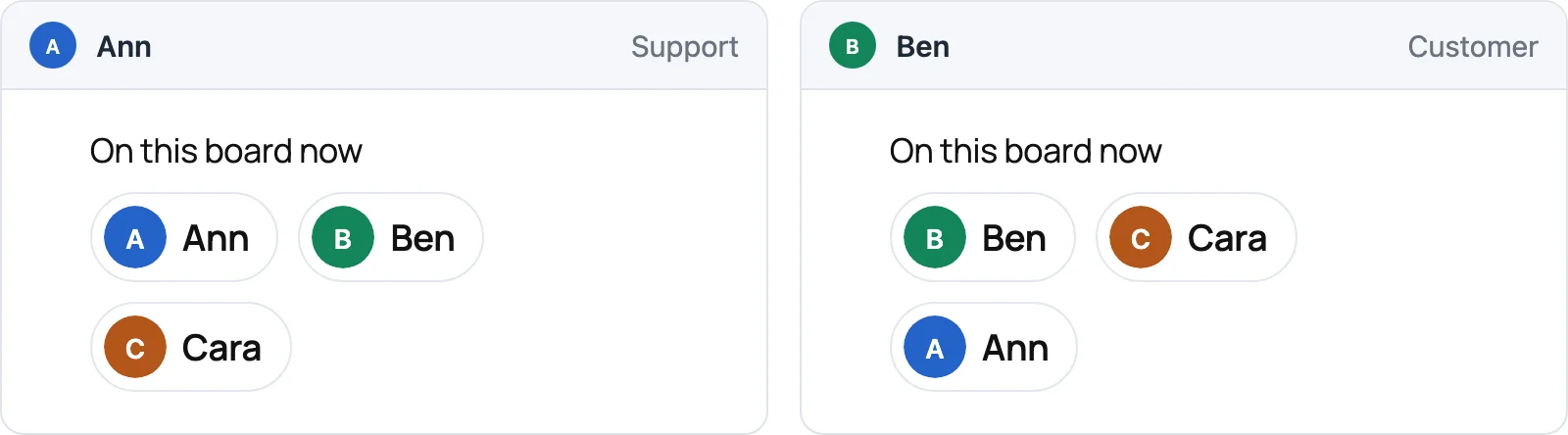
A presence room for each board, named after it: board:1, listing everyone who has the board open.
Your plugin decides who may join and what the others see of them. A page that joins asks your site first, and a rule answers: a function your plugin declares once for every room whose name fits board:{id}. WordPlus Cloud then holds the page to the answer. This rule says:
- A visitor who is not signed in is refused.
- A member of the board joins, and the others see their name and their role on it.
- Anyone else is refused.
// The presence rooms of the boards, such as board:1.
wordplus_realtime()->room( 'board:{id}', function ( $user_id, array $p ) {
	// 1. A visitor who is not signed in.
	if ( $user_id <= 0 ) {
		return false;
	}

	// 2. A member of the board, with what the others see of them.
	if ( my_board_member( (int) $p['id'], $user_id ) ) {
		return array( 'info' => array( 'name' => get_userdata( $user_id )->display_name, 'role' => 'editor' ) );
	}

	// 3. Anyone else.
	return false;
}, array( 'presence' => true ) );
- A member is the asking user, by their id as a string. A user with several tabs or devices is one member: they leave when their last connection does.
- Everyone needs an id: a visitor needs one from a plugin, the negative one
wordplus_realtime_visitor_idgives (as Better Messages does for its guests). A page with neither is refused withforbidden. infois at most 4 KB, sealed with the room key: WordPlus Cloud lists members without reading it. Withoutinfo, the user name and picture.- Up to 1,000 members are listed in full, with
joinandleave. Past that, the room counts them, andmembersPage()pages through them, up to 100,000.
const board = wordplusRealtimeClient.page().join( 'board:1' );

board.on( 'joined', () => draw( [ ...board.members ] ) );   // [ [ id, info ], … ]
board.on( 'join', ( { id, info } ) => add( id, info ) );
board.on( 'leave', ( { id } ) => remove( id ) );
A move to another server shows nobody leaving.
Counting
count => true gives a room a live count, without a list: room.on( 'count', ( n ) => … ), at most once a second, and room.count holds the latest. A presence room counts its members. Any other room its connections. Your server asks with wordplus_realtime()->in( $room )->count().
Who is online, across the site
- Online: every connection whose user the site vouched for makes that user online: a signed-in user page carries their identity, and a visitor page asks the keys route for theirs. They go offline 10 seconds after their last connection closes, so a reload does not flicker.
- Who appears: every identified user, unless the filter
wordplus_realtime_hiddenanswers true for them, for a "Hide my status" setting. - Who may watch: identified users only, up to 1,000 users a connection.
const rt = wordplusRealtimeClient.page();

rt.online.watch( [ 34, 43 ] ).on( 'change', ( { id, online, at } ) => dot( id, online ) );   // their status now, then every change
rt.online.has( 34 );                                         // for a user watched
rt.online.lastSeen( 43 );                                    // when, in ms, for one offline
rt.online.on( 'count', ( n ) => showOnline( n ) );           // how many are online, live
const { ids, next } = await rt.online.list();                // a page of who is online
add_filter( 'wordplus_realtime_hidden', function ( $hidden, $user_id ) {
	return (bool) get_user_meta( $user_id, 'my_hide_status', true );
}, 10, 2 );

wordplus_realtime()->online()->has( 42 );   // and ->count(), ->list(), ->states( array( 42, 43 ) )
Ready-made
Optional, as every ready-made part: the presence room above is all a list needs, drawn your way with the JavaScript API. These are the ready-made ones.
The Better Messages members list on a presence room, with a call button for each of the others, and a live count:
<online-list room="shop" title="In the shop" call="support:{pair}" type="video"></online-list>
<online-count room="product:7"></online-count>
wordplus_realtime()->call_screen() loads them with the call screen, ui() without (the call screen). call names the call each row places: {pair} is the two user ids in order, {me} and {id} each one. type is the call buttons of each row, video, audio, or both as video audio, and a row shows them only once your calls() rule lets the page user call that member. title goes above the list, Online by default.