The Flask example
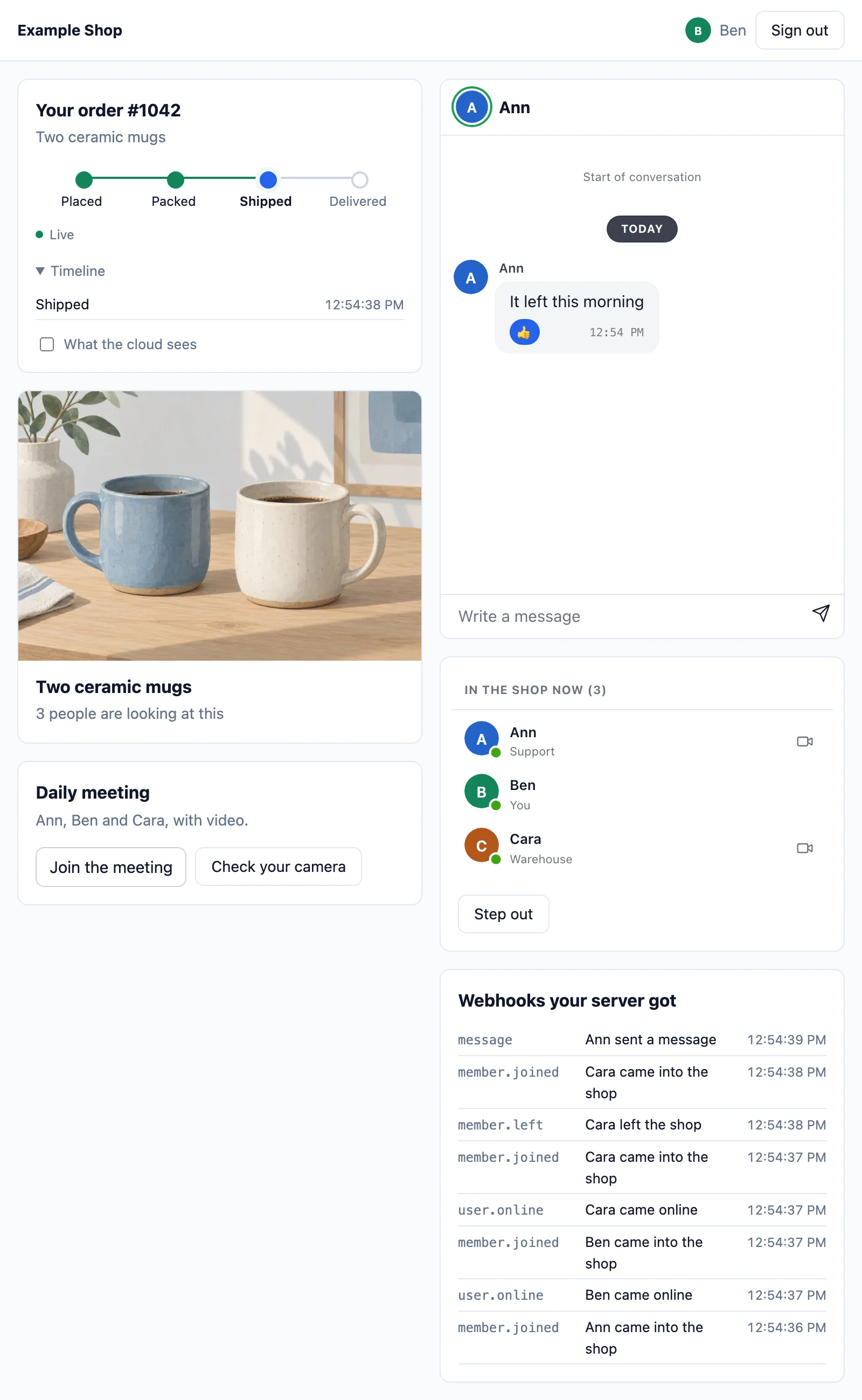
A whole shop on Flask, in the package examples/flask: sign in as Ann (support), Ben (a customer) or Cara (the warehouse), each in a browser of their own, and try everything this guide covers.
| On the page | What makes it |
|---|---|
| The order of Ben follows as Ann moves it on, and Ben alone gets a notice | the order:{id} room, sent to by POST /orders/<pk>/status with except_tab, and to_user (sending) |
| The chat of Ann and Ben, with typing, reactions and read ticks | <chat-room> on the chat:{a}:{b} room, which lets pages send them. The server keeps the conversation from the webhook and gives it back from GET /chat/messages (keeping the conversation). The name and picture of the other side above it from the directory |
| Who is in the shop, with a call button for each | <online-list> on the shop presence room, the name and role of each member. Its call buttons, and those of the members, ask GET /api/call-token, a route of the app, which lets two people of the shop call when one of them is staff, and answers realtime.call_token() (who may call) |
| The daily meeting | <group-call-button>, a group call. It asks GET /api/meeting-token?id=daily, which lets in everyone of the shop with realtime.group_call_token() |
| The live show | <live-stream>, a live stream Ann presents and everyone else watches, with a token from GET /api/show-token?id=mugs: realtime.stream_token(), Ann the host |
| The order timeline, and what the cloud carried of it | the order room history. GET /orders/{pk}/wire seals the update as the server sends it, with the room key (encryption) |
| How many are looking at the mugs | the product:{id} room, public and counted |
| The webhooks the server got | realtime.on("*", …), which sends each on to the shop webhooks room (webhooks) |
Try it online at flask.docs.wordplus.cloud: this example as a demo, where every visitor gets a shop of their own for a day, and its links open Ben and Cara in windows of their own. Its calls end after 10 minutes and its meetings after 15 (limits in the demo part, which the page keeps to). Under each card, See the code shows the parts of this example that make it, on the server and on the page: the lines between # region demo: <card> and # endregion in its files.
Run it
cd examples/flask
cp .env.example .env              # the key and secret of your app, with http://localhost:8000 among its addresses, and a local key
python -m venv .venv && .venv/bin/pip install -r requirements.txt
.venv/bin/flask --app app run --port 8000
Open it in two browsers (or a private window), sign in as Ann in one and Ben in the other, and move the order on, chat, and call.
Its files
| File | |
|---|---|
app.py | the realtime server part with init_app(), the rooms it declares, signing in, the order route, the routes that start a call, the daily meeting and the live show (each its own check, then a token), and the page |
templates/page.html | the page, with wordplus_realtime(), the settings and the import map of the client, and the shop data through tojson |
demo.py | the demo part alone (WORDPLUS_DEMO=1), the same file in the three Python examples: a shop for each visitor, its windows, and the frame around the page |
shop/shop.js | the page script, served as it is with no Node and no bundler: connect(), the order, the product, the chat, who is in the shop, the webhooks, the meeting, the show and the call screen. The same file runs the shop in every example |