Calls in Flask
Calls between two people that ring in every tab and device the callee has open, group calls on the WordPlus Cloud media servers, and the Better Messages call screen: the buttons, the ring and the call window, with no call code. The media of a call is encrypted end to end, with keys your server gives out.
- A call between two people connects on three paths, tried in turn: directly between the two devices, through our relays (TURN) on the ports of the web, 443 and 80, when a network blocks that, and through our media servers when even the relays cannot reach. It moves from one to the next without hanging up, and takes no credits on any path.
- Group calls have no limit on people. The people on video up to the floor of your plan take no credits, a person on audio counting half, and each one above takes a credit a minute from your account (limits).
- How a call and a group call start, run and end: how calls work.
- Step by step: calls from a button, team meetings, consultations by booking, classes, webinars and audio rooms, and waiting rooms and breakout rooms.
Your first call
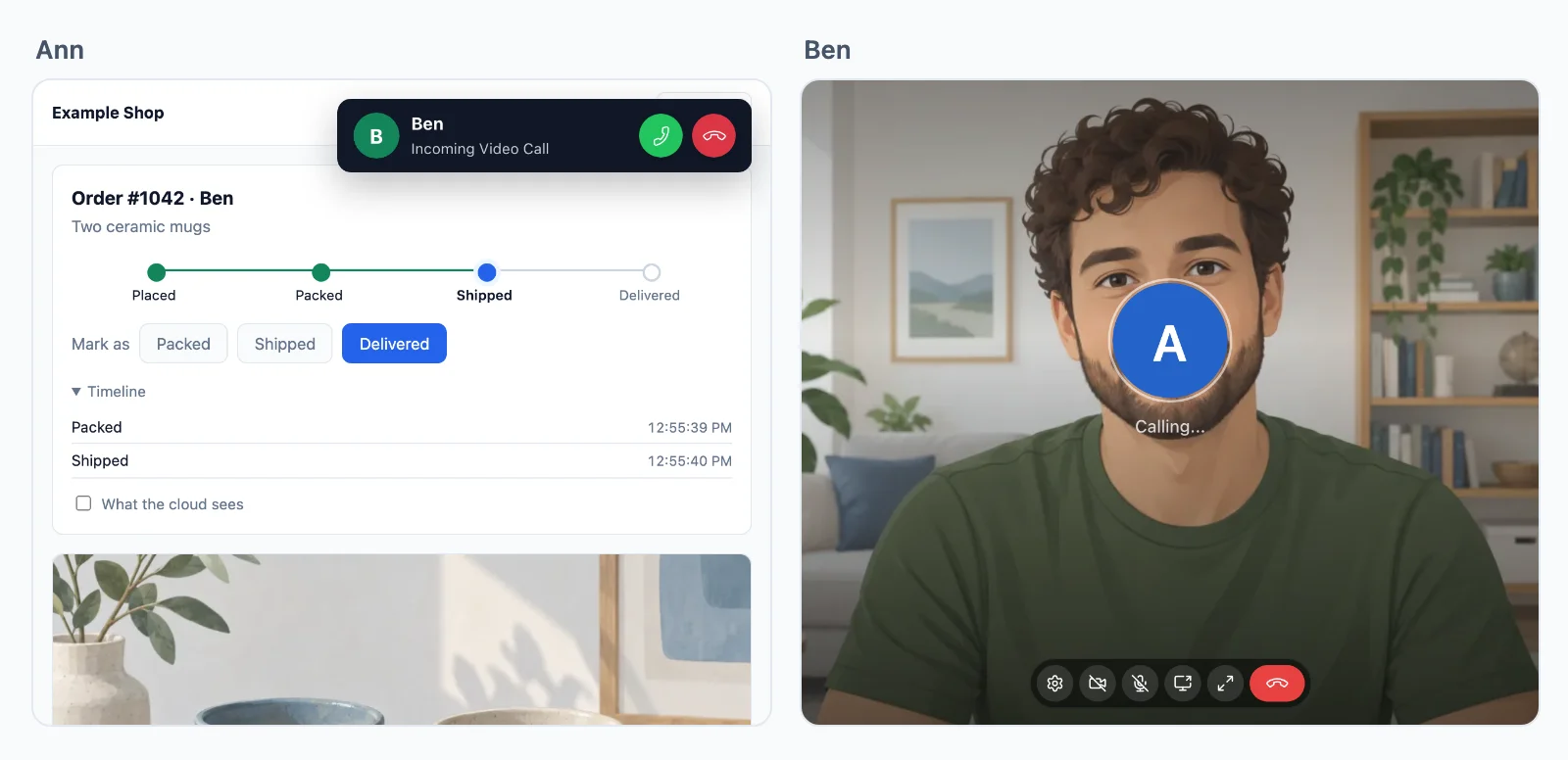
On top of getting started, a call is three pieces: a route of yours that answers a token for the signed-in user, the call screen, and a button that asks the route. Here anyone signed in may call anyone, which who may call narrows down.
# app.py: GET /call-token?to=34&type=video, which the button asks as it is pressed.
from flask import abort, request, session

@app.get("/call-token")
def call_token():
    me = session.get("user_id")
    if me is None:
        abort(401)
    return {"token": realtime.call_token(me, request.args["to"], type=request.args.get("type"))}
await rt.callScreen(); // the ring and the call window, on every page a call may ring on
<call-button to="34" token-url="/call-token" type="video" name="Ann">Call Ann</call-button>
Sign in as user 42 in one browser and as Ann, user 34, in another, and press the button: it asks your route, Ann's browser rings, and once she answers, each sees the other. The rest of this page is the rest of it: who may call, group calls, a call interface of your own, and the other way, by a rule.
Who may call
Your app decides, in its own route: the button asks it for a token, your route checks whatever your app needs, and answers a token or refuses. The person called answers with no token of their own, as the token that rang them proves your server said yes. With no token from your server nothing starts, so nobody gets around your route (permissions).
These routes say:
- Someone signed in calls: a visitor is refused.
- One of the two is staff: customers call staff, and staff call anyone.
- The daily meeting,
meeting:daily, a group call, is hosted by staff: they mute the others, let them speak or make them listeners, and take them out. - Everyone else signed in joins it.
# app.py: is_staff() is yours, from your data.
from flask import abort, request, session

@app.get("/call-token")
def call_token():
    # 1. Someone signed in.
    me = session.get("user_id")
    if me is None:
        abort(401)

    # 2. One of the two is staff.
    to = request.args["to"]
    if not is_staff(me) and not is_staff(to):
        abort(403)

    return {"token": realtime.call_token(me, to, type=request.args.get("type"))}

# GET /meeting-token?id=daily, for the meeting meeting:daily.
@app.get("/meeting-token")
def meeting_token():
    # 4. Everyone signed in joins it.
    me = session.get("user_id")
    if me is None:
        abort(401)

    # 3. Staff host it.
    token = realtime.group_call_token(me, "meeting:" + request.args["id"], type=request.args.get("type"), admin=is_staff(me))
    return {"token": token}
- What
call_token()takes beside the two people, as keywords:type,audioorvideo, as the button asked;name, a name of your own for the call, whichcall.endedand the other webhooks give back and a spot in the page takes,call:and a random id by default;info, what the person called sees of the caller, yourprofileby default; andinto, to ring someone into a call that is up (adding people). - What
group_call_token()takes beside the user and the name:type,publishandsubscribe(whether they send and receive),admin,hidden(listed to nobody),encryptandinfo(group calls in depth). - A token rings once, so the button asks for a new one each time. It is for its user: on anyone else's page it starts nothing (
forbidden). It lasts 6 hours at most (call_token_ttl). Someone taken out of a group call needs a new one to come back, so your route is asked again. - To refuse, answer 401 or 403, as
abort()does: the button rings nobody, opens no window, and tells the person they cannot make this call. adminmakes them its host, who mutes the others, lets them speak or makes them listeners, and takes them out, on a proof in the token that only your server makes (permissions).- A host in the call screen has the host buttons on the tile of each of the others: Manage Participant opens Mute Microphone, Stop Camera & Mic and Allow Camera & Mic (Demote to Viewer and Promote to Speaker in an audio call), Spotlight for Everyone or Remove Spotlight in a video call, up to four people, and Remove from Call, with Clear Spotlight in Host Controls.
- A host on a page of your own does the same with
group.mute( user ),group.letSpeak( user ),group.makeListener( user ),group.remove( user ),group.spotlightOn( user )andgroup.spotlightOff( user )(your own call interface). - Your server does it with no page open:
realtime.call(name).mute(),.permit(),.remove(),.spotlight()and.end()(from your server). - The media of a group call your server names is encrypted end to end when its tokens say
encrypt=True. The group calls that come from a call always are. - User ids are yours: a number, or text such as
user_2abcorauth0|5f7c, up to 64 characters with no space.
By a rule
The other way, for an app that would rather declare who may call whom once: a rule, a function your server declares in app.py for every call whose name fits a pattern, as it declares rooms. The button then names the call in place of a route, <call-button to="34" call="support:{pair}">, and the calls route among the routes init_app() adds (/api/realtime/calls) asks the rule as someone calls, answers or joins. Everything else stays the same: the call screen and its buttons, the ring, the paths a call connects on, its encryption, the host and what a host does, your server's realtime.call(name), and credits. The two ways mix: a calls() rule that owns the name of a call is still asked as someone answers it.
The same four as rules, where the name of a call carries its people, support:34:42:
# app.py: a support call, such as support:34:42, for the two people in its name. User 42 is "42" there, user_2abc itself.
def may_call(user, with_user, p):
    pair = (p["a"], p["b"])
    if str(user) not in pair or str(with_user) not in pair:
        return False

    # 2. One of the two is staff.
    return is_staff(user) or is_staff(with_user)

realtime.calls("support:{a}:{b}", may_call)

# The daily meeting, meeting:daily: 3. staff host it, 4. everyone else signed in joins it.
realtime.group_calls("meeting:{id}", lambda user, p: {"admin": True} if is_staff(user) else True)
- A page with nobody signed in is refused before any rule runs.
with_useris the other person: whomusercalls, or who callsuser. Your server is asked again when the callee answers, with the callee asuser.callandside, the fourth and fifth arguments when the rule takes them, are the name of the call and which side asks:side["role"]iscallerorcallee. A rule that says yes to every callee and checks only callers lets people answer calls they may not place.- The answer:
False,True, or a dict:info(what the others see ofuser: yourprofileby default), and in a group callpublish,subscribe,adminandhidden. For a host's acts, your calls route asks this rule again, and does them only for a host. - Encrypted end to end:
realtime.group_calls("meeting:{id}", rule, encrypt=True). - User ids in a rule: an id of digits comes as a number and any other as text, so compare them with the name as text. An id calls cannot take is refused with
no_user.
The call screen
Optional, as every ready-made part: your own call interface below places, answers and draws calls with no element, and your own interface has the whole of it.
Start it on every page where a call may ring, and put buttons where people call from:
await rt.callScreen(); // the ring and the call window, on this page
<call-button to="{{ agent.id }}" token-url="/call-token" type="video" name="{{ agent.name }}">Call {{ agent.name }}</call-button>
<group-call-button call="meeting:daily" token-url="/meeting-token?id=daily" type="video" title="Daily meeting">Join the meeting</group-call-button>
token-urlis your route (who may call). A press asks it with a GET, with the page's cookies, and reads{ token }:<call-button>sends?to=34&type=video, and<group-call-button>addscallandtypeto what you wrote,?id=daily&call=meeting:daily&type=video.- By a rule,
call="support:{pair}"in place oftoken-url, andcallalone on<group-call-button>(by a rule).{pair}is filled in with the page user and the one called, in order, so whichever of the two calls names the same call:support:34:42. - A list with call buttons:
<online-list room="shop" token-url="/call-token">puts one on the row of every member, asking your route as it is pressed (presence). By a rule,call="support:{pair}". - Its words come in English, German, Spanish, French, Italian, Dutch, Polish, Croatian and Hebrew, by the page
<html lang>.rt.callScreen( { strings: { … } } )changes any of them. - Its look is that of Better Messages, in a shadow root: your styles do not reach in, and its colours are CSS custom properties your page sets.
- Group calls load the room client and its encryption worker from the routes, which the page settings name: nothing to add.
- Leaving during a call asks first, in the browser's own words: another page, a reload or a closed tab would end it, as every page of yours loads anew.
The call in its chat
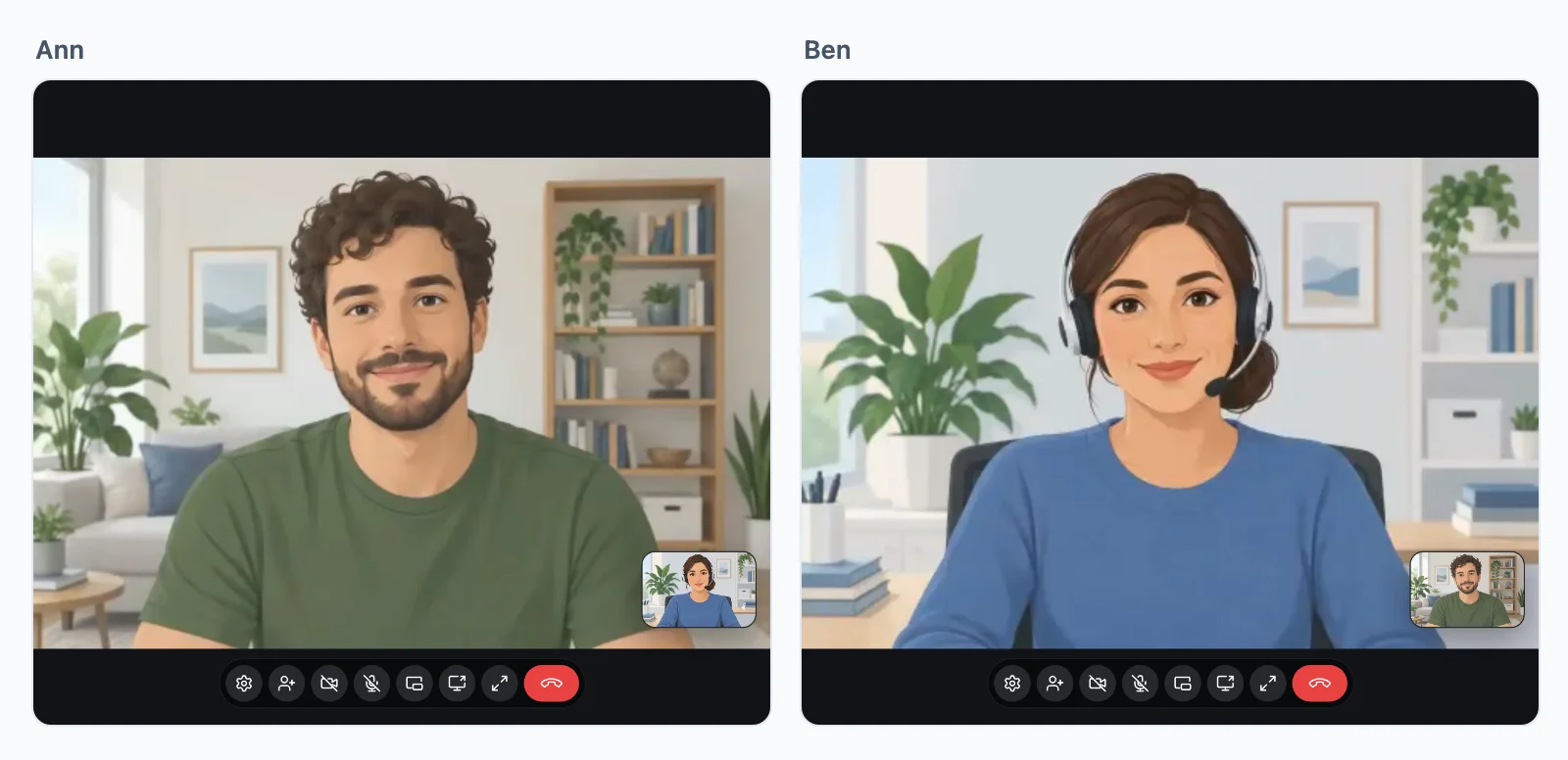
A conversation between two can hold its own call: the other person on the chat's top bar with a video and an audio call button, and their call in the chat itself while it is on, beside the messages. Give the chat the other person, with their name and picture as your page has them, and token-url, your route for its call buttons:
<chat-room room="chat:34:42" to="42" name="Ben" avatar="/photos/42.jpg" token-url="/chat-call-token" style="height: 560px"></chat-room>
Its call buttons ask your route with the name of the chat as well, ?to=42&type=video&name=chat:34:42. Your route puts that name on the token, so the call shows in the chat. The name comes from the page, so check it:
# app.py: is_member_of() is yours, from your data.
@app.get("/chat-call-token")
def chat_call_token():
    me = session.get("user_id")
    to, name = request.args["to"], request.args["name"]

    # The person calling and the person called are both members of that chat.
    if me is None or not is_member_of(name, me) or not is_member_of(name, to):
        abort(403)

    # The call takes the name of the chat, so it shows there.
    return {"token": realtime.call_token(me, to, type=request.args.get("type"), name=name)}
Narrower than 600px, the call takes the whole chat, and Show Chat in its controls puts the messages under it. start-call="video" calls them once as the chat opens, for a Video button elsewhere that links to the chat (<chat-room>). By a rule, call with no token-url is the call named as the room, which your calls rule for chat:{a}:{b} decides, as the rule for support:{a}:{b} above.
The call in the page
The call screen opens a call in a window in the corner, over the page. To show it in the page itself, above a chat or in place of a picture, put a <call-spot> where it goes, naming the calls it takes:
<call-spot call="support:{a}:{b}" style="height: 480px"></call-spot>
A call shows there as it starts, until it ends or the page closes. call takes the name your token gives the call (name) or a rule's name, support:34:42, or a pattern of names. With no call, the spot takes no place, or shows what you put inside it (<call-spot>).
Group calls
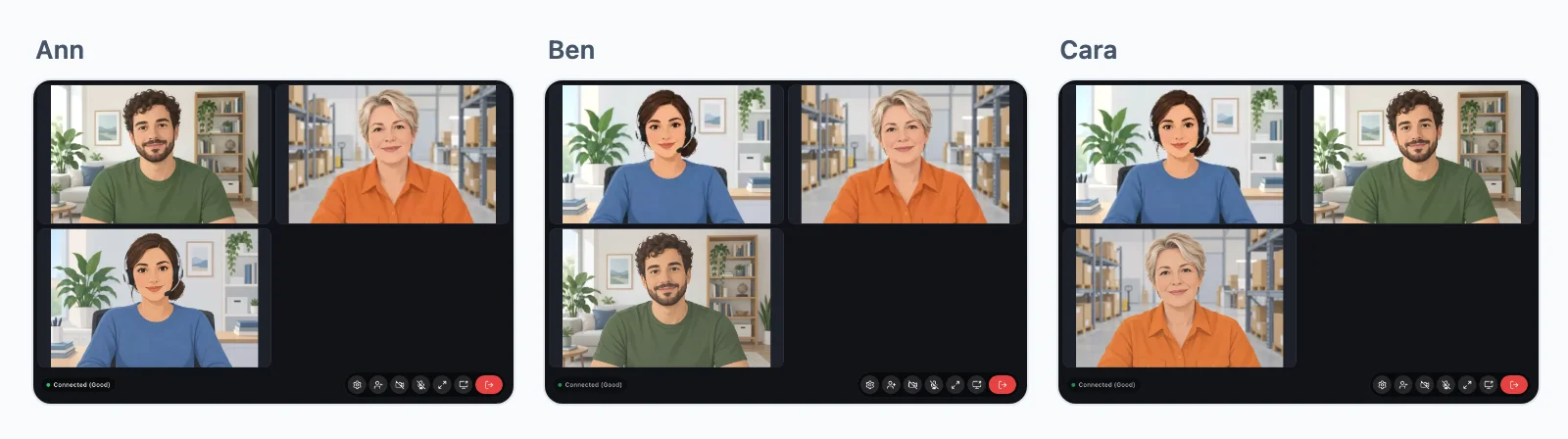
A group call runs on our media servers, with no limit on people: a name your route answers a token for with group_call_token(), as meeting:daily above, the token saying what this person may do in it (who may call). It has no setup of its own: it starts as the first person joins. A page joins it with a button that asks your route, and the call screen draws it:
<group-call-button call="meeting:daily" token-url="/meeting-token?id=daily" type="video" title="Daily meeting">Join the meeting</group-call-button>
- By a rule, a
group_calls()rule says who joins and who hosts, and the button namescallalone (by a rule). - Straight in as the page opens, with no button: straight into a meeting.
- From a call between two: ringing someone in makes it one (adding people).
- Speakers and listeners, for a class or an audio room: speakers and listeners.
- Its host mutes, lets speak and takes out, from the call screen or a page of your own, and your server with
realtime.call(name)(from your server). - A screen of your own:
rt.joinGroupCall( token )(your own call interface).
Straight into a meeting
A meeting room can take people in as they open its page, with no button to press. join on the spot joins the group call it names, as its <group-call-button> would, asking your route as the button does, and your route decides as for the button. Here your route writes it only while the meeting is on, so the first one in still starts it with the button inside:
@app.get("/teams/<int:pk>")
def team_page(pk):
    room = f"meeting:{pk}"
    on = realtime.call(room).get()["people"] > 0   # someone is in it now
    return render_template("team.html", pk=pk, room=room, on=on)
<call-spot call="{{ room }}" token-url="/meeting-token?id={{ pk }}" {% if on %}join="video"{% endif %}>
    <group-call-button call="{{ room }}" token-url="/meeting-token?id={{ pk }}">Start the meeting</group-call-button>
</call-spot>
It joins once: someone who leaves, or whom the host takes out, stays out while the page is open, and opening the page again joins again (straight into a meeting). By a rule, a spot with no token-url joins as your group_calls() rule says.
Camera, microphone and sound
- Off as they come in. They come in with the camera and microphone off, and turn on what they want from the call's controls, so the browser asks for neither as the page opens.
join-with="microphone", or"microphone camera", has them on as they come in.- Sound. A browser plays sound only once the person has clicked or typed on the page, or on the page of your site they came from. A page opened straight into a meeting, from a link in a new tab say, shows the others and Turn sound on over the call: their voices start at that click, or at any other on the page.
Adding people
Once a call is up, either side may ring someone else in, and it goes on as a group call, taking credits as one.
- On a page of your own, the page sends your route
call.ref, which proves this user is in the call, and your route answersrealtime.call_token(me, to, into=…)with its own check of whom they may add.call.add( token )then rings them in (adding people). - The call screen's Add Person button lists whom a
calls()rule for the call's name offers inpeople, the rule way's part:
# The staff not in the call, each still asked of may_call.
def staff_to_add(user, call):
    return [id for id in staff_ids() if str(id) not in call.split(":")[1:]]

realtime.calls("support:{a}:{b}", may_call, people=staff_to_add)
The screen then shows an Add Person button, listing them with the names and pictures from your profile. The person added is asked of your rule as any call: user calling them about the call name, then them taking a call from user.
Speakers and listeners
A class, a town hall or an audio room: a few speak and everyone else listens. Your token makes the listeners (publish=False), and your server lets someone speak while the call runs (classes, webinars and audio rooms). For one person live to a large audience, with guests on stage, see live streams and interviews and questions on stage.
The route of a class, class:7, says:
- The teacher speaks, and hosts the class.
- Anyone who is not a student is turned away.
- A student listens until the teacher lets them speak.
# app.py: GET /classes/7/token, which <group-call-button call="class:7" token-url="/classes/7/token" type="audio"> asks.
@app.get("/classes/<int:pk>/token")
def class_token(pk):
    me = session.get("user_id")

    # 1. The teacher speaks, and hosts the class.
    if me is not None and is_teacher_of(pk, me):
        return {"token": realtime.group_call_token(me, f"class:{pk}", type="audio", admin=True)}

    # 2. Anyone who is not a student.
    if me is None or not is_student_of(pk, me):
        abort(403)

    # 3. A student listens until let speak.
    return {"token": realtime.group_call_token(me, f"class:{pk}", type="audio", publish=may_speak(pk, me))}
By a rule, the same three in realtime.group_calls("class:{id}", …), which answers {"admin": True}, False or {"publish": …}.
A Let speak button of your own, in a list of raised hands beside the call, posts to a route of yours, which:
- Takes it from the teacher alone.
- Keeps the choice where your token route reads it, for every join after.
- Changes it in the call at once.
from flask import abort, request, session

# The Let speak button of the teacher: {"user", "speak"}.
@app.post("/classes/<int:pk>/speakers")
def speakers(pk):
    body = request.get_json()

    # 4. The teacher alone.
    if not is_teacher_of(pk, session.get("user_id")):
        abort(403)

    # 5. Kept where the token route reads it, for every join after.
    set_may_speak(pk, body["user"], body["speak"])

    # 6. At once in the call: their page hears `permissions`.
    realtime.call(f"class:{pk}").permit(body["user"], publish=body["speak"])
    return "", 204
- On the call screen, the teacher, as host, has Manage Participant on the tile of each student: Promote to Speaker and Demote to Viewer in an audio call, Allow Camera & Mic and Stop Camera & Mic in a video call. They change the call as
permit()does, through your calls route. Your Let speak route above also keeps the choice for the joins after. - A student let speak finds the microphone and camera in the call controls. Made a listener again, they go, and what the student sent stops.
- A token signed for them before follows the change, so an older one cannot undo it. A token signed after says what your token route, or your rule, says then, so keep who may speak where it reads it, as
set_may_speak()does. - Raised hands are a room of the same name, which carries a
handevent, and the page of your own call readsgroup.canandperson.publish(speakers and listeners).
Your own call interface
The call screen is built on this, and nothing else:
// A token from your route, as the buttons ask it.
async function tokenFrom( url ) {
    const answer = await fetch( url );
    if ( ! answer.ok ) throw new Error( 'Your server said no' );
    return ( await answer.json() ).token;
}

const calls = await rt.calls();

const call = await rt.startCall( await tokenFrom( '/call-token?to=34&type=video' ) );
call.on( 'state', ( state ) => show( state ) );       // ringing, connecting, connected, reconnecting, ended
call.on( 'path', ( path ) => show( path ) );          // direct, relay or room: the path it connects on now
call.on( 'remote', () => call.remote.camera?.attach( video ) );
call.on( 'autoplay_blocked', () => showSoundButton() );   // the browser holds the sound back until a click

calls.on( 'incoming', async ( incoming ) => {
    const answered = await incoming.accept();     // the call, or the group call it rings into. Or incoming.decline( 'busy' )
} );

const meeting = await rt.joinGroupCall( await tokenFrom( '/meeting-token?id=daily&type=video' ) );
meeting.on( 'person', ( person ) => person.camera?.attach( tileFor( person ) ) );
if ( meeting.can.admin ) await meeting.mute( 43 );   // a host: mute, letSpeak, makeListener, remove, spotlightOn, spotlightOff
By a rule, rt.call( 'support:{pair}', { to: 34, type: 'video' } ) and rt.groupCall( 'meeting:daily', { type: 'video' } ) in place of the tokens (by a rule).
From your server
Your server sees the group calls going on and runs them, with no page open:
realtime.list_calls()                     # [{"name", "people", "started_at"}]
call = realtime.call("meeting:daily")
call.get()                                # {"people", "started_at", "list": [{"user", "joined_at", "camera", "microphone", "screen"}]}
call.permit(43, publish=True)             # a listener let speak, publish=False back to listening
call.mute(43, "microphone")               # "camera" or "screen" too: they may turn it on again
call.spotlight(43, True)                  # on the main tiles for everyone, up to four. None, False: nobody
call.remove(43)                           # out now, their tokens from before refused
call.end()                                # out, everyone
- A host's buttons are on the call screen already, for whom your token, or your rule, makes
admin. Buttons of your own call a route of yours that checks who asks, then these, as the Let speak route above. get()with nobody in the call answerspeople0,started_atNone and an empty list, as straight into a meeting reads it.started_atis when this call began: one named again after everyone left begins again.- A call between two people runs between the two, so it is not in
list_calls(). Once someone is added it is a group call, namedcall:and its id.
What a call holds
A host runs a group call as in Better Messages, and some acts are held by the call itself, so a reload, a dropped connection or a token signed later does not undo them:
- A mute is once, and the person may turn the microphone on again. Mute Microphone (
hold=True) keeps it off untilunmute(). - Make Listener and its promotion (
permit()withhold=True) hold until the other one or a switch of Broadcast Mode. - Remove is a kick, which a locked call keeps out. A ban keeps them out for the minutes given, at most a week, or until the call ends.
- The rules, Mute Everyone, Lock and Broadcast Mode, hold until everyone has left.
- A raised hand stays up until it is lowered or its owner leaves, and an ask keeps nothing.
end()lets go of everything but a ban given minutes.
A host is never held, and a ban of a host is refused.
call = realtime.call("meeting:daily")
call.mute(43, "microphone", hold=True)        # Mute Microphone, until unmute() or the end of the call
call.unmute(43)                               # Allow Microphone
call.permit(43, publish=False, hold=True)     # Make Listener, held for every join after
call.ban(43, minutes=60, by=1)                # out for an hour, for host 1. No minutes: until the call ends
call.unban(43)                                # may join again
call.bans()                                   # [{"user", "until"}]
call.rules(locked=True)                       # the rules now: {"mode", "locked", "muted"}
call.lower_hands()                            # every hand down. hand(43, False) for one
call.ask(43, ["microphone"], 1)               # for host 1: {"id", "devices"}
call.end(by=1)                                # out, everyone, and all it held goes but a timed ban
- The call screen does these itself for a host, where the call offers them: the token names the acts this package takes (
acts), and gives everyone amemberproof to raise a hand with, so nothing more is needed on your server. bynames the host you act for, which thecall.moderatedwebhook gives back (None for your server). Keep a longer ban there, in your own data (webhooks).permit()withoutholdchanges the call now, as before, and lets go of apublishheld before.
Every event, why a call ended, and what WordPlus Cloud sees: calls in depth.